nRF Connect for Desktop forces me to install J-Link but I have it already

I'm using nRF Connect for Desktop on Linux and updated today to v5.3.0.

I have J-Link V9.24a installed and it is available in $PATH. Also it works well with Programmer v4.7.4, current nrfutil and all other software from Nordic.

However I am not using Debian-like distro and I get annoying message "Install SEGGER J-Link" at every startup:

nRF Connect for Desktop requires SEGGER J-Link. The recommended version v9.24a is available for installation. Click "Install" to start.
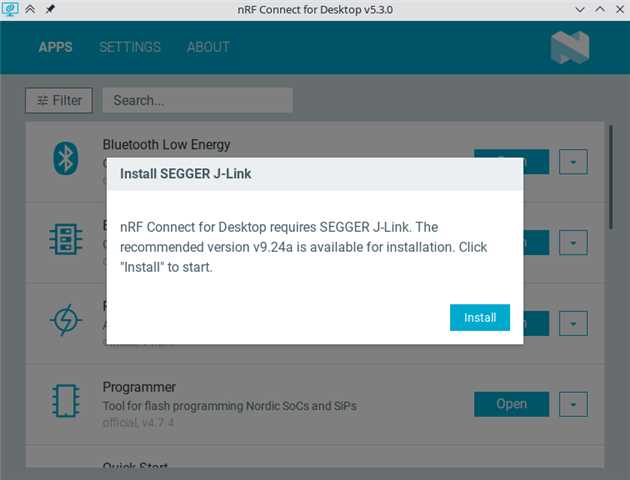
As you can see on the screenshot I can't do anything but click on "Install". This opens super user authentication window which I click "Cancel" on, then the process fails with error message in another window and only then I can use the app normally. This is a bit cumbersome way to open the application.

Ideally this process should look for J-Link in PATH and don't suggest installation if it finds correct J-Link version. Also the initial window could have close button for quick cancellation.

I think the former worked in previous version because I used to see warnings about outdated J-Link after nRF Connect for Desktop updates.

  • Hi Mateusz,

    What distributer are you using.? We have official support for Ubuntu. Also  run which JLinkExe and /bin/sh -c 'JLinkExe -CommandFile $(mktemp --dry-run)' in shell and report back the results.

    Regards,

    Swathy

  • Hi Swathy,

    I use current Arch Linux, not Ubuntu.

    $ which JLinkExe          
    /home/xxx/.local/bin/JLinkExe

    $ /bin/sh -c 'JLinkExe -CommandFile $(mktemp --dry-run)'
    SEGGER J-Link Commander V9.24a (Compiled Mar  5 2026 11:04:55)
    DLL version V9.24a, compiled Mar  5 2026 11:03:48

    Could not open J-Link Command File '/tmp/tmp.tLDOtwIu9W'

    (I think the latter command is failing because --dry-run does not create any file).

    Please note that my original question actually referred to two things:
    1. nRF Connect for Desktop not discovering JLink tools installed on my system, this is what we discuss now.
    2. Initial pop up window not having any opt-out button like 'Cancel' or 'Close'. One can now only click 'Install'.

    I did a test and added /opt/SEGGER/JLink to PATH so that which command showed:

    $ which JLinkExe
    /opt/SEGGER/JLink/JLinkExe

    It did not help.

    Thank you for your support!

  • Hi Mateusz,

    It looks like the setup is so that /home/xxx/.local/bin/ is in the PATH when running in your shell but it is not in the PATH when running NCD. In NCD open the Developer Console Ctrl+Shift+I and there enter require('child_process').execSync('printenv PATH', {encoding: 'utf8'}) to see the PATH as NCD sees it. JLinkExe must be in that PATH for NCD to find it.

    Best Regards,

    Swathy

Related