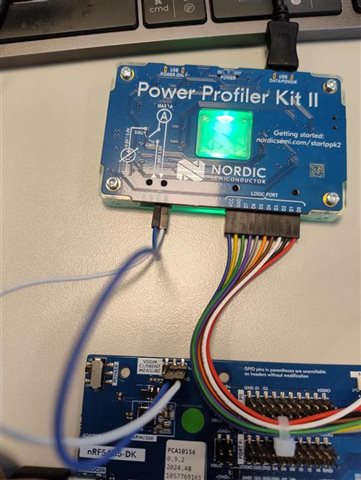
How to reach datasheet-level 2.9 µA System ON IDLE current on nRF54L15 DK with NCS Matter sample?

We are planning to use the nRF54L15 for a Matter over Thread product, so we are currently evaluating the low-power performance of this device.

According to the nRF54L15 product specification / datasheet, the sleep current for:
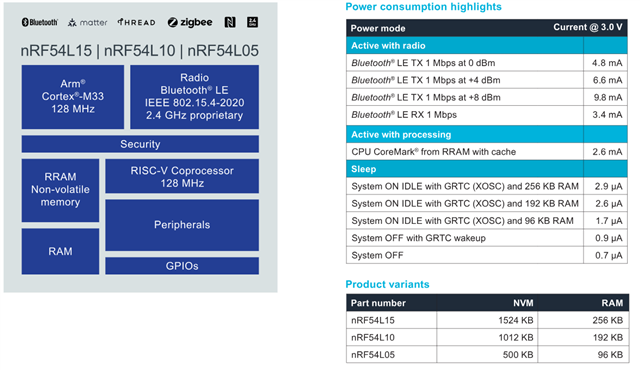
is listed as approximately 2.9 µA. Since the nRF54L15 has 256 KB RAM, I expected that it should be possible to observe a sleep current close to this value under the proper low-power configuration.

I used the following setup for the test:

  • Board: nRF54L15 DK
  • Chip: nRF54L15
  • SDK: nRF Connect SDK v3.2.1
  • Sample: nrf/samples/matter/window_covering
  • Build command:  west build -b nrf54l15dk/nrf54l15/cpuapp -p always -- -DCONF_FILE=prj_release.conf
  • Measurement tool: Nordic PPK
  • Measurement mode: Ammeter mode
  • Measurement point: VDD CURRENT MEASURE on the nRF54L15 DK
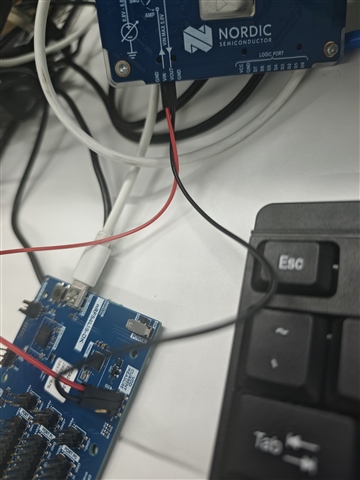
Test 1: Original sample without modifications

First, I built and flashed the sample using the original prj_release.conf without any modifications.

In this case, the measured baseline current was about 194.18 µA.
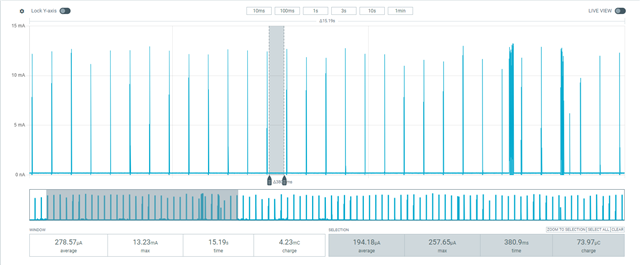
Test 2: After disabling shell/banner/early console

I suspected that some UART/logging-related functionality might still be enabled, so I added the following configurations to prj_release.conf:

CONFIG_CHIP_LIB_SHELL=n
CONFIG_NCS_BOOT_BANNER=n
CONFIG_BOOT_BANNER=n
CONFIG_EARLY_CONSOLE=n

After adding the above configurations, I rebuilt and flashed the application again.

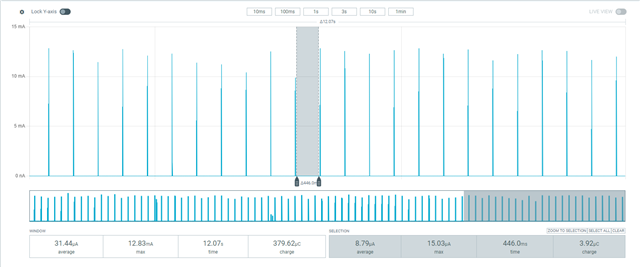
The measured baseline current dropped significantly, and the lowest current I observed was about 8.79 µA.

This is much better than the original result, but it is still higher than the 2.9 µA value listed in the datasheet for System ON IDLE with GRTC and 256 KB RAM.
Questions

  1. Is it expected that the Matter window_covering sample on the nRF54L15 DK cannot reach the datasheet-level System ON IDLE current of around 2.9 µA without further modifications?
  2. What are the remaining contributors that may keep the current at around 8.8 µA in this sample? For example, could this be caused by Thread/Matter timers, enabled peripherals, DK board circuitry, retained RAM configuration, logging backend, UART state, or other subsystems?
  3. What additional project configuration changes, device tree changes, or board-level settings are required in order to observe a sleep current close to 2.9 µA on the nRF54L15 DK?
  4. Is there a recommended minimal low-power sample or reference configuration for measuring the lowest System ON IDLE current on nRF54L15?

Thanks.

Parents
  • Hello,

    Thanks for your details explanation.

    I have run the default window_covering sample from NCS matter and have not done that many changes except adding the following config in the prj.conf file 

    CONFIG_SERIAL=n         # Do not initialize UART logger module
    CONFIG_POWEROFF=y       # System OFF library

    When the build command was west build -b nrf54l15dk/nrf54l15/cpuapp, it will automatically take the configurations from prj.conf file.

    I also have tried like you by mentioning explicitly prj.release (there also I added the above 2 configs)in the build command (west build -b nrf54l15dk/nrf54l15/cpuapp -p always -- -DCONF_FILE=prj_release.conf)

    and the board configuraton setting was like that

    For both of these build I got same sleep current like 4.16uA. I have added the sample (zipped folder) here you can try to run and measure the current.3872.window_covering.zip

    To know how to measure the current in source meter mode, you can look at the following documentation

    Measuring current in Source Meter mode • Power Profiler Kit User Guide • Technical Documentation

    Regards,

    Kazi

Reply
  • Hello,

    Thanks for your details explanation.

    I have run the default window_covering sample from NCS matter and have not done that many changes except adding the following config in the prj.conf file 

    CONFIG_SERIAL=n         # Do not initialize UART logger module
    CONFIG_POWEROFF=y       # System OFF library

    When the build command was west build -b nrf54l15dk/nrf54l15/cpuapp, it will automatically take the configurations from prj.conf file.

    I also have tried like you by mentioning explicitly prj.release (there also I added the above 2 configs)in the build command (west build -b nrf54l15dk/nrf54l15/cpuapp -p always -- -DCONF_FILE=prj_release.conf)

    and the board configuraton setting was like that

    For both of these build I got same sleep current like 4.16uA. I have added the sample (zipped folder) here you can try to run and measure the current.3872.window_covering.zip

    To know how to measure the current in source meter mode, you can look at the following documentation

    Measuring current in Source Meter mode • Power Profiler Kit User Guide • Technical Documentation

    Regards,

    Kazi

Children
No Data
Related