nRF54LM20 FOTA BLE doesn't swap images

Hello 

I need some advice on FOTA via BLE on the nRF54LM20B. I use SDK v 3.3.0, building /ns variant.

I managed to get FOTA working to upload an updated image via BLE, but after a reboot, the new image doesn't load and remains in a "pending" state.

Could you please advise me on what needs to be configured on the nRF54LM20B to enable the image update?

I previously tried FOTA via BLE on the nRF5340 according Norxic Academy course, where it worked without any issues.

In RTT, I see the following:

  1. 00> *** Booting MCUboot v2.3.0-dev-fce4dac2e629 ***
    00> *** Using nRF Connect SDK v3.3.0-ba167d9f3db4 ***
    00> *** Using Zephyr OS v4.3.99-fd9204a02d52 ***
    00> [00:00:00.001,667] <inf> mcuboot: Starting bootloader
    00> [00:00:00.002,113] <wrn> mcuboot: Cannot upgrade: not a compatible amount of sectors
    00> [00:00:00.002,372] <dbg> mcuboot: boot_slots_compatible: slot0 sectors: 238, slot1 sectors: 223, usable slot0 sectors: 237
    00> [00:00:00.002,568] <dbg> mcuboot: boot_validate_slot: boot_validate_slot: slot 0, expected_swap_type 0
    00> [00:00:00.002,735] <dbg> mcuboot: bootutil_img_validate: bootutil_img_validate: flash area 0xd344
    00> [00:00:00.002,888] <dbg> mcuboot: bootutil_img_hash: bootutil_img_hash
    00> [00:00:00.098,972] <dbg> mcuboot: bootutil_tlv_iter_begin: bootutil_tlv_iter_begin: type 65535, prot == 0
    00> [00:00:00.099,162] <dbg> mcuboot: bootutil_img_validate: bootutil_img_validate: TLV off 489

    00> [00:00:00.128,957] <inf> mcuboot: Bootloader chainload address offset: 0x18000
    00> [00:00:00.129,108] <inf> mcuboot: Image version: v3.3.4
    00> [00:00:00.129,219] <inf> mcuboot: Jumping to the first image slot
    00> [00:00:00.002,114] <dbg> os: z_impl_k_mutex_lock: 0x20000970 took mutex 0x2000088c, count: 1, orig prio: 0
    00> [00:00:00.002,300] <dbg> os: z_impl_k_mutex_unlock: mutex 0x2000088c lock_count: 1
    00> [00:00:00.002,445] <dbg> os: z_impl_k_mutex_unlock: new owner of mutex 0x2000088c: (nil) (prio: -1000)
    00> [00:00:00.002,616] <dbg> os: z_impl_k_mutex_lock: 0x20000970 took mutex 0x20000878, count: 1, orig prio: 0
    00> [00:00:00.002,788] <dbg> os: z_impl_k_mutex_unloc

Thank you

Parents
  • Hi Iot Developer, 
    Can you send us your project files so we can take a look ? 
    From what the logs showed it seems that it may have something to do with the size of Slot 0 and Slot 1. They supposed to be identical: 

    00> [00:00:00.002,113] <wrn> mcuboot: Cannot upgrade: not a compatible amount of sectors
    00> [00:00:00.002,372] <dbg> mcuboot: boot_slots_compatible: slot0 sectors: 238, slot1 sectors: 223, usable slot0 sectors: 237

  • Hello,

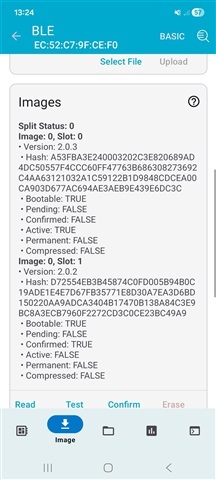
    so the upload and swap seem to be working fine now—it no longer stays in "Pending" status in slot 1 in Auterm. 

    The slot sizes were indeed different, but I managed to fix that.

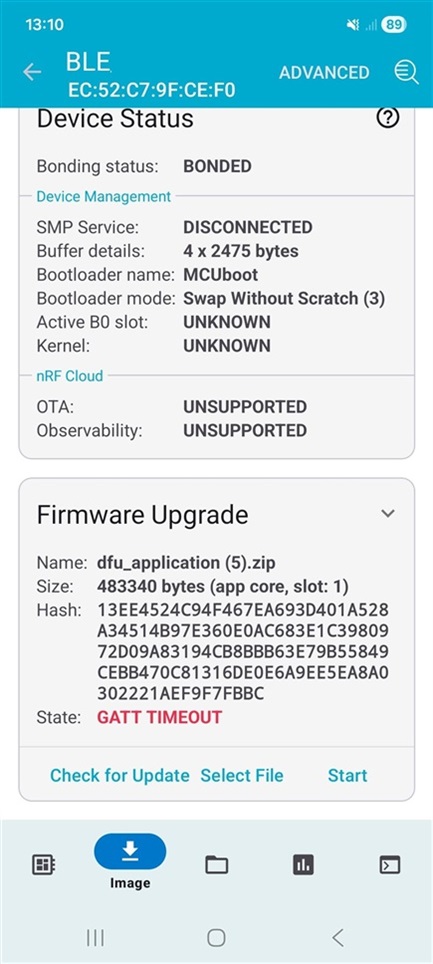
    But now I'm having an issue with the Device Manager mobile app—when I select "Test and confirm" while uploading a new image, it displays "GATT TIMEOUT" (see attached screenshot), even though both the upload and image swap complete successfully.

    Do you happen to know what might be causing this? If I select "Confirm," shouldn't the new image be applied when uploading from both the computer and the mobile app without having to reset the DevKit using the button?

    Thank you


  • Hi, 

    Which image did you use to DFU upload ? 
    Do you see the new image advertiser after the new image is sent to the device ? 

    If the new image doesn't have the BLE DFU capability it won't be able to confirm the new image. 

    Please try to describe the issue with more information so we can investigate. Normally, the device has to do a soft reset to swap the image. Then when the new image is running and advertise, the phone can automatically connect and then confirm the image. 

    Alternatively, it's possible to automatically confirm from inside the application code, don't need the mobile app to confirm. 

    You mentioned you had to do a hard reset for the new image to run ? 

Reply
  • Hi, 

    Which image did you use to DFU upload ? 
    Do you see the new image advertiser after the new image is sent to the device ? 

    If the new image doesn't have the BLE DFU capability it won't be able to confirm the new image. 

    Please try to describe the issue with more information so we can investigate. Normally, the device has to do a soft reset to swap the image. Then when the new image is running and advertise, the phone can automatically connect and then confirm the image. 

    Alternatively, it's possible to automatically confirm from inside the application code, don't need the mobile app to confirm. 

    You mentioned you had to do a hard reset for the new image to run ? 

Children
  • The new image has been successfully uploaded and swapped from both the PC (Auterm) and the mobile device (Device Manager), but I’m getting a “GATT TIMEOUT” error in the mobile app when I select “Test+Confirm.” 

    I didn't perform a reset using the button; everything happened automatically.

    This is what an RTT statement looks like:

    00> *** Booting MCUboot v2.3.0-dev-fce4dac2e629 ***
    00> *** Using nRF Connect SDK v3.3.0-ba167d9f3db4 ***
    00> *** Using Zephyr OS v4.3.99-fd9204a02d52 ***
    00> [00:00:00.001,666] <inf> mcuboot: Starting bootloader
    00> [00:00:00.002,149] <inf> mcuboot: Primary image: magic=good, swap_type=0x3, copy_done=0x1, image_ok=0x1
    00> [00:00:00.002,334] <inf> mcuboot: Secondary image: magic=unset, swap_type=0x1, copy_done=0x3, image_ok=0x3
    00> [00:00:00.002,498] <inf> mcuboot: Boot source: none
    00> [00:00:00.002,629] <inf> mcuboot: Image index: 0, Swap type: none
    00> [00:00:00.125,632] <inf> mcuboot: Bootloader chainload address offset: 0x18000
    00> [00:00:00.125,782] <inf> mcuboot: Image version: v2.1.3
    00> [00:00:00.125,893] <inf> mcuboot: Jumping to the first image slot
    00> *** Booting MCUboot v2.3.0-dev-fce4dac2e629 ***
    00> *** Using nRF Connect SDK v3.3.0-ba167d9f3db4 ***
    00> *** Using Zephyr OS v4.3.99-fd9204a02d52 ***
    00> [00:00:00.001,530] <inf> mcuboot: Starting bootloader
    00> [00:00:00.002,014] <inf> mcuboot: Primary image: magic=good, swap_type=0x3, copy_done=0x1, image_ok=0x1
    00> [00:00:00.002,198] <inf> mcuboot: Secondary image: magic=good, swap_type=0x2, copy_done=0x3, image_ok=0x3
    00> [00:00:00.002,361] <inf> mcuboot: Boot source: none
    00> [00:00:00.002,494] <inf> mcuboot: Image index: 0, Swap type: test
    00> [00:00:00.124,108] <inf> mcuboot: Starting swap using move algorithm.
    00> [00:00:55.202,072] <inf> mcuboot: Bootloader chainload address offset: 0x18000
    00> [00:00:55.202,223] <inf> mcuboot: Image version: v2.1.4
    00> [00:00:55.202,334] <inf> mcuboot: Jumping to the first image slot

    If I select "Confirm only" in the Device Manager mobile app when uploading an image, the process completes successfully and the app displays: "UPLOAD COMPLETE".

    It just seems strange to me that, at a different RTT terminal address (the application address), I still see the output from the old image without pressing the reset button, even though the new image is active in slot 0 in both Auterm and the mobile app. (verified by the change in the LED's flashing speed on the DevKit). If I then press the reset button, the RTT output is okay.

    Opening the terminal without pressing the reset button:

    00> *** Using nRF Connect SDK v3.3.0-ba167d9f3db4 ***
    00> *** Using Zephyr OS v4.3.99-fd9204a02d52 ***
    00> [00:00:00.001,684] <inf> mcuboot: Starting bootloader
    00> [00:00:00.002,168] <inf> mcuboot: Primary image: magic=good, swap_type=0x3, copy_done=0x1, image_ok=0x1
    00> [00:00:00.002,352] <inf> mcuboot: Secondary image: magic=unset, swap_type=0x1, copy_done=0x3, image_ok=0x3
    00> [00:00:00.002,517] <inf> mcuboot: Boot source: none
    00> [00:00:00.002,650] <inf> mcuboot: Image index: 0, Swap type: none
    00> [00:00:00.125,615] <inf> mcuboot: Bootloader chainload address offset: 0x18000
    00> [00:00:00.125,766] <inf> mcuboot: Image version: v2.1.3
    00> [00:00:00.125,878] <inf> mcuboot: Jumping to the first image slot
    

    Then after RESET button pressed:

    00> *** Booting MCUboot v2.3.0-dev-fce4dac2e629 ***
    00> *** Using nRF Connect SDK v3.3.0-ba167d9f3db4 ***
    00> *** Using Zephyr OS v4.3.99-fd9204a02d52 ***
    00> [00:00:00.001,561] <inf> mcuboot: Starting bootloader
    00> [00:00:00.002,044] <inf> mcuboot: Primary image: magic=good, swap_type=0x3, copy_done=0x1, image_ok=0x1
    00> [00:00:00.002,228] <inf> mcuboot: Secondary image: magic=good, swap_type=0x3, copy_done=0x3, image_ok=0x1
    00> [00:00:00.002,390] <inf> mcuboot: Boot source: none
    00> [00:00:00.002,524] <inf> mcuboot: Image index: 0, Swap type: perm
    00> [00:00:00.124,090] <inf> mcuboot: Starting swap using move algorithm.
    00> [00:01:04.462,264] <inf> mcuboot: Bootloader chainload address offset: 0x18000
    00> [00:01:04.462,414] <inf> mcuboot: Image version: v2.1.4
    00> [00:01:04.462,525] <inf> mcuboot: Jumping to the first image slot

    Thank you

Related