Can’t generate ncs-sbom with nRF Connect SDK v3.1.1

Hello.

When I ran the NCS SBOM command using VS Code,
the following error occurred, and the file could not be generated.

I would appreciate it if you could tell me how to resolve this.

The following settings have already been implemented.
→pip3 install -r nrf/scripts/requirements-west-ncs-sbom.txt

My system configuration is as follows.

Windows
Microcontroller: nRF54L05
SDK: nRF Connect SDK v3.1.1
Toolchain: nRF Connect SDK Toolchain v3.1.1
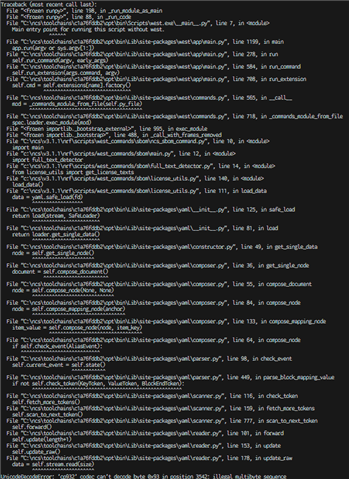
  • Hi,
    The script fails due to a UnicodeDecodeError, see the last line. It opens UTF-8 license files without specifying an encoding, so Python reads them using your Japanese Windows default (cp932). Try setting PYTHONUTF8=1 in your environment or change the with open() lines in load_data() in v3.1.1/nrf/scripts/west_commands/sbom/license_utils.py:

    with open(Path(__file__).parent / 'data/spdx-licenses.yaml', 'r', encoding='utf-8') as fd:
    
    with open(Path(__file__).parent / 'data/license-texts.yaml', 'r', encoding='utf-8') as fd:


    Best regards,
    Benjamin

  • Dear Benjamin

    Sorry for the late reply.
    I was able to resolve the issue successfully using the method you suggested.
    Thank you very much.

Related