This post is older than 2 years and might not be relevant anymore
More Info: Consider searching for newer posts

nRF52840 DK can not advertising extension when using zephyr nRF Connect SDK v1.6.1

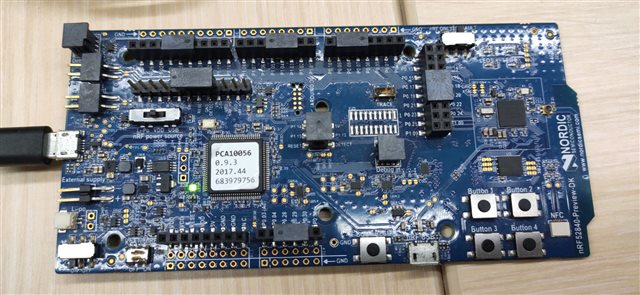
HW : nRF52840DK

SW :  nRF3.7.0 desktop tool

          nRF Connect SDK v1.6.1

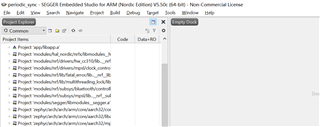
IDE: SES

Project: periodic_sync or periodic_adv
Operation:

1. build -> rebuild the solution,  success;

2. Target -> Download zephyr/zephyr.elf,  success;

result: 

nRF52840DK LED1 blink , no any advertising packet can be received.


Anyone can help me why the extend adv pkt can not received, and how should I do correctly?

Parents
  • Hi, 

    Have a look at the response Sigurd provided in this post.

    I add CONFIG_BT_LL_SW_SPLIT=y into prj.conf of periodic_sync and periodic_adv. One DK runs periodic_adv and get the log like this: 

    *** Booting Zephyr OS build v2.6.0-rc1-ncs1  ***
    
    Starting Periodic Advertising Demo
    
    [00:00:00.276,367] <inf> bt_hci_core: HW Platform: Nordic Semiconductor (0x0002)
    
    [00:00:00.276,367] <inf> bt_hci_core: HW Variant: nRF52x (0x0002)
    
    [00:00:00.276,397] <inf> bt_hci_core: Firmware: Standard Bluetooth controller (0                                                                                                                                                             x00) Version 2.6 Build 0
    
    [00:00:00.276,947] <inf> bt_hci_core: Identity: FA:B0:6E:34:31:BE (random)
    
    [00:00:00.276,947] <inf> bt_hci_core: HCI: version 5.2 (0x0b) revision 0x0000, m                                                                                                                                                             anufacturer 0x05f1
    
    [00:00:00.276,947] <inf> bt_hci_core: LMP: version 5.2 (0x0b) subver 0xffff
    
    Set Periodic Advertising Data...done.
    
    Set Periodic Advertising Data...done.
    
    Set Periodic Advertising Data...done.
    
    Set Periodic Advertising Data...done.
    
    Set Periodic Advertising Data...done.
    
    Set Periodic Advertising Data...done.
    
    Set Periodic Advertising Data...done.
    
    Set Periodic Advertising Data...done.
    

    Another DK runs periodic_sync and get the log like this

    *** Booting Zephyr OS build v2.6.0-rc1-ncs1  ***
    
    Starting Periodic Advertising Synchronization Demo
    
    Checking LED device...done.
    
    Configuring GPIO pin...done.
    
    Scan callbacks register...success.
    
    Periodic Advertising callbacks register...Success.
    
    Start scanning...success.
    
    Start blinking LED...
    
    Waiting for periodic advertising...
    
    [00:00:00.258,514] <inf> bt_hci_core: HW Platform: Nordic Semiconductor (0x0002)
    
    [00:00:00.258,514] <inf> bt_hci_core: HW Variant: nRF52x (0x0002)
    
    [00:00:00.258,514] <inf> bt_hci_core: Firmware: Standard Bluetooth controller (0x00) Version 2.6 Build 0
    
    [00:00:00.259,094] <inf> bt_hci_core: Identity: DA:20:CF:24:38:05 (random)
    
    [00:00:00.259,094] <inf> bt_hci_core: HCI: version 5.2 (0x0b) revision 0x0000, manufacturer 0x05f1
    
    [00:00:00.259,094] <inf> bt_hci_core: LMP: version 5.2 (0x0b) subver 0xffff
    
    [DEVICE]: 59:67:CB:E2:45:60 (random), AD evt type 2, Tx Pwr: 127, RSSI -78  C:0 S:1 D:0 SR:0 E:0 Prim: LE 1M, Secn: No packets, Interval: 0x0000 (0 ms), SID: 255
    
    [DEVICE]: 59:67:CB:E2:45:60 (random), AD evt type 4, Tx Pwr: 127, RSSI -78  C:0 S:1 D:0 SR:1 E:0 Prim: LE 1M, Secn: No packets, Interval: 0x0000 (0 ms), SID: 255
    
    [DEVICE]: 98:D6:BB:23:D7:AF (public), AD evt type 0, Tx Pwr: 127, RSSI -81  C:1 S:1 D:0 SR:0 E:0 Prim: LE 1M, Secn: No packets, Interval: 0x0000 (0 ms), SID: 255
    
    [DEVICE]: 0F:26:07:0C:5A:31 (random), AD evt type 5, Tx Pwr: 127, RSSI -38 Test Periodic Advertising C:0 S:0 D:0 SR:0 E:1 Prim: LE 1M, Secn: LE 2M, Interval: 0x0780 (2400 ms), SID: 0
    
    Found periodic advertising.
    
    Creating Periodic Advertising Sync...success.
    
    Waiting for periodic sync...
    
    [DEVICE]: 5D:07:B0:F2:BC:39 (random), AD evt type 3, Tx Pwr: 127, RSSI -36  C:0 S:0 D:0 SR:0 E:0 Prim: LE 1M, Secn: No packets, Interval: 0x0000 (0 ms), SID: 255
    
    PER_ADV_SYNC[0]: [DEVICE]: 0F:26:07:0C:5A:31 (random) synced, Interval 0x0780 (2400 ms), PHY LE 2M
    
    Periodic sync established.
    
    Stop blinking LED.
    
    Waiting for periodic sync lost...
    
    [DEVICE]: A4:30:7A:67:32:2C (public), AD evt type 0, Tx Pwr: 127, RSSI -85  C:1 S:1 D:0 SR:0 E:0 Prim: LE 1M, Secn: No packets, Interval: 0x0000 (0 ms), SID: 255
    
    PER_ADV_SYNC[0]: [DEVICE]: 0F:26:07:0C:5A:31 (random), tx_power 127, RSSI -38, CTE 1, data length 5, data: 04ffffffb0
    
    [DEVICE]: 74:15:A4:DD:73:86 (random), AD evt type 4, Tx Pwr: 127, RSSI -81  C:1 S:1 D:0 SR:1 E:0 Prim: LE 1M, Secn: No packets, Interval: 0x0000 (0 ms), SID: 255
    
    [DEVICE]: 59:67:CB:E2:45:60 (random), AD evt type 4, Tx Pwr: 127, RSSI -80  C:0 S:1 D:0 SR:1 E:0 Prim: LE 1M, Secn: No packets, Interval: 0x0000 (0 ms), SID: 255
    
    PER_ADV_SYNC[0]: [DEVICE]: 0F:26:07:0C:5A:31 (random), tx_power 127, RSSI -39, CTE 1, data length 5, data: 04ffffffb3
    
    [DEVICE]: 6C:4A:85:5A:95:F5 (public), AD evt type 0, Tx Pwr: 127, RSSI -82  C:1 S:1 D:0 SR:0 E:0 Prim: LE 1M, Secn: No packets, Interval: 0x0000 (0 ms), SID: 255
    
    [DEVICE]: 6C:4A:85:5A:95:F5 (public), AD evt type 4, Tx Pwr: 127, RSSI -82  C:1 S:1 D:0 SR:1 E:0 Prim: LE 1M, Secn: No packets, Interval: 0x0000 (0 ms), SID: 255
    
    PER_ADV_SYNC[0]: [DEVICE]: 0F:26:07:0C:5A:31 (random), tx_power 127, RSSI -40, CTE 1, data length 5, data: 04ffffffb5


    If you still have the issue, please provide the logs. Thanks. 

    -Amanda H.

  • hi Amanda ,

    Very glad receive your reply. The test log show as below, it still looks not work.

    00> [00:00:00.746,948] <inf> bt_hci_core: HW Platform: Nordic Semiconductor (0x0002)
    00> [00:00:00.746,978] <inf> bt_hci_core: HW Variant: nRF52x (0x0002)
    00> [00:00:00.746,978] <inf> bt_hci_core: Firmware: Standard Bluetooth controller (0x00) Version 2.4 Build 99
    00> [00:00:00.747,528] <inf> bt_hci_core: Identity: F5:75:13:83:84:7C (random)
    00> [00:00:00.747,528] <inf> bt_hci_core: HCI: version 5.2 (0x0b) revision 0x0000, manufacturer 0x05f1
    00> [00:00:00.747,528] <inf> bt_hci_core: LMP: version 5.2 (0x0b) subver 0xffff
    (Connection lost)(Connection lost)
    00> [00:00:00.695,770] <inf> bt_hci_core: HW Platform: Nordic Semiconductor (0x0002)
    00> [00:00:00.695,800] <inf> bt_hci_core: HW Variant: nRF52x (0x0002)
    00> [00:00:00.695,800] <inf> bt_hci_core: Firmware: Standard Bluetooth controller (0x00) Version 2.4 Build 99
    00> [00:00:00.696,350] <inf> bt_hci_core: Identity: F5:75:13:83:84:7C (random)
    00> [00:00:00.696,350] <inf> bt_hci_core: HCI: version 5.2 (0x0b) revision 0x0000, manufacturer 0x05f1
    00> [00:00:00.696,350] <inf> bt_hci_core: LMP: version 5.2 (0x0b) subver 0xffff

    I use the SES IDE, it seems the log not print out, and I can not make it works. 

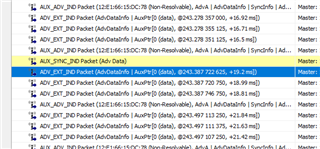
    The 52840DK board led1 blink priodically, the ellisys not capture any extend adv pkt either.

  • Hi, 

    00> [00:00:00.746,978] <inf> bt_hci_core: Firmware: Standard Bluetooth controller (0x00) Version 2.4 Build 99

    Are you using v1.6.1? 

    After updating prj.conf, you need to reload the project to make it effective. You could try this periodic_adv.zip.

    -Amanda H.

Reply Children
  • Hi  Amanda ,

    The project SDK you attached is work well on my 52840DK, and ellisys can capture the sync pkt also.

    Besides, on my local PC I am using v1.6.1 SDK;

    This is the SDK I download from nRF Connect v3.7.0 ToolChain Manager;

    I add the  CONFIG_BT_LL_SW_SPLIT=y into prj.conf of periodic_sync, but it still not work.

    periodic_sync_v01.zip

    Can you help check the reason why my sdk not work? 

  • Hi, 

    Do you have another DK running periodic_adv at the same time?

    Your project can work on my side. 

    *** Booting Zephyr OS build v2.6.0-rc1-ncs1  ***
    
    Starting Periodic Advertising Synchronization Demo
    
    Checking LED device...done.
    
    Configuring GPIO pin...done.
    
    Scan callbacks register...success.
    
    Periodic Advertising callbacks register...Success.
    
    Start scanning...success.
    
    Start blinking LED...
    
    Waiting for periodic advertising...
    
    [00:00:00.258,300] <inf> bt_hci_core: HW Platform: Nordic Semiconductor (0x0002)
    
    [00:00:00.258,300] <inf> bt_hci_core: HW Variant[DEVICE]: B9:D7:13:00:00:10 (public), AD evt type 0, Tx Pwr: 127, RSSI -83 Tier C:1 S:1 D:0 SR:0 E:0 Prim: LE 1M, Secn: No packets, Interval: 0x0000 (0 ms), SID: 255
    
    [DEVICE]: B9:D7:12:6F:F0:1D (public), AD evt type 0, Tx Pwr: 127, RSSI -87 Tier C:1 S:1 D:0 SR:0 E:0 Prim: LE 1M, Secn: No packets, Interval: 0x0000 (0 ms), SID: 255
    
    : nRF52x (0x0002)
    
    [00:00:00.258,331] <inf> bt_hci_core: Firmware: Standard Bluetooth controller (0x00) Version 2.6 Build 0
    
    [00:00:00.258,880] <inf> bt_hci_core: Identity: DA:20:CF:24:38:05 (random)
    
    [00:00:00.258,880] <inf> b[DEVICE]: B9:D7:12:6F:F0:1D (public), AD evt type 4, Tx Pwr: 127, RSSI -82  C:1 S:1 D:0 SR:1 E:0 Prim: LE 1M, Secn: No packets, Interval: 0x0000 (0 ms), SID: 255
    
    t_hci_core: HCI: version 5.2 (0x0b) revision 0x0000, manufacturer 0x05f1
    
    [00:00:00.258,880] <inf> bt_hci_core: LMP: version 5.2 (0x0b) subver 0xffff
    
    [DEVICE]: 13:5C:A8:05:2A:44 (random), AD evt type 5, Tx Pwr: 127, RSSI -33 Test Periodic Advertising C:0 S:0 D:0 SR:0 E:1 Prim: LE 1M, Secn: LE 2M, Interval: 0x0780 (2400 ms), SID: 0
    
    Found periodic advertising.
    
    Creating Periodic Advertising Sync...success.
    
    Waiting for periodic sync...
    
    [DEVICE]: 04:E8:6F:0B:76:6D (random), AD evt type 3, Tx Pwr: 127, RSSI -86  C:0 S:0 D:0 SR:0 E:0 Prim: LE 1M, Secn: No packets, Interval: 0x0000 (0 ms), SID: 255
    
    PER_ADV_SYNC[0]: [DEVICE]: 13:5C:A8:05:2A:44 (random) synced, Interval 0x0780 (2400 ms), PHY LE 2M
    
    [DEVICE]: B9:D7:13:00:10:1D (public), AD evt type 0, Tx Pwr: 127, RSSI -83 Tier C:1 S:1 D:0 SR:0 E:0 Prim: LE 1M, Secn: No packets, Interval: 0x0000 (0 ms), SID: 255
    
    [DEVICE]: B9:D7:13:00:10:1D (public), AD evt type 4, Tx Pwr: 127, RSSI -84  C:1 S:1 D:0 SR:1 E:0 Prim: LE 1M, Secn: No packets, Interval: 0x0000 (0 ms), SID: 255
    
    Periodic sync established.
    
    Stop blinking LED.
    
    Waiting for periodic sync lost...
    
    [DEVICE]: 3C:4B:BD:B5:76:58 (random), AD evt type 3, Tx Pwr: 127, RSSI -90  C:0 S:0 D:0 SR:0 E:0 Prim: LE 1M, Secn: No packets, Interval: 0x0000 (0 ms), SID: 255
    
    PER_ADV_SYNC[0]: [DEVICE]: 13:5C:A8:05:2A:44 (random), tx_power 127, RSSI -30, CTE 1, data length 5, data: 04ffffffa2
    
    PER_ADV_SYNC[0]: [DEVICE]: 13:5C:A8:05:2A:44 (random), tx_power 127, RSSI -30, CTE 1, data length 5, data: 04ffffffa5
    
    PER_ADV_SYNC[0]: [DEVICE]: 13:5C:A8:05:2A:44 (random), tx_power 127, RSSI -30, CTE 1, data length 5, data: 04ffffffa7
    

    Try to reload the project or reopen the Segger project to make the config effective. 

    -Amanda

  • Hi Amanda,

    I reopen the SES several times, the issue still exist. 

    I have two questions :

    Q1:  Did you rebuild the SDK based on v1.6.1 I gave you before download it? is it possible the problem related to SES (v5.50d 64-bits) config?

    Q2:  Why my platform can not log output?  and how could i fix this?

  • Hi,

    yuyin said:
    Q1:  Did you rebuild the SDK based on v1.6.1 I gave you before download it? is it possible the problem related to SES (v5.50d 64-bits) config?

    I use the zephyr.hex under periodic_sync_v01\build_nrf52840dk_nrf52840 and rebuild with the same version of SES as yours. Both two can work. 


    yuyin said:
    Q2:  Why my platform can not log output?  and how could i fix this?

    Do you use the correct serial port of the DK via Device manager Windows? You could try another one. Or maybe you would try thisperiodic_sync.zip

    -Amanda H

  • Hi Amanda ,

    which board you test the issue, 52840 Preview DK or 52840 DK board?

    I am using the  52840 Preview DK, does it have the problem?

    The PC I am using only have one serial port via DK.

Related