This discussion has been locked.
You can no longer post new replies to this discussion. If you have a question you can start a new discussion

Softdevice - I cannot set tx power above +4dBm but as per the datasheet it supports up to +8dbm

Hello,

I am doing BLE advertising on the nRF52833  and using nRF5 SK 17.0.2. I cannot set TX power above +4dbm from sd_ble_gap_tx_power_set(). I have checked in nrf_gap.h header file there also written " @note Supported tx_power values: -40dBm, -20dBm, -16dBm, -12dBm, -8dBm, -4dBm, 0dBm, +3dBm and +4dBm." So then how can I set it to +8dbm?

Thanks in advance.

Regards,

Neeraj Dhekale

Parents
  • Hi Neeraj,

    Which SoftDevice are you using? And why are you using that specific SoftDevice? If you for instance look at the API documentation for tx_power values in the ble_gap.h file for S140 (<SDK17.0.2>components\softdevice\s140\headers\ble_gap.h), you will see the following:

     * @note Supported tx_power values: -40dBm, -20dBm, -16dBm, -12dBm, -8dBm, -4dBm, 0dBm, +3dBm and +4dBm.
      *       In addition, on some chips following values are supported: +2dBm, +5dBm, +6dBm, +7dBm and +8dBm.
     *       Setting these values on a chip that does not support them will result in undefined behaviour.

    S113 also supports up to +8 dBm for SoCs that support it. S122 for instance, does not.

    Einar

Reply
  • Hi Neeraj,

    Which SoftDevice are you using? And why are you using that specific SoftDevice? If you for instance look at the API documentation for tx_power values in the ble_gap.h file for S140 (<SDK17.0.2>components\softdevice\s140\headers\ble_gap.h), you will see the following:

     * @note Supported tx_power values: -40dBm, -20dBm, -16dBm, -12dBm, -8dBm, -4dBm, 0dBm, +3dBm and +4dBm.
      *       In addition, on some chips following values are supported: +2dBm, +5dBm, +6dBm, +7dBm and +8dBm.
     *       Setting these values on a chip that does not support them will result in undefined behaviour.

    S113 also supports up to +8 dBm for SoCs that support it. S122 for instance, does not.

    Einar

Children
  • Hello Einar,

    Thank you for your reply.

    Which SoftDevice are you using?

    I am using S132.

    why are you using that specific SoftDevice?

    Actually, I am new to nordic. I have checked this documentation and for nRF52833 there is S140. But the problem is that the example which I had copied there was not S140 support. Also, everything else was working fine, so I just continued to work with it. But now I realized I made mistake. I want to ask you, how can I make it compatible with S140? Can I just copy the S140 folder from another project? will that work? or is there another procedure to make it compatible with S140?

    Thanks and regards,

    Neeraj Dhekale

  • Hi Neeraj,

    Changing SoftDevice is normally quite straight-forward. I suggest you compare your project with an example project that use the SoftDevice you are migrating too, and with that as a reference, update the following in your project:

    • Path to SoftDevice header files (include path)
    • Project preprocessor define that state the SoftDevice version (Like "S140")
    • Adjust the application start address to to equal the size of the new SoftDevice
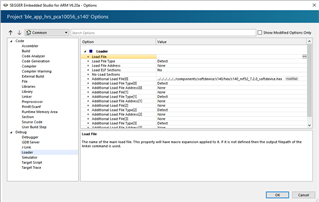
    • If you use SES or another IDE that flashes the SoftDevice automatically for you, you should also change that. In SES that would be by changing the "additional load file" like here: 
  • Thank you very much for this information.

    Actually, I have a development board nRF 52840 DK. I do all my development on this board, and once everything goes fine. I just do flash it to BE33 (nRF 52833 based) module. So shall I select PCA10040 or pca10010? Click here for documentation. The documentation says PCA10056 can be used for nRF52840 DK and PCA10100 can be used for nRF52833. What shall I do?

    Currently, I do flash PCA10010 > S132 on both boards and it works fine. except for above issue Smiley.

    Or Shall I use PCA 10056 for both nRF52840 and nRF52833 by keeping in mind about some limitation in future for nRF52840 DK board?

    Regards,

    Neeraj Dhekale

  • Hi,

    The PCA10100  is the nRF52833 DK and the PCA10056 is the nRF52840 DK, so I would pick PCA10100 if that is available for the relevant project. If not, pick PCA10056  and make the required adjustments. In addition to those mentioned below, you also need to change the define with the IC in the preprocessor defines part of your project settings, and change the startup file and system file (if you are using SES for instance, open the project file in a text editor and search for nrf52840 - that is simpler and faster than going through the GUI).

  • Hello Einar Thorsrud,

    Sorry for the late reply. I was busy solving my other problems of nRF.

    As you suggested I have copied the PCA10056 > S140 folder from other projects and by comparing I made the required changes in the above folder and it got built successfully. But whenever nrf_sdh_ble_enable() function executes from ble_stack_init() function.  it throws error "<error> app: Fatal error". If you want I can explain what changes I have made to create the PCA10056 > S140 folder.

    But when I tried to go back and check the working in PCA10040 > S132 folder. It works completely fine.

    Please correct me if I am doing anything wrong.

    Thanks and regards,

    Neeraj

Related