nRF51 Dongle not does not find devices anymore after firmware update in third party app.

Hello everybody

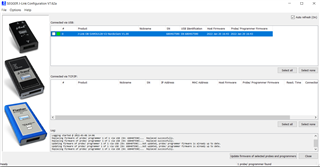
I am using the nRF51 Dongle to connect via a third party app to a measuring device. This always worked very well on my first computer, the app could detect the dongle, scan for bluetooth devices and then connect to the measuring device. However, while setting up the third party app on a different computer, I accidentally updated the firmware of the device to version "2022 Jan 20 16:43" as seen in the picture below in the J-Link Configuration (unfortunately I do not know the old version). All the threads which have a similar problem, are solved with dead links to older firmware. Is there a possibility to roll back to some later version of the firmware? If yes, how can I do so?
Many thanks for your help and support.

Sincerely,
Chris

Parents Reply Children
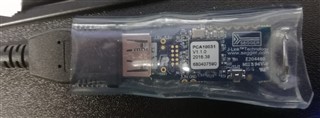
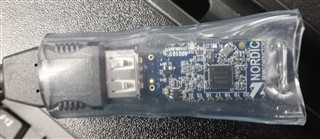
  • Hi, thanks for your fast response. It is not the same FW anymore and as it is the only thing I change between when it was working and when it stopped working I assumed that must be the problem. The PCA is 10031 and that's how it looks like:

  • So the application on the nRF is no longer the same, is that what you are saying?

    If so, 

    This always worked very well on my first computer, the app could detect the dongle, scan for bluetooth devices and then connect to the measuring device.

    Then it may not be that strange that it is no longer working?

    What firmware was flashed on the nRF51 dongle? (the nRF51 chip, not the Segger chip)

    BR,
    Edvin

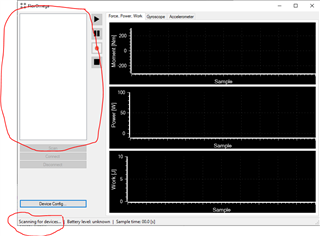
  • Ah sorry then I did not understand you correctly. We do not have any application on the nRF we only use it as a Bluetooth "antenna". The third party windows app was able to detect Bluetooth devices when the dongle was plugged in to the computer. Please see the picture below. I could click on "Scan" and then after a few seconds in the upper left white rectangle a lot of devices could be seen, however after the firmware update it stays blank and it only says "scanning for devices". The app is however still able to detect the nRF as the Scan button only gets released when the program is "connected" to the dongle.


  • I updated the firmware using the app J-Link Configurator V7.62a. I am really sorry when I cannot answer all your questions. Where can I see which hardware is installed on which chip (I unfortunately never flashed something on the chip by myself and my knowledge of the architecture of the dongle is also very minimal). 

  • fungiking said:
    I could click on "Scan" and then after a few seconds in the upper left white rectangle a lot of devices could be seen,

    I see, but that means that the nRF chip on the dongle was programmed with something. If it doesn't have an application, then the radio will not turn on at all, and then you will not be able to use it to detect bluetooth devices.

    Whether your application (from your screenshot) searches for nRF dongles and automatically program them, I don't know.

    Do you have another dongle that is working? If so, can you please try the following:

    Download nRF Command Line Tools, and install it. Then open a command window in any location that you can store a file (open file explorer, assuming you are using Windows, press "Alt" and "D", type cmd and hit Enter.

    Then type this command while the working dongle is inserted in your computer:

    nrfjprog --readcode working_fw.hex

    Whether or not you have a working dongle, please try to insert the dongle that is not working, and type:

    nrfjprog --readcode not_working_fw.hex

    This should give you some .hex files. Can you please upload the two hex files here? What I want to check is whether or not there is any fw at all on the nRF Chip on the dongle that is not working. 

    If you have a dongle that is working, then you can try to program the non-working dongle with the FW from the working dongle:

    nrfjprog --program working_fw.hex --verify --sectorerase --reset

    And see if it starts working then.

    If not, can you please try to find out whether the pc application that you are using (screenshot) is programming the nRF, or if it expects the nRF to already be programmed with a certain firmware?

    BR,

    Edvin

Related