

Hello,
I'm evaluating power optimization on nRF52. I'm using a Power Profiler Kit II and a nRF52-DK board.
I tried a lot of configuration and everything work as expected.
My problem here is that I can't get rid of 700µA spikes each 1ms, some of them are skipped. See below :
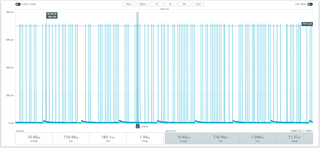
I'm using the test beacon default project, I removed the BLE, so I'm measuring only the idle.
My .conf file :
CONFIG_BT=y
CONFIG_BT_DEBUG_LOG=n
CONFIG_BT_DEVICE_NAME="Test beacon"
# Drivers and peripherals
CONFIG_ADC=n
CONFIG_I2C=n
CONFIG_WATCHDOG=n
CONFIG_PINMUX=n
CONFIG_SPI=n
CONFIG_IS_SPM=n
CONFIG_FW_INFO=y
CONFIG_GPIO=y
CONFIG_SERIAL=n
# Power management
#CONFIG_SYS_POWER_MANAGEMENT=n
CONFIG_PM=y
CONFIG_PM_DEVICE=y
CONFIG_TICKLESS_KERNEL=y
#CONFIG_TICKLESS_IDLE=y
# Interrupts
CONFIG_DYNAMIC_INTERRUPTS=n
CONFIG_IRQ_OFFLOAD=n
# Memory protection
CONFIG_THREAD_STACK_INFO=n
CONFIG_THREAD_CUSTOM_DATA=n
CONFIG_FPU=n
# Console
CONFIG_CONSOLE=n
CONFIG_UART_CONSOLE=n
CONFIG_STDOUT_CONSOLE=n
CONFIG_PRINTK=n
CONFIG_EARLY_CONSOLE=n
Is there a way to get rid of those spikes ? What is causing them ?
Thanks.
