NCS DFU Supported External Flash Devices

OS: Windows

NCS: 2.2.0

We have discovered that we do not have enough internal flash space to support BLE DFU and need to add an external flash to our nRF52833-based design.

The nRF52840 DK board has an external flash (MX25R64) and BLE DFU is shown to work with the bus configured as SPI or QSPI.

 https://devzone.nordicsemi.com/f/nordic-q-a/82430/ncs-external-flash-ota-change-qspi-to-spi/345238

Our board is very small, so the MX25R64 is simply too physically large, so we are looking at the Gigadevices GD25WD40E/20E.  It is tiny at 1.2x1.2mm and supports SPI bus.

https://www.mouser.com/datasheet/2/870/gd25wd40e_gd25wd20e_datasheet_rev1_1_20221019-3081635.pdf

We have no way of verifying this device without doing another version of the board.  That is a big risk.

1.  Is there a specific memory layout of the flash for NCS DFU to work?  For example, the Gigadevices part's memory layout looks like:
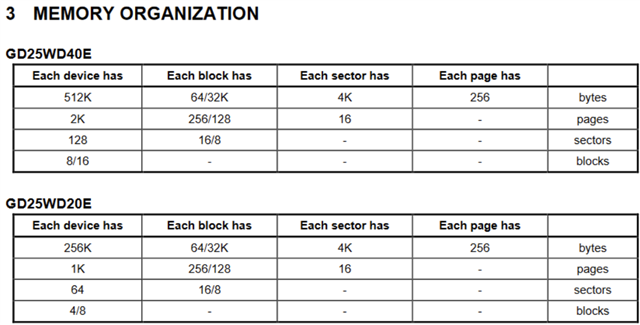
2. Is there a specific list of SPI/QSPI flash devices that work with NCS DFU?

Parents
  • I think getting a breakout board as suggested is a good option to debug/verify this works. The breakout board can be done with a different package type.

    That said, I do believe you should be able to make this work. The spi_nor driver is pretty generic.

    In terms of how to switch between internal flash, spi flash and qspi flash you can find the driver test for the flash module useful:
    https://github.com/nrfconnect/sdk-zephyr/tree/main/tests/drivers/flash

    In your case that want to use spi you can find these two files relevant:
    boards/nrf52840dk_flash_spi.conf
    boards/nrf52840dk_mx25r_high_perf.overlay

    By modifying the .overlay file you should hopefully relatively quickly find configuration that works.

    Edit, here are the properties that can be set:
    https://github.com/nrfconnect/sdk-zephyr/blob/main/dts/bindings/mtd/jedec%2Cspi-nor.yaml 
    https://github.com/nrfconnect/sdk-zephyr/blob/main/dts/bindings/mtd/jedec%2Cspi-nor-common.yaml 

    "Properties supporting Zephyr spi-nor flash driver (over the Zephyr SPI API) control of serial flash memories using the standard M25P80-based command set."

    Kenneth

  • Thanks for the feedback.  I think spinning a breakout board and testing with the nRF52833 DK is the best way to go, too.  

  • I finally am getting back to this ticket.  Here is what I have done.

    1.  The "hello world" DFU over BLE using internal flash is working on the nRF52833 DK.

    2. I then ported the project to the nRF52840 DK to use it's external QSPI flash.  This is also working.

    3. Now I am trying to add an external SPI flash device on a breakout board to the nRF52833 DK to prove it will work.  The SPI NOR flash I am using is the ISSI IS25LP080D.
    www.issi.com/.../25LP-WP080D-040D-020D.pdf

    From item #2 above I modified...

    Both of these overlay files update the SPI bus (identical content in both files)

    • /boards/nrf52833dk_nrf52833.overlay
    • /child_image/mcuboot/boards/nrf52833dk_nrf52833.overlay

    Both of the these conf files have these lines added to switch from QSPI to SPI

    • prj.conf
    • /child_image/mcuboot/boards/nrf52833dk_nrf52833.conf
    # Additions for DFU external flash
    CONFIG_FLASH=y
    CONFIG_SPI=y
    CONFIG_SPI_NOR=y
     

    I am seeing two things that are odd.  CONFIG_SPI_NOR in both .conf files has the red/orange squiggly lines under it.  When I highlight it says:

    CONFIG_SPI_NOR was assigned the value y, but got the value n. Missing dependencies:
    DT_HAS_JEDEC_SPI_NOR_ENABLED
     https://developer.nordicsemi.com/nRF_Connect_SDK/doc/latest/kconfig/index.html  and searching for "CONFIG_SPI_NOR" shows does have DT_HAS_JEDEC_SPI_NOR_ENABLED as a dependency.

    However in my build directory both of the .config files shows CONFIG_DT_HAS_JEDEC_SPI_NOR_ENABLED=y 
    • build_nrf52833dk_nrf52833/mcuboot/zephyr/.config
    • build_nrf52833dk_nrf52833/zephyr/.config

    I suspect this is the root cause of the build error I am getting, but the message doesn't give any real detail.
    c:/users/bryan/ncs/toolchains/v2.2.0/opt/zephyr-sdk/arm-zephyr-eabi/bin/../lib/gcc/arm-zephyr-eabi/12.1.0/../../../../arm-zephyr-eabi/bin/ld.exe: zephyr/drivers/spi/libdrivers__spi.a(spi_nrfx_spi.c.obj): in function `k_sem_give':
    C:\Virtuix\nordic\myapps\hello_world_dfu\build_nrf52833dk_nrf52833\mcuboot\zephyr\include\generated\syscalls\kernel.h:1071: undefined reference to `z_impl_k_sem_give'

    I have attached my hello_world_dfu project for reference.  The build output log is saved in the root directory (build_output.txt).  I appreciate any help!

    hello_world_dfu.zip
  • I did not have time to look into this today, and I am out of office tomorrow. The undefined reference to `z_impl_k_sem_give' error seems to be related to MULTITHREADING is not enabled? Maybe try to delete your build folder and build again.

    Kenneth

  • Kenneth,

    You are a genius!  I started digging when you focused me on MULTITHREADING and I found this reference online in a prj.conf file.  This resolved the error.

    # If you don't add this when setting CONFIG_SPI=y, you'll get a lot of undefined references 
    # from the nrfx spim driver E.G. "undefined reference to `z_impl_k_sleep'"
    CONFIG_MULTITHREADING=y

  • I have wired up the SPI NOR flash and added the sfdp-bfp into both overlay files

    * boards\nrf52833dk_nrf52833.overlay

    * child_image\mcuboot\boards\nrf52833dk_nrf52833.overlay

    However, I am still seeing issues around the conf settings in prj.conf and child_image\mcuboot\boards\nrf52833dk_nrf52833.conf

    CONFIG_FLASH=y
    CONFIG_SPI=y
    CONFIG_SPI_NOR=y

    warning: SPI_NOR (defined at drivers/flash/Kconfig.nor:4) was assigned the value 'y' but got the
    value 'n'. Check these unsatisfied dependencies: DT_HAS_JEDEC_SPI_NOR_ENABLED (=n). See
    docs.zephyrproject.org/.../kconfig.html and/or look up SPI_NOR in the
    menuconfig/guiconfig interface. The Application Development Primer, Setting Configuration Values,
    and Kconfig - Tips and Best Practices sections of the manual might be helpful too.

    It still builds, but when it boots...

    *** Booting Zephyr OS build v3.2.99-ncs1 ***
    I: Starting bootloader
    W: Failed reading sectors; BOOT_MAX_IMG_SECTORS=256 - too small?
    W: Cannot upgrade: not a compatible amount of sectors
    E: Unable to determine flash sector of the image trailer
    E: Image in the primary slot is not valid!
    E: Unable to find bootable image

  • For testing can you first try to make the flash test driver to work?

    https://github.com/nrfconnect/sdk-zephyr/tree/main/tests/drivers/flash

    In your case that want to use spi you can find these two files relevant:
    boards/nrf52840dk_flash_spi.conf
    boards/nrf52840dk_mx25r_high_perf.overlay
    (remove the 
    mxicy,mx25r-power-mode = "high-performance"; in your case from the .overlay)

    By modifying the .overlay file you should hopefully relatively quickly find configuration that works.

Reply Children
  • Kenneth,

    I took the flash app you provided and modified it for the nRF52833DK with the ISSI is25lp080d SPI NOR flash.  After a lot of experimental changes it is now passing.  This shows that the flash is connected properly and can be read/written.  I attached flash.zip for reference for everyone.

    https://github.com/nrfconnect/sdk-zephyr/tree/main/tests/drivers/flash

    ncs\v2.2.0\zephyr\tests\drivers\flash

    The key modifications were:

    * delete testcase.yaml

    * Modify the contents of the overlay file.

    / {
            aliases {
                    spi-flash0 = &is25lp080d;
            };
    };

    &pinctrl {
        spi1_default: spi1_default {
                group1 {
                        psels = <NRF_PSEL(SPIM_SCK, 0, 23)>,
                                <NRF_PSEL(SPIM_MOSI, 0, 21)>,
                                <NRF_PSEL(SPIM_MISO, 0, 22)>;
                };
        };
        spi1_sleep: spi1_sleep {
                group1 {
                        psels = <NRF_PSEL(SPIM_SCK, 0, 23)>,
                                <NRF_PSEL(SPIM_MOSI, 0, 21)>,
                                <NRF_PSEL(SPIM_MISO, 0, 22)>;
                        low-power-enable;
                };
        };
    };

    &spi1 {
            compatible = "nordic,nrf-spim";     <<<<<<<<<<<<<<<<<< added
            status = "okay";
            cs-gpios = <&gpio0 20 GPIO_ACTIVE_LOW>;
            pinctrl-0 = <&spi1_default>;
            pinctrl-1 = <&spi1_sleep>;
            pinctrl-names = "default", "sleep";
            is25lp080d:is25lp080d@0 {
                    compatible = "jedec,spi-nor";
                    reg = <0>;
                    spi-max-frequency = <0x50000000>;
                    // see is25lp080d datasheet Section 8.29 for jedec-id
                    jedec-id = [ 9D 60 14 ];             <<<<<<<<<<<<<<<<<<  added
                    size = <8388608>;     // 8 Mbits
            };
    };
    Notes from getting it working.
    1.  Required added  compatible = "nordic,nrf-spim";
    2.  The jedec-id is required.  I modified it to an incorrect value and the test fails.  Confirm it is correct.
    3.  The sfdp-bfp field (used on the nRF52840DK external flash example) is not required (at least for this part) and is grossly over complex to implement.  If you get a single bit incorrect, it won't work.

    *** Booting Zephyr OS build v3.2.99-ncs1 ***
    Running TESTSUITE flash_driver
    ===================================================================
    START - test_read_unaligned_address
    PASS - test_read_unaligned_address in 0.047 seconds
    ===================================================================
    TESTSUITE flash_driver succeeded

    ------ TESTSUITE SUMMARY START ------

    SUITE PASS - 100.00% [flash_driver]: pass = 1, fail = 0, skip = 0, total = 1 duration = 0.047 seconds
    - PASS - [flash_driver.test_read_unaligned_address] duration = 0.047 seconds

    ------ TESTSUITE SUMMARY END ------

    ===================================================================
    PROJECT EXECUTION SUCCESSFUL

    =================================================================

    Now that I know the flash is hooked up correctly and can talk to it, I integrated they overlay file it into my nRF52833 DK -based "hello world dfu" project.  

    The only modification I did was to both (/boards and /child_image/mcuboot/boards) both nrf52833dk_nrf52833.overlay files to use the below for dfu

    / {
            chosen {
                    nordic,pm-ext-flash = &is25lp080d;
            };
    };
    Instead of the below used for the flash test
    / {
            aliases {
                    spi-flash0 = &is25lp080d;
            };
    };

    When I flash the board, I got this error.

    *** Booting Zephyr OS build v3.2.99-ncs1 ***
    I: Starting bootloader
    W: Failed reading sectors; BOOT_MAX_IMG_SECTORS=256 - too small?
    W: Cannot upgrade: not a compatible amount of sectors
    I: Bootloader chainload address offset: 0xf000
    *** Booting Zephyr OS build v3.2.99-ncs1 ***
    Hello World 1! nrf52833dk_nrf52833

    If I increase CONFIG_BOOT_MAX_IMG_SECTORS=512, one error goes away.

    *** Booting Zephyr OS build v3.2.99-ncs1 ***
    I: Starting bootloader
    W: Cannot upgrade: not a compatible amount of sectors
    I: Bootloader chainload address offset: 0xf000
    *** Booting Zephyr OS build v3.2.99-ncs1 ***
    Hello World 1! nrf52833dk_nrf52833

    CONFIG_BOOT_MAX_IMG_SECTORS is a setting from the nrf52840 DK serial DFU  external flash example that I based this project on.

    https://github.com/simon-iversen/sdk-zephyr/tree/serial_dfu_ext_flash_hello_world/samples/hello_world

    1.  I can not find a reference to what CONFIG_BOOT_MAX_IMG_SECTORS  does and how it interacts with other settings.  

    2.  "not a compatible amount of sectors".  What is a "compatible amount of sectors"?  Please explain. 

    3. I thought the source of the issues is the fact that I don't have a pm_static.yaml like in the above serial dfu with external flash example I reference above.  Contents of pm_static.yaml

    external_flash:
      address: 0xf4000
      end_address: 0x800000
      region: external_flash
      size: 0x70c000

    mcuboot_secondary:
      address: 0x00000
      device: MX25R64
      end_address: 0xf4000
      region: external_flash
      size: 0xf4000

    This matches the output of:

    PS C:\Virtuix\nordic\myapps\hello_world\build> west build -t partition_manager_report
    -- west build: running target partition_manager_report
    [1/1] cmd.exe /C "cd /D C:\Virtuix\nordic\myapps\hello_world\b...put C:/Virtuix/nordic/myapps/hello_world/build/partitions.yml" external_flash (0x800000 - 8192kB):
    +---------------------------------------------+
    | 0x0: mcuboot_secondary (0xf4000 - 976kB) |
    | 0xf4000: external_flash (0x70c000 - 7216kB) |
    +---------------------------------------------+

    flash_primary (0x100000 - 1024kB):
    +-------------------------------------------------+
    | 0x0: mcuboot (0xc000 - 48kB) |
    +---0xc000: mcuboot_primary (0xf4000 - 976kB)-----+
    | 0xc000: mcuboot_pad (0x200 - 512B) |
    +---0xc200: mcuboot_primary_app (0xf3e00 - 975kB)-+
    | 0xc200: app (0xf3e00 - 975kB) |
    +-------------------------------------------------+

    sram_primary (0x40000 - 256kB):
    +--------------------------------------------+
    | 0x20000000: sram_primary (0x40000 - 256kB) |
    +--------------------------------------------+

    I then attempted to create my own pm_static.yaml

    external_flash:
      address: 0x71000
      end_address: 0x100000
      region: external_flash
      size: 0x8f000

    mcuboot_secondary:
      address: 0x00000
      device: is25lp080d
      end_address: 0x8f000
      region: external_flash
      size: 0x8f000

    Again based off the output of
    PS C:\Virtuix\nordic\myapps\hello_world_dfu\build_nrf52833dk_nrf52833> west build -t partition_manager_report
    -- west build: running target partition_manager_report
    [1/1] cmd.exe /C "cd /D C:\Virtuix\nordic\myapps\hello_world_...pps/hello_world_dfu/build_nrf52833dk_nrf52833/partitions.yml"
    external_flash (0x100000 - 1024kB):
    +-------------------------------------------+
    | 0x0: mcuboot_secondary (0x71000 - 452kB) |
    PS C:\Virtuix\nordic\myapps\hello_world_dfu\build_nrf52833dk_nrf52833> west build -t partition_manager_report
    -- west build: running target partition_manager_report
    [1/1] cmd.exe /C "cd /D C:\Virtuix\nordic\myapps\hello_world_...pps/hello_world_dfu/build_nrf52833dk_nrf52833/partitions.yml"
    external_flash (0x100000 - 1024kB):
    +-------------------------------------------+
    | 0x0: mcuboot_secondary (0x71000 - 452kB) |
    | 0x71000: external_flash (0x8f000 - 572kB) |
    +-------------------------------------------+

    flash_primary (0x80000 - 512kB):
    +-------------------------------------------------+
    | 0x0: mcuboot (0xf000 - 60kB) |
    +---0xf000: mcuboot_primary (0x71000 - 452kB)-----+
    | 0xf000: mcuboot_pad (0x200 - 512B) |
    +---0xf200: mcuboot_primary_app (0x70e00 - 451kB)-+
    | 0xf200: app (0x70e00 - 451kB) |
    +-------------------------------------------------+

    sram_primary (0x20000 - 128kB):
    +--------------------------------------------+
    | 0x20000000: sram_primary (0x20000 - 128kB) |
    +--------------------------------------------+

    I still get the same output. 
    *** Booting Zephyr OS build v3.2.99-ncs1 ***
    I: Starting bootloader
    W: Cannot upgrade: not a compatible amount of sectors
    I: Bootloader chainload address offset: 0xf000
    *** Booting Zephyr OS build v3.2.99-ncs1 ***
    Hello World 1! nrf52833dk_nrf52833

    There is something I am simply not understanding.

    hello_world_dfu_13_3_23.zip
     

    flash.zip

Related