Generate OTA file

Hi,

I'm really sorry but I can't figure out how to do this.  I've added FOTA to my ZigBee project (using the light switch example) but I can't find anything on how to generate an *.ota file that I can use to do the update via ZigBee2MQTT.

Am I able to do this on the NRF52840? Is there any documentation on this? I feel like I've been looking for too long and have subject blindness.

Thank you

  • Hi alyssiarosewhite,
    I've been experimenting with Zigbee2MQTT but haven’t had any success with OTA updates. Could you please share what changes you made to get OTA working on your Nordic board?

  • I’ve been experimenting with Zigbee2MQTT and the nRF52840 board to perform OTA updates, but I haven’t been successful so far. I created a custom external converter for the nRF52840, added it as a supported device, and generated the my_index.json file — however, the OTA update still doesn’t work. I’ve attached all the necessary details. I created 127F-0141-02000000-light_bulb.zigbee file but this file is not visible in Zigbee2Mqtt OTA firmware update page. please help me troubleshoot this issue.

    External converter

    import * as m from 'zigbee-herdsman-converters/lib/modernExtend';

    console.log(">>> Loading external converter for Dimable_Light_v01");

    export default {
    zigbeeModel: ["Dimable_Light_v01"],
    model: "Dimable_Light_v01",
    vendor: "Nordic",
    description: "Automatically generated definition",
    extend: [m.deviceEndpoints({"endpoints":{"5":5,"10":10}}), m.light()],
    meta: {"multiEndpoint":true},
    };

    my_index.json
    [
    {
    "url": "/ota/127F-0141-02000000-light_bulb.zigbee",
    "imageType": 321,
    "manufactureCode": 4735,
    "fileVersion": 16777216,
    "force": true
    }
    ]

    configuration.yaml
    version: 4
    mqtt:
    base_topic: zigbee2mqtt
    server: mqtt://localhost:1883
    serial:
    port: COM18
    adapter: zboss
    baudrate: 115200
    rtscts: false
    external_converters:
    - >-
    C:/Users/nagarajan.m/Downloads/zigbee2mqtt-master/zigbee2mqtt-master/data/external_converters/Dimable_Light_v01.mjs
    advanced:
    log_level: info
    channel: 16
    network_key:
    - 192
    - 99
    - 61
    - 57
    - 226
    - 129
    - 254
    - 190
    - 202
    - 191
    - 105
    - 202
    - 14
    - 55
    - 40
    - 50
    pan_id: 23150
    ext_pan_id:
    - 71
    - 227
    - 191
    - 250
    - 103
    - 23
    - 180
    - 99
    frontend:
    enabled: true
    port: 8080
    homeassistant:
    enabled: false
    ota:
    update_check_interval: 1440
    disable_automatic_update_check: false
    image_block_response_delay: 250
    default_maximum_data_size: 50
    ota_base_url: http://localhost:8081/
    zigbee_ota_override_index_location: data/my_index.json
    zigbee_ota: true
    devices:
    '0xf4ce366c68e5776c':
    friendly_name: Nordic_Light_Bulb


  • You should add this code into the external converter

        ota: {
            ota: true,
            isUpdateAvailable: async (device, logger, data) => {
                return ota.isUpdateAvailable(device, logger, data, 'your_ota_index.json');
            },
            updateDevice: async (device, logger, data, onProgress) => {
                logger.info(`Starting FOTA update for ${device.ieeeAddr}...`);
                return ota.updateToLatest(device, logger, data, onProgress, 'your_ota_index.json');
            },
        },

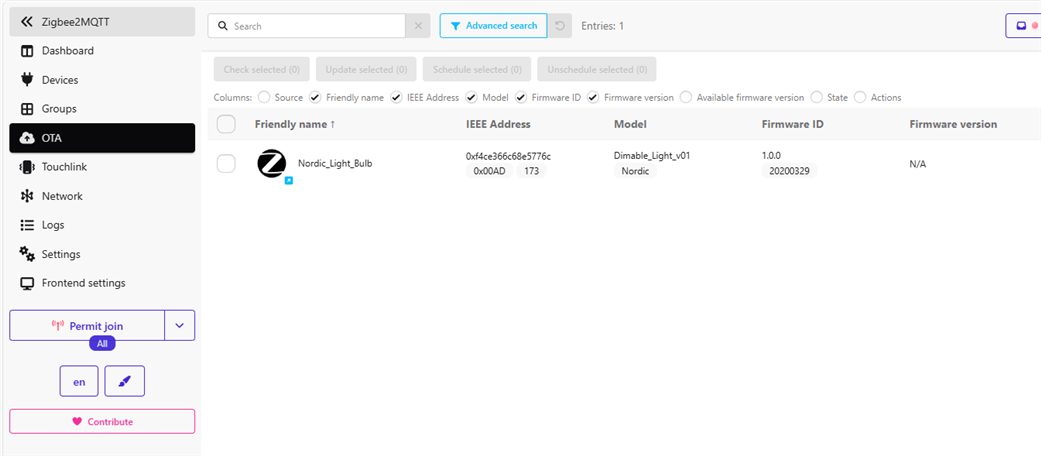
  • Thanks for the information. I can now see the device listed under the OTA tab, but when I try to trigger an update through MQTT Explorer, I get the following error:

    update = {"data":{},"error":"Update of 'Nordic_Light_Bulb' failed (No image currently available)","status":"error"}

    I’ve placed the file 127F-0141-02000000-light_bulb.zigbee in my MQTT local server directory. Do I need to use a .ota file instead, or is the .zigbee format acceptable?

Related