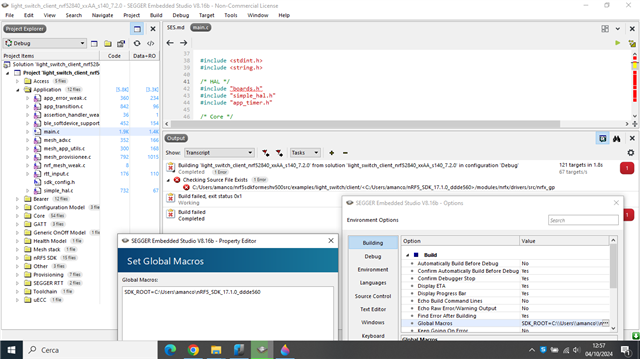
Getting error: board.h and other header no such file or directory. with nRF5_SDK_15.0.0_a53641a and nrf5sdkformeshv500src in the same path.
What could it be?
The evaluation board is nRF52833 purchased by Mouser.
Thanks in advance,
Antonio
Getting error: board.h and other header no such file or directory. with nRF5_SDK_15.0.0_a53641a and nrf5sdkformeshv500src in the same path.
What could it be?
The evaluation board is nRF52833 purchased by Mouser.
Thanks in advance,
Antonio
Hi Hung,
i'm using Windows. I removed < and > but, as you can see, i have an error again

Thanks in advance,
Antonio
Hi again,
Please show which file is missing. At least now it's not complaining about boards.h.
Please double check this:

You see the highlight part, for some reason the compiler is putting the nRFSDK 5 folder inside the nRF5 Mesh SDK folder. You may want to try close the program and open it again.
An option if it still doesn't work is to remove SDK_ROOT and put the nRF5_SDK_17.1.0_ddde560 folder to the same folder as the Mesh SDK. Like they are in the same parent folder.
Hi Hung,
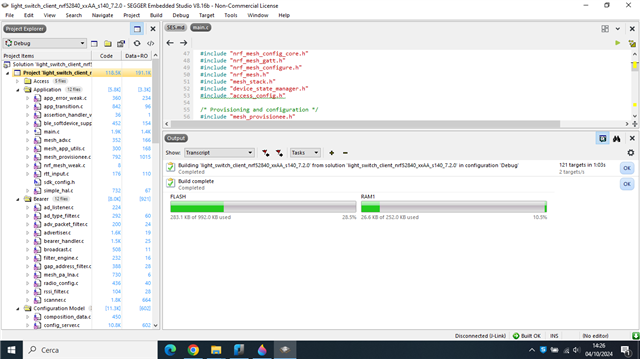
it works!!! Thanks a lot...
Now, i would like to make two boards communicate by sdk mesh with a simple application; for example a board as light switch client and the other as light switch server; in particular on the board client i press a button and on the board server a led flashes every time i press a button on the board client. Is my idea right? Which files can i work on, besides main.c?
Thanks in advance,
Antonio
Hi Antonio,
Glad that it build now. Have you tried to follow the documentation ? https://docs.nordicsemi.com/bundle/nrf5_sdk_mesh/page/md_examples_light_switch_README.html
As I mentioned earlier, it's not recommended to use nRF5 SDK for Mesh unless you have a good reason for it.
If you want to get started , please start with nRF Connect SDK.
We have a lot of material for it for example:
https://www.youtube.com/watch?v=OXzz1shWhvs
https://www.youtube.com/watch?v=Jt2ui22fBjM
I would suggest to get familiar with the nRF Mesh app on the phone. You can use the app to provision the mesh node, either the Light switch client or the light switch server.
You don't need to modify the source code to make them communicate to each other, just need to provision them correctly.
For example here is a demo https://www.youtube.com/watch?v=XthbU9NP0Yg