Updating App + Net Core via Wi-Fi (HTTP) FOTA

Hello,
I’m working with a custom board using nRF7002 + nRF5340 + MX25R64 (SPI4), and I’m trying to perform firmware updates over Wi-Fi using a firmware file hosted on an HTTP server.

During the build process, I confirmed that:

  • The output includes separate files for app core and net core.bin

  • A file that seems to contain both app and net core images is also generated.zip

However, when I attempt to run the firmware update using the file, the update fails with the following log output:.zip

[00:00:24.743,804] <inf> downloader: Setting up TLS credentials, sec tag count 1
[00:00:24.743,988] <inf> downloader: Connecting to 3.5.188.194
[00:00:25.470,947] <inf> downloader: Downloaded 2048/897008 bytes (0%)
[00:00:25.471,099] <err> dfu_target: No supported image type found
[00:00:25.471,252] <err> fota_download: Unknown image type
[00:00:25.475,341] <err> wifi_socket: FOTA download error occurred
[00:00:25.475,494] <wrn> fota_download: fota_download_cancel invalid state

Is there any additional configuration I need to enable for using a .zip file with Wi-Fi FOTA?


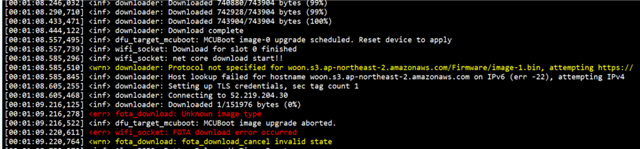
  • Based on the attached log, the app core (image 0) downloads successfully.
    When the net core (image 1) download starts, it immediately throws an error.
    I suspect the net-core firmware (.bin) was not built with its image number set to 1.

    How can I generate the net-core firmware file correctly?

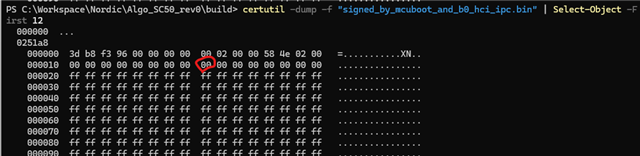
    When I open the net-core firmware in a hex editor, should the byte at the position shown in the screenshot be 01?

  • Hello,

    Vidar and a few other key persons are out of office this week, we will look into your question next week when they are back.

    Kenneth

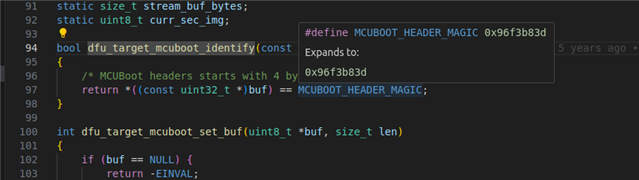
  • Sorry for the delayed response. Have you been able to make any progress on this in the meantime? The image number is not specified in the image itself, but is part of the SMP command. The error indicates that dfu_target_img_type() returns DFU_TARGET_IMAGE_TYPE_NONE instead of DFU_TARGET_IMAGE_TYPE_MCUBOOT when called from downloader_callback(). The question is why. The binary dump shows that the first four bytes contain the correct MCUBOOT_HEADER_MAGIC value, which is used to identify whether it is a mcuboot image.

Related