assert flash Memory Metadata not aligned after FOTA

Hi There

I run a NRF52840 with the MESH SDK, and use the Flash manager provided.

After some time i would like to update the Device over FOTA this ends in a Assert on booting with the new firmware at the point flash_manager.c Line 256

NRF_MESH_ASSERT(p_manager->config.p_area[i].metadata.pages_in_area == p_manager->config.page_count);

when erase the full mcu this assert is not showing up due no existing data.

In the best case i can keep the data in the Fields, when not how to erase the Flash bevore or at the FOTA?

Regards Simon

  • Hi Simon,

    Our apologies, this is something we should have done first, but I would like to check, are you working on a new project?

    If so, I strongly recommend using the nRF Connect SDK (NCS) instead. The nRF5 SDK is in maintenance mode and is not recommended for new project. We also provide online course here to help you ramp up quickly with NCS: Nordic Semiconductor Online Learning Platform - Nordic Developer.

    Notably, the DFU feature in the nRF5 SDK for Mesh is experimental and contains some flaw. It is also proprietary. Meanwhile, NCS supports a new Mesh DFU solution, which is now specified by the Bluetooth SIG in the Mesh Device Firmware Update Model spec.

    Hieu

  • Hi Hieu

    It is an old Project, what in the first instance was rollout 3 Years ago, to update the Devices in the field i would like to provied a new version over FOTA.

    As far i know, the issue arises also with the NCS when flashing on (the existing) Mesh SDK Projekt over FOTA or not "erase all" when flashing over jlink.

    The Issue is not from the DFU itsleve, it comes after booting the application with a different flash configuration than present in the flash. 

    The following ilustration what is happening, While checking Flash Address FC there is a missmatch in the configuration, and the Assert arrises this is ok so far. now i would like to avid the asserting with the ideas in the upper posts.

    I just wondered how you would propperly handle this.

    Flash Address Old New
    0x00000FE Mesh Data Mesh Data
    0x00000FD App Data 1 App Data1
    0x00000FC App Data 2 App Data1.1 <- here it asserts
    0x00000FB App Data 3 App Data 2
    0x00000FA empty App Data 3
    0x00000F9 empty App Data 4

    Regards

    Simon

  • Hi Simon,

    I understand now. Then it is what it is.

    Generally, we advise against changing the memory layout, unless you have got reserved sections for that purpose.

    May I know the details behind how you are sure that the assert happened at the App Data 1.1 section?

    What is your full memory layout, including the main application slots, before and after this change?

    Regards,

    Hieu

  • Hi Hieu

    in the post 8 day ago i tried to show where the assert happend and what the log output writes, i had added this part after the first version was deployed in the field, so far i expected some issue in this code area.

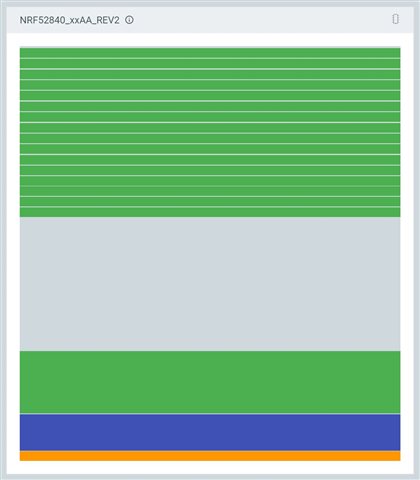
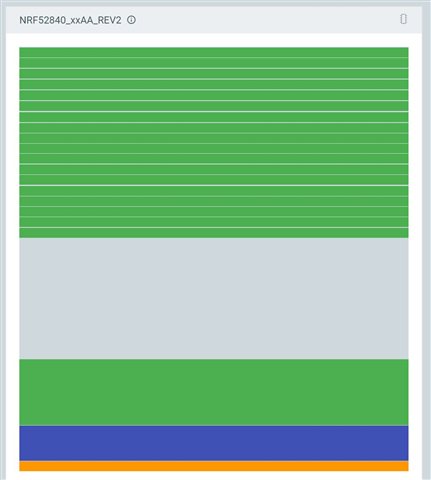
    The compared memory layout below (the Bootloader was not shown in this view)

    Old Version

    flash page end at 0x000EF000

    New Version

    flash page end at 0x000EE000

    Memory Layout old Memory Layout new
  • Hi Simon,

    I'm just giving a short ping today to let you know I am still looking into this. My knowledge of the old solution is rusty, and digging has been a bit time consuming.

Related