Modularisation of a firmware

Hello

Our 52840-based device has a functionality of playing one of 10 pre-recorded phrases via I2S interface. We'd like to be able to update the wording or load a different language via OTA, separately from the firmware, and the other way around - update firmware without touching the audio data. The device has external flash and MCUBoot. 

Please advise, 

Thanks, 
Dmitry

  • Hello Abhijith,

    As you mentioned, we have used mcumgr to transfer the audio data to external flash. We have configured mcumgr transport to use serial and BLE both.

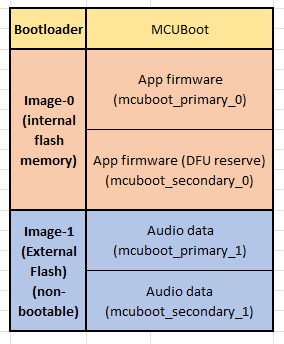
    In our device we have used external flash as image-1 (define two slots mcuboot_primary_1 and mcuboot_secondary_1). We are uploading the audio file to slot 1 (n = 1).

    We have successfully uploaded and tested the file using mcumgr serial transport with our windows system. We like to test this using BLE. Looks like mcumgr BLE transport support is not available for windows?

    Below are the few questions regarding this,

    • Can we test the same using nRF Connect Device manager phone application? If yes, can you please explain how can we do that? we have tired using "file" option but it failes. Giving error "Upload failed: Not supported (8)".
    • We need to signed the file with imgtool before uploading it. Without this mcumgr not uploading file. Is this neccessary to sign the file? Can we skip this?
    • We need to create two slot, mcuboot_primary_1 and mcuboot_secondary_1 for image-1. Can we not use only single slot?

    We are using nRF Connect SDK version 2.5.2 and our device is using BLE coded phy.

    Thanks,
    Romal


  • Hello,

    I recommend using the latest version of the nRF Connect SDK, as there were major changes introduced after NCS v2.7.0, including the transition to Sysbuild for multi-image builds. There have also been several configuration changes and bug fixes since NCS v2.5.2.

    Romal said:
    We like to test this using BLE. Looks like mcumgr BLE transport support is not available for windows?

    You are correct, this is a limitation of the mcumgr command-line tool, which only works on Linux. The same has been mentioned in this ticket.

    Romal said:
    Can we test the same using nRF Connect Device manager phone application? If yes, can you please explain how can we do that? we have tired using "file" option but it failes. Giving error "Upload failed: Not supported (8)".

    Could you please let me know what file format you are using? I’m not aware of any specific file extension limitations in the Device Manager app, but could you share a screenshot of the error message or collect the logs so we can check further?

    Romal said:
    We need to signed the file with imgtool before uploading it. Without this mcumgr not uploading file. Is this neccessary to sign the file? Can we skip this?

    Regarding the signing requirement, this is necessary for the bootloader to validate and ensure the integrity of the image. If the image is unsigned, the upload may be refused.
    When you build your application in nRF Connect SDK, the build system automatically signs the image with a default development key. For production, you must use your own signing key.

    Romal said:
    We need to create two slot, mcuboot_primary_1 and mcuboot_secondary_1 for image-1. Can we not use only single slot?

    If you’re asking whether single-slot DFU over BLE is supported, unfortunately, it is not supported at this time. The feature is planned for a future release, but I don’t have a specific timeline to share.

    Kind Regards,

    Abhijith

  • Hi,


    Thanks for the update.

    I recommend using the latest version of the nRF Connect SDK, as there were major changes introduced after NCS v2.7.0, including the transition to Sysbuild for multi-image builds. There have also been several configuration changes and bug fixes since NCS v2.5.2.

    We will use the latest NCS version.

    You are correct, this is a limitation of the mcumgr command-line tool, which only works on Linux. The same has been mentioned in this ticket.

    Noted. Thanks. 

    Could you please let me know what file format you are using? I’m not aware of any specific file extension limitations in the Device Manager app, but could you share a screenshot of the error message or collect the logs so we can check further?

    We are using .bin file. This BIN file is actually different audio data file combined together and signed using the key (.pem) used to signed application firmware file. We have used imgtool.py to signed the file. We are uploading this file to mcuboot_secondary_1 part located in external flash memory. This file is non-bootable.  Application firmware read the audio data from this location. Below is the partition info for your reference and also attached the log from nrf Connect Device manager app.

    Device Manager, 2025-10-16
    NCA_H_37e1ca3530b0efe7 (EC:6A:3C:9B:72:5C)
    V	11:35:47.121	Connecting to NCA_H_37e1ca3530b0efe7 using AutoConnect(automaticallyRequestHighestValueLength=true)
    D	11:35:48.251	onConnectionStateChange: status=0, newState=2
    I	11:35:48.262	Connected to EC:6A:3C:9B:72:5C
    I	11:35:48.325	Connected to NCA_H_37e1ca3530b0efe7
    V	11:35:48.328	Requesting MTU: 517
    D	11:35:48.564	onMtuChanged: mtu=498
    I	11:35:48.573	MTU set to 498
    V	11:35:48.575	Discovering services
    D	11:35:48.580	onServicesDiscovered: status=0
    I	11:35:48.583	Services discovered
    E	11:35:48.598	Monitoring & Diagnostics Service not supported
    V	11:35:48.600	Disconnecting from NCA_H_37e1ca3530b0efe7
    D	11:35:48.606	onConnectionStateChange: status=0, newState=0
    I	11:35:48.608	Disconnected from NCA_H_37e1ca3530b0efe7
    I	11:35:48.627	Services discovered
    I	11:35:48.633	MTU changed to: 498
    I	11:35:48.741	Data written to descr. 00002902-0000-1000-8000-00805f9b34fb
    I	11:35:48.745	Data written to da2e7828-fbce-4e01-ae9e-261174997c48
    I	11:35:48.836	Notification received from da2e7828-fbce-4e01-ae9e-261174997c48, value: (0x) 01-00-00-19-00-00-FF-06-BF-68-62-75-66-5F-73-69-7A-65-19-09-AB-69-62-75-66-5F-63-6F-75-6E-74-04-FF
    I	11:35:48.841	Wait for value changed complete
    A	11:35:48.850	Received Header (Version: 0, Op: 1, Flags: 0, Len: 25, Group: 0, Seq: 255, Command: 6) CBOR {"buf_size":2475,"buf_count":4}
    I	11:35:48.862	SMP reassembly supported with buffer size: 2475 bytes and count: 4
    I	11:35:48.866	PHY read (TX: LE Coded, RX: LE Coded)
    A	11:35:48.872	Sending (18 bytes) Header (Version: 1, Op: 2, Flags: 0, Len: 10, Group: 0, Seq: 0, Command: 0) CBOR {"d":"Hello!"}
    A	11:35:48.876	Sending (9 bytes) Header (Version: 1, Op: 0, Flags: 0, Len: 1, Group: 0, Seq: 1, Command: 6) CBOR {}
    I	11:35:48.878	Data written to da2e7828-fbce-4e01-ae9e-261174997c48
    I	11:35:48.881	Data written to da2e7828-fbce-4e01-ae9e-261174997c48
    I	11:35:48.930	Notification received from da2e7828-fbce-4e01-ae9e-261174997c48, value: (0x) 0B-00-00-0B-00-00-00-00-BF-61-72-66-48-65-6C-6C-6F-21-FF
    A	11:35:48.938	Received Header (Version: 1, Op: 3, Flags: 0, Len: 11, Group: 0, Seq: 0, Command: 0) CBOR {"r":"Hello!"}
    I	11:35:49.016	Notification received from da2e7828-fbce-4e01-ae9e-261174997c48, value: (0x) 09-00-00-19-00-00-01-06-BF-68-62-75-66-5F-73-69-7A-65-19-09-AB-69-62-75-66-5F-63-6F-75-6E-74-04-FF
    A	11:35:49.019	Received Header (Version: 1, Op: 1, Flags: 0, Len: 25, Group: 0, Seq: 1, Command: 6) CBOR {"buf_size":2475,"buf_count":4}
    A	11:35:49.031	Sending (19 bytes) Header (Version: 1, Op: 0, Flags: 0, Len: 11, Group: 0, Seq: 2, Command: 7) CBOR {"format":"sv"}
    I	11:35:49.040	Data written to da2e7828-fbce-4e01-ae9e-261174997c48
    I	11:35:49.106	Notification received from da2e7828-fbce-4e01-ae9e-261174997c48, value: (0x) 09-00-00-06-00-00-02-07-BF-62-72-63-08-FF
    W	11:35:49.113	Received Header (Version: 1, Op: 1, Flags: 0, Len: 6, Group: 0, Seq: 2, Command: 7) CBOR {"rc":8}
    A	11:35:49.126	Sending (9 bytes) Header (Version: 1, Op: 0, Flags: 0, Len: 1, Group: 0, Seq: 3, Command: 8) CBOR {}
    I	11:35:49.133	Data written to da2e7828-fbce-4e01-ae9e-261174997c48
    I	11:35:49.197	Notification received from da2e7828-fbce-4e01-ae9e-261174997c48, value: (0x) 09-00-00-15-00-00-03-08-BF-6A-62-6F-6F-74-6C-6F-61-64-65-72-67-4D-43-55-62-6F-6F-74-FF
    A	11:35:49.202	Received Header (Version: 1, Op: 1, Flags: 0, Len: 21, Group: 0, Seq: 3, Command: 8) CBOR {"bootloader":"MCUboot"}
    A	11:35:49.226	Sending (30 bytes) Header (Version: 1, Op: 0, Flags: 0, Len: 22, Group: 0, Seq: 4, Command: 8) CBOR {"query":"active_b0_slot"}
    I	11:35:49.232	Data written to da2e7828-fbce-4e01-ae9e-261174997c48
    I	11:35:49.287	Notification received from da2e7828-fbce-4e01-ae9e-261174997c48, value: (0x) 09-00-00-06-00-00-04-08-BF-62-72-63-03-FF
    W	11:35:49.292	Received Header (Version: 1, Op: 1, Flags: 0, Len: 6, Group: 0, Seq: 4, Command: 8) CBOR {"rc":3}
    A	11:35:49.306	Sending (20 bytes) Header (Version: 1, Op: 0, Flags: 0, Len: 12, Group: 0, Seq: 5, Command: 8) CBOR {"query":"mode"}
    I	11:35:49.314	Data written to da2e7828-fbce-4e01-ae9e-261174997c48
    I	11:35:49.376	Notification received from da2e7828-fbce-4e01-ae9e-261174997c48, value: (0x) 09-00-00-08-00-00-05-08-BF-64-6D-6F-64-65-02-FF
    A	11:35:49.382	Received Header (Version: 1, Op: 1, Flags: 0, Len: 8, Group: 0, Seq: 5, Command: 8) CBOR {"mode":2}
    I	11:35:53.437	Connection parameters updated (interval: 11.25ms, latency: 0, timeout: 420ms)
    I	11:35:54.465	Connection parameters updated (interval: 45.0ms, latency: 0, timeout: 420ms)
    E	11:36:05.231	Upload failed: Mcu Mgr Error: 8
    I	11:36:09.762	Connection parameters updated (interval: 45.0ms, latency: 0, timeout: 420ms)
    W	11:36:19.628	Error: (0x13): GATT CONN TERMINATE PEER USER
    I	11:36:19.634	Disconnected
    

    Got your clarification about signing the image and slot configuration. Thanks.

    Would you please help us about uploading file issue?

    Thanks,

    Romal.

  • Hello Romal,

    Sorry for the long response time. I was out of the office for quite a while, and this case was originally created by someone else (possibly your colleague). Your comment changed the case status (since you are not the thread creator), which caused it to remain in my queue. That’s why my colleague didn’t take it over during my absence. I’m sorry this happened.

    Have you made any progress on this? Please let me know if you are still facing the issue. I will look into it and update you at the earliest.

    Kind regards,
    Abhijith

Related