DevAcademy - nRF Connect SDK Intermediate - Lesson 9 Exercise 5 - Unable to find bootable image

The solution for "nRF Connect SDK Intermediate - Lesson 9 Exercise 5" does not appear to boot-up after flashing and gives the following output on the com port:

*** Booting MCUboot v2.1.0-dev-9b4ae4cbc9e2 ***
*** Using nRF Connect SDK v3.1.1-e2a97fe2578a ***
*** Using Zephyr OS v4.1.99-ff8f0c579eeb ***
W: Failed reading sectors; BOOT_MAX_IMG_SECTORS=128 - too small?
E: Image in the primary slot is not valid!
E: Unable to find bootable image

It worked fine on nRF54L15-DK, but it's not working on the nRF54LM20-DK.

Here is my set-up:

  • Hardware:  nRF54LM20-DK

  • nRF Connect SDK: v3.1.1

  • nRF Connect Toolchain: v3.1.1

  • nRF Connect for VS Code: 2025.9.798
  • Hello,

    Please note that the DevAcademy sample you are trying to use is not supported on the nRF54LM20-DK. This is fairly new hardware, and support for this DK has not yet been added to the Academy sample. I can try it on my side tomorrow and update you.

    Kind regards,
    Abhijith

  • Thank you for looking into this.

    I am just attempting to verify the method for doing OTA over BLE with nRF54LM20-DK.

    If you have another example that can do this, please let me know.

    I have checked with_mcuboot and locator_tag example, and those appear to boot correctly with nRF54LM20-DK. But I'm not sure why those work but the example code does not.

  • Hello Ken,

    I tested the same sample using the DK and was able to reproduce the same error message on my side. I’m currently working on this and will update you once I have more information.

    The sample in DevAcademy is a modified version of peripheral_lbs, demonstrating how to add DFU support to an application. There isn’t an exact equivalent sample, but Zephyr does provide the smp_server sample, which showcases image management and DFU over BLE using SMP. However, it’s not a fully out-of-the-box BLE OTA solution.

    Kind regards,
    Abhijith

  • Hi Abhijith,

    Thanks for confirming the issue and looking into it. I’ll work with the smp_server example in the meantime and wait for your update once you have more details.

    Best regards,
    Ken

  • Hello Ken,

    Official support for the nRF54LM20 DK will be available soon, but I do not have a clear timeline to share at the moment. You can include the configuration 

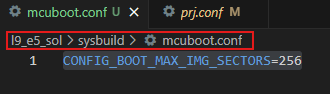
    CONFIG_BOOT_MAX_IMG_SECTORS=256 inisde mcuboot.conf to make it work with the Academy sample you shared.

    I: Boot source: none
    I: Image index: 0, Swap type: none
    I: Bootloader chainload address offset: 0xe000
    I: Image version: v2.9.0
    *** Booting My Application v2.9.0-5ab89f397924 ***
    *** Using nRF Connect SDK v3.1.1-e2a97fe2578a ***
    *** Using Zephyr OS v4.1.99-ff8f0c579eeb ***
    Starting Bluetooth Peripheral LBS sample
    I: 2 Sectors of 4096 bytes
    I: alloc wra: 0, f70
    I: data wra: 0, 10
    I: SoftDevice Controller build revision: 
    I: fc de 41 eb a2 d1 42 24 |..A...B$
    I: 00 b5 f8 57 9f ac 9d 9e |...W....
    I: aa c9 b4 34             |...4    
    I: HW Platform: Nordic Semiconductor (0x0002)
    I: HW Variant: nRF54Lx (0x0005)
    I: Firmware: Standard Bluetooth controller (0x00) Version 252.16862 Build 1121034987
    I: No ID address. App must call settings_load()
    Bluetooth initialized
    I: HCI transport: SDC
    I: Identity: F2:6C:A8:EB:86:77 (random)
    I: HCI: version 6.1 (0x0f) revision 0x3069, manufacturer 0x0059
    I: LMP: version 6.1 (0x0f) subver 0x3069
    Advertising successfully started
    Connected

    Kind Regards,

    Abhijith

Related