hci_uart will not flash with VS Studio

I have a new nrf9160dk board that I will be using for a BLE customer application. I am using zephyr/samples/bluetooth/hci_uart SDK V3.2.0 to be loaded into the nRF52840 in the DK board. I can build and compile with VS Studio with no problems. When I try to flash it into the nRF52840 (switch SW10 set to nRF52) it fails. see below. I tried to flash it using the programmed which said it was programmed but it did not run or boot the nRF52840. There is a startup message in the code. any help you can give would be greatly appreciated since this is needed for a customer application.

************************************************************************

Executing task: nRF Connect: Flash: hci_uart/hci_uart (active)

Flashing hci_uart to nRF9160 DK
west flash -d c:\Nordic4\test\hci_uart\build --domain hci_uart --dev-id 960028025 --erase

*-- west flash: rebuilding
[0/5] Performing build step for 'hci_uart'
ninja: no work to do.
[4/5] cmd.exe /C "cd /D C:\Nordic4\test\hci_uart\build\_sysbuild && C:\Nordic\v1.7.0\toolchains\66cdf9b75e\opt\bin\cmake.exe -E true"
-- west flash: using runner nrfutil
-- runners.nrfutil: mass erase requested
-- runners.nrfutil: reset after flashing requested
-- runners.nrfutil: Flashing file: C:\Nordic4\test\hci_uart\build\merged.hex

thread 'main' panicked at C:\Users\VssAdministrator\.cargo\git\checkouts\nrf-device-lib-cf1a63c495be42f5\936ac5a\serialport-lister\src\lib.rs:49:60:
called `Option::unwrap()` on a `None` value
note: run with `RUST_BACKTRACE=1` environment variable to display a backtrace
Error: Subprocess C:\Nordic\v1.7.0\toolchains\66cdf9b75e\nrfutil\home\bin\nrfutil-device.exe failed with unexpected exit code Some(101)
FATAL ERROR: command exited with status 1: nrfutil --json device x-execute-batch --batch-path 'C:\Nordic4\test\hci_uart\build\hci_uart\zephyr\generated_nrfutil_batch.json' --serial-number 960028025

* The terminal process terminated with exit code: 1.
* Terminal will be reused by tasks, press any key to close it.

***************************************************************

  • Hi,

    Error: Subprocess C:\Nordic\v1.7.0\toolchains\66cdf9b75e\nrfutil\home\bin\nrfutil-device.exe failed with unexpected exit code Some(101)

    I might be wrong, but I think you are using the tool chain version 1.7.0 which is archaic... If it is the case, change to the matching toolchain version (toolchain v3.2.0) and it should work. Please keep your SDK versions and toolchain versions the same.

    If it is not the case, what command / build config are you using. 

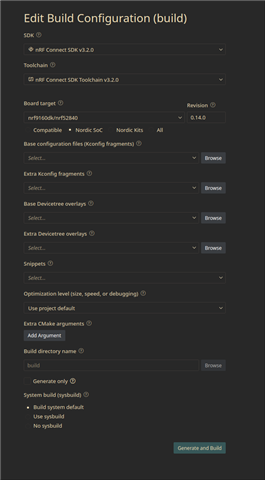
    I tried to build and flash this sample on my board and it worked fine.  Here are the config I used :

    It results in the command:  west build --pristine --board nrf9160dk/nrf52840

    Best regards,

    Simon D-M

  • Hello Simon D-M,

    I work with Timothy. First, I should point out that Tim is using the 66cdf9b75e toolchain, which is 3.2.0/3.2.1 SDK. Like yourself, I was at first thrown off by the C:\Nordic\v1.7.0 prefix, but it is just an alternative to the standard C\ncs.

    I managed to find this DevZone ticket nrfutil device list command fails - Nordic Q&A - Nordic DevZone - Nordic DevZone that shows that NS claimed to have fixed this issue 10 months ago. However, clearly the problem was not fixed correctly or completely (or got reverted). Can you please have the developers figure out how we could still be seeing the issue after that fix. Presumably that fix solved the issue for one individual. Is it possible that the fix was subsequently lost? This seems plausible as Tim has told me that he did not see this problem until around v3.1.0.

    Thank you, Simon D-M.

    Burt Silverman

  • Hi,

    From what I understood from your issue, the bug is happening from the nRF Util bundled with the toolchain. I am wondering if this also happen on the "standalone" version. Can you try to download the latest version (link), and program the board with that version (nrfutil device program [OPTIONS] --firmware <PATH>)?

    Can you please send me both versions' information by running this command : "nrfutil device --version" (maybe you will need to run "nrfutil.exe device --version" for the standalone version)?

    From what I can see internally, it indeed should have been already patched some times ago.

    If you need an alternative right now, you should be able to use nRF JProg to program the chip manually. It has been deprecated, but should still be working for older chips like the nRF9160.

    Best regards,

    Simon D-M

  • This what I see when I use the downloaded version.

    if I program. this command and domwloaded version works fine.

    ************************************************************

    C:\my_files>nrfutil device program --firmware C:\Nordic4\test_n9160\central_uart_tjm\build\central_uart_tjm\zephyr\tfm_merged.hex
    [00:00:02] ###### 100% [2/3 960028025] Programmed

    ***************************************************************

    :\my_files>nrfutil device --version
    nrfutil-device 2.15.1 (6f9a83f 2025-10-10)
    commit-hash: 6f9a83f9a59349b6eb90328523c41dc36b795f0a
    commit-date: 2025-10-10
    host: x86_64-pc-windows-msvc
    build-timestamp: 2025-10-10T06:44:46.117845000Z
    classification: nrf-external

    Detected SEGGER J-Link version: JLink_V8.76

    The device command version you are currently using was tested with a different J-Link version (JLink_V8.66) than the one you have installed (JLink_V8.76). The tested version is not required, and your J-Link version will most likely work fine. If you get issues related to J-Link with your devices, use the tested version.

  • This what I see when I use the downloaded version.

    if I program. this command and domwloaded version works fine.

    ************************************************************


    C:\my_files>nrfutil device program --firmware C:\Nordic4\test_n9160\central_uart_tjm\build\central_uart_tjm\zephyr\tfm_merged.hex
    [00:00:02] ###### 100% [2/3 960028025] Programmed

    ***************************************************************

    :\my_files>nrfutil device --version
    nrfutil-device 2.15.1 (6f9a83f 2025-10-10)
    commit-hash: 6f9a83f9a59349b6eb90328523c41dc36b795f0a
    commit-date: 2025-10-10
    host: x86_64-pc-windows-msvc
    build-timestamp: 2025-10-10T06:44:46.117845000Z
    classification: nrf-external

    Detected SEGGER J-Link version: JLink_V8.76

    The device command version you are currently using was tested with a different J-Link version (JLink_V8.66) than the one you have installed (JLink_V8.76). The tested version is not required, and your J-Link version will most likely work fine. If you get issues related to J-Link with your devices, use the tested version.

Related