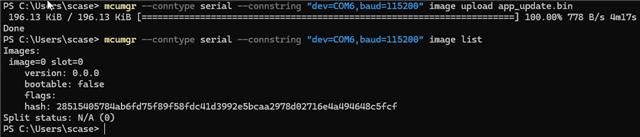
I've been wrestling with an issue whereby I attempt to deploy an mcuboot image to a device and inconsistently I get a message that says the firmware image is not valid (error code 9).
Some specifics:
- I am using nRF52840 on an Adafruit Feather nRF52840 Express boards
- I am using NCS SDK 2.6.1
- I have a pm_static.yml in place
- I am trying to use only one slot for mcuboot
- Currently I'm just using the default key for signing the update
There is a lot I don't know about mcuboot, so I apologize in advance if I'm missing obvious things or need to ask clarifying questions.
Here is a sequence of steps that helps define the problem:
- I take 3 of these boards and blank them first by using nrfjprog --recover
- I flash each of these boards with the same merged.hex. Let's call this firmware version 1.0.
- I confirm that all of these boards are working as expected, running v1.0.
- I modify firmware 1.0 slightly. For example in one case, I added code to enable and use the hardware watchdog timer. So, the inclusion of extra drivers for that is probably not nothing, but overall the functionality of the code is not significantly different. Let's call this v1.1. For this version I did not change the pm_static or mcuboot config at all.
- I attempt to flash v1.1 to each of the three boards using mcuboot. These are identical boards, running identical firmware. An outboard device is pulling the pin to get the bootloader active and sending the image via serial, so in some ways this may limit my visibility into the process.
- Two of the boards take the update and run it just fine - total success. One of the boards says "DFU image is not valid 9(0)" and fails to apply the update, leaving the board in an inop state. This third board can be recovered and flashed again. It's not permanently damaged, but most of the time, if it failed once it will fail on subsequent attempts as well.
If the problem is with the image, why does it work for two of the identical boards with identical firmware?
If I turn off the mcuboot option to validate the image (CONFIG_BOOT_VALIDATE_SLOT0), what will happen is that the update will still not work, but it never produces a definitive error message and just repeatedly attempts to apply it in a loop.
I'm not sure what questions I need to be asking at this point to identify the cause of the problem, as this doesn't seem to make any sense. Can anyone suggest steps that would be helpful for getting to the bottom of it? I'll attach my configs here for reference.
adafruit_feather_nrf52840.overlay
#~~~~~~~~~~~~~~~~~~~~~~~~~~~~~~~~~~~~~~~~~~~~~~~~~~~~~~~~~~~~~~~~~~~~~~~~~~~~~~~
#~~ GENERAL ~~~~~~~~~~~~~~~~~~~~~~~~~~~~~~~~~~~~~~~~~~~~~~~~~~~~~~~~~~~~~~~~~~~~
# GPIO enable
CONFIG_GPIO=y

# Enable Zephyr base64 encode for Notecard uploads
CONFIG_BASE64=y

# Enable the watchdog timer
CONFIG_WATCHDOG=y

# Allow Zephyr to safely reboot the system
CONFIG_REBOOT=y

#~~~~~~~~~~~~~~~~~~~~~~~~~~~~~~~~~~~~~~~~~~~~~~~~~~~~~~~~~~~~~~~~~~~~~~~~~~~~~~~
#~~ MEMORY ~~~~~~~~~~~~~~~~~~~~~~~~~~~~~~~~~~~~~~~~~~~~~~~~~~~~~~~~~~~~~~~~~~~~~
CONFIG_SYSTEM_WORKQUEUE_STACK_SIZE=2048

#~~~~~~~~~~~~~~~~~~~~~~~~~~~~~~~~~~~~~~~~~~~~~~~~~~~~~~~~~~~~~~~~~~~~~~~~~~~~~~~
#~~ BLUETOOTH ~~~~~~~~~~~~~~~~~~~~~~~~~~~~~~~~~~~~~~~~~~~~~~~~~~~~~~~~~~~~~~~~~~


#~~~~~~~~~~~~~~~~~~~~~~~~~~~~~~~~~~~~~~~~~~~~~~~~~~~~~~~~~~~~~~~~~~~~~~~~~~~~~~~
#~~ FLASH ~~~~~~~~~~~~~~~~~~~~~~~~~~~~~~~~~~~~~~~~~~~~~~~~~~~~~~~~~~~~~~~~~~~~~~
# CONFIG_FLASH=y
# CONFIG_FLASH_PAGE_LAYOUT=y
# CONFIG_NVS=y
# CONFIG_NVS_LOG_LEVEL_DBG=y
# CONFIG_MPU_ALLOW_FLASH_WRITE=y


#~~~~~~~~~~~~~~~~~~~~~~~~~~~~~~~~~~~~~~~~~~~~~~~~~~~~~~~~~~~~~~~~~~~~~~~~~~~~~~~
#~~ DFU ~~~~~~~~~~~~~~~~~~~~~~~~~~~~~~~~~~~~~~~~~~~~~~~~~~~~~~~~~~~~~~~~~~~~~~~~
# Include the mcuboot bootloader, required for DFU
CONFIG_BOOTLOADER_MCUBOOT=y
# CONFIG_SECURE_BOOT=y
# CONFIG_DISABLE_FLASH_PATCH=y


#~~~~~~~~~~~~~~~~~~~~~~~~~~~~~~~~~~~~~~~~~~~~~~~~~~~~~~~~~~~~~~~~~~~~~~~~~~~~~~~
#~~ LOGGING ~~~~~~~~~~~~~~~~~~~~~~~~~~~~~~~~~~~~~~~~~~~~~~~~~~~~~~~~~~~~~~~~~~~~
CONFIG_LOG=y
CONFIG_LOG_PRINTK=y
CONFIG_LOG_BACKEND_SHOW_COLOR=y
CONFIG_LOG_PROCESS_THREAD_STACK_SIZE=2048
# Settings below are helpful for debugging and reduce dropped messages
# CONFIG_LOG_PROCESS_THREAD_STACK_SIZE=4096
# CONFIG_LOG_BUFFER_SIZE=4096

#~~~~~~~~~~~~~~~~~~~~~~~~~~~~~~~~~~~~~~~~~~~~~~~~~~~~~~~~~~~~~~~~~~~~~~~~~~~~~~~
#~~ BLUETOOTH ~~~~~~~~~~~~~~~~~~~~~~~~~~~~~~~~~~~~~~~~~~~~~~~~~~~~~~~~~~~~~~~~~~
CONFIG_BT=y
CONFIG_BT_OBSERVER=y
CONFIG_BT_EXT_ADV=y

#~~~~~~~~~~~~~~~~~~~~~~~~~~~~~~~~~~~~~~~~~~~~~~~~~~~~~~~~~~~~~~~~~~~~~~~~~~~~~~~
#~~ SERIAL ~~~~~~~~~~~~~~~~~~~~~~~~~~~~~~~~~~~~~~~~~~~~~~~~~~~~~~~~~~~~~~~~~~~~~
CONFIG_SERIAL=y

#~~~~~~~~~~~~~~~~~~~~~~~~~~~~~~~~~~~~~~~~~~~~~~~~~~~~~~~~~~~~~~~~~~~~~~~~~~~~~~~
#~~ NOTECARD ~~~~~~~~~~~~~~~~~~~~~~~~~~~~~~~~~~~~~~~~~~~~~~~~~~~~~~~~~~~~~~~~~~~
# Used for Notecard interface
CONFIG_I2C=y
CONFIG_NEWLIB_LIBC=y

#~~~~~~~~~~~~~~~~~~~~~~~~~~~~~~~~~~~~~~~~~~~~~~~~~~~~~~~~~~~~~~~~~~~~~~~~~~~~~~~
#~~ UART ~~~~~~~~~~~~~~~~~~~~~~~~~~~~~~~~~~~~~~~~~~~~~~~~~~~~~~~~~~~~~~~~~~~~~~~
# CONFIG_UART_ASYNC_API=y
# CONFIG_UART_0_INTERRUPT_DRIVEN=n
# CONFIG_UART_0_ASYNC=y
# Are these two lines below needed for DFU???
# CONFIG_CONSOLE=y
# CONFIG_UART_CONSOLE=y
# CONFIG_UART_INTERRUPT_DRIVEN=y
# CONFIG_UART_LINE_CTRL=y
#~~~~~~~~~~~~~~~~~~~~~~~~~~~~~~~~~~~~~~~~~~~~~~~~~~~~~~~~~~~~~~~~~~~~~~~~~~~~~~~
#~~ USB CDC ACM ~~~~~~~~~~~~~~~~~~~~~~~~~~~~~~~~~~~~~~~~~~~~~~~~~~~~~~~~~~~~~~~~
CONFIG_USB_DEVICE_STACK=y
CONFIG_USB_DEVICE_DRIVER=y
CONFIG_USB_DEVICE_PRODUCT=""
CONFIG_USB_DEVICE_PID=0x0004
CONFIG_USB_WORKQUEUE=y                  #--sc 30 May 2024
CONFIG_USB_DEVICE_INITIALIZE_AT_BOOT=y  #--sc 30 May 2024

#--sc 21 Oct 2025
CONFIG_USB_CDC_ACM_RINGBUF_SIZE=4096

#~~~~~~~~~~~~~~~~~~~~~~~~~~~~~~~~~~~~~~~~~~~~~~~~~~~~~~~~~~~~~~~~~~~~~~~~~~~~~~~
#~~ POWER ~~~~~~~~~~~~~~~~~~~~~~~~~~~~~~~~~~~~~~~~~~~~~~~~~~~~~~~~~~~~~~~~~~~~~~
CONFIG_PM_DEVICE=y

#~~~~~~~~~~~~~~~~~~~~~~~~~~~~~~~~~~~~~~~~~~~~~~~~~~~~~~~~~~~~~~~~~~~~~~~~~~~~~~~
#~~ DEBUG: THREAD ANALYZER ~~~~~~~~~~~~~~~~~~~~~~~~~~~~~~~~~~~~~~~~~~~~~~~~~~~~~
# CONFIG_THREAD_ANALYZER=y
# CONFIG_THREAD_ANALYZER_USE_PRINTK=y
# CONFIG_THREAD_ANALYZER_AUTO=y
# CONFIG_THREAD_ANALYZER_AUTO_INTERVAL=5
# CONFIG_THREAD_NAME=y
CONFIG_DEBUG_THREAD_INFO=y

# CONFIG_NORDIC_SECURITY_BACKEND=y
PM_MCUBOOT_OFFSET=0x0
PM_MCUBOOT_ADDRESS=0x0
PM_MCUBOOT_END_ADDRESS=0xc000
PM_MCUBOOT_SIZE=0xc000
PM_MCUBOOT_NAME=mcuboot
PM_MCUBOOT_ID=0
PM_mcuboot_ID=PM_MCUBOOT_ID
PM_mcuboot_IS_ENABLED=1
PM_0_LABEL=MCUBOOT
PM_MCUBOOT_PAD_OFFSET=0xc000
PM_MCUBOOT_PAD_ADDRESS=0xc000
PM_MCUBOOT_PAD_END_ADDRESS=0xc200
PM_MCUBOOT_PAD_SIZE=0x200
PM_MCUBOOT_PAD_NAME=mcuboot_pad
PM_MCUBOOT_PAD_ID=1
PM_mcuboot_pad_ID=PM_MCUBOOT_PAD_ID
PM_mcuboot_pad_IS_ENABLED=1
PM_1_LABEL=MCUBOOT_PAD
PM_MCUBOOT_PRIMARY_OFFSET=0xc000
PM_MCUBOOT_PRIMARY_ADDRESS=0xc000
PM_MCUBOOT_PRIMARY_END_ADDRESS=0x100000
PM_MCUBOOT_PRIMARY_SIZE=0xf4000
PM_MCUBOOT_PRIMARY_NAME=mcuboot_primary
PM_MCUBOOT_PRIMARY_ID=2
PM_mcuboot_primary_ID=PM_MCUBOOT_PRIMARY_ID
PM_mcuboot_primary_IS_ENABLED=1
PM_2_LABEL=MCUBOOT_PRIMARY
PM_MCUBOOT_PRIMARY_SPAN="mcuboot_pad app"
PM_APP_OFFSET=0xc200
PM_APP_ADDRESS=0xc200
PM_APP_END_ADDRESS=0x100000
PM_APP_SIZE=0xf3e00
PM_APP_NAME=app
PM_APP_ID=3
PM_app_ID=PM_APP_ID
PM_app_IS_ENABLED=1
PM_3_LABEL=APP
PM_MCUBOOT_PRIMARY_APP_OFFSET=0xc200
PM_MCUBOOT_PRIMARY_APP_ADDRESS=0xc200
PM_MCUBOOT_PRIMARY_APP_END_ADDRESS=0x100000
PM_MCUBOOT_PRIMARY_APP_SIZE=0xf3e00
PM_MCUBOOT_PRIMARY_APP_NAME=mcuboot_primary_app
PM_MCUBOOT_PRIMARY_APP_ID=4
PM_mcuboot_primary_app_ID=PM_MCUBOOT_PRIMARY_APP_ID
PM_mcuboot_primary_app_IS_ENABLED=1
PM_4_LABEL=MCUBOOT_PRIMARY_APP
PM_MCUBOOT_PRIMARY_APP_SPAN="app"
PM_SRAM_PRIMARY_OFFSET=0x0
PM_SRAM_PRIMARY_ADDRESS=0x20000000
PM_SRAM_PRIMARY_END_ADDRESS=0x20040000
PM_SRAM_PRIMARY_SIZE=0x40000
PM_SRAM_PRIMARY_NAME=sram_primary
PM_NUM=5
PM_ALL_BY_SIZE="mcuboot_pad mcuboot sram_primary app mcuboot_primary_app mcuboot_primary"
# SPDX-License-Identifier: Apache-2.0

cmake_minimum_required(VERSION 3.20.0)
find_package(Zephyr REQUIRED HINTS $ENV{ZEPHYR_BASE})
project(GR3_Firmware)

target_sources(app PRIVATE
  src/main.c
  src/gr3_observer.c
  src/gr3_event_mgr.c
  src/gr3_timekeeping.c
  src/gr3_notecard.c
  src/note_c_hooks.c
  src/gr3_filter.c
  src/gr3_health.c
  src/gr3_uploader.c
  src/gr3_flash.c
  src/gr3_config.c
)

# Let Zephyr build additional 3rd party libs (e.g. `note-c`) with `app`
target_sources(app
	PRIVATE note-c/n_atof.c
	PRIVATE note-c/n_b64.c
	PRIVATE note-c/n_cjson.c
	PRIVATE note-c/n_cjson_helpers.c
	PRIVATE note-c/n_const.c
	PRIVATE note-c/n_cobs.c
	PRIVATE note-c/n_ftoa.c
	PRIVATE note-c/n_helpers.c
	PRIVATE note-c/n_hooks.c
	PRIVATE note-c/n_i2c.c
	PRIVATE note-c/n_md5.c
	PRIVATE note-c/n_printf.c
	PRIVATE note-c/n_request.c
	PRIVATE note-c/n_serial.c
	PRIVATE note-c/n_str.c
	PRIVATE note-c/n_ua.c
)

target_include_directories(app
	PRIVATE note-c
)