NRF54L10 takes too much current

Hi everyone,

I'm working on a project using the nRF54 and Zephyr RTOS. Previously, I implemented almost identical functionality on an nRF52, where the device consumed around 3.5 µA while waiting for an input change (GPIO_INT_LEVEL_ACTIVE). I changed to nrf54, and I hopped current will be less. 

Now, with mostly the same code base and doing nothing more, the current consumption sits at magical 150 µA

CONFIG_PM_DEVICE=y
CONFIG_PM_POLICY_DEFAULT=y
CONFIG_PM=y
CONFIG_PM_DEVICE=y
CONFIG_PM_DEVICE_RUNTIME=y

Here is what I've tried so far to debug this:

  • I've experimented with various configuration options (prj.conf).

  • I even tried blocking the execution right at the beginning of main() using a semaphore to ensure no application logic is running.

Despite this, the power consumption is always ....150 µA.

Has anyone encountered similar power management issues on the nRF54 with Zephyr, or are there specific Kconfig options/peripherals I should look into to debug this leak?

Thanks in advance!

  • Question: 
    if a specific hardware pin of the nRF54L10 SoC is completely omitted from both the board's default Devicetree (.dts) definition and any overlays (.overlay), will it be automatically configured to a safe, low-power state by default?
    Do I need to explicitly initialize or configure it in software to prevent it from floating and drawing leakage current during sleep modes or waiting for semaphore in firmware ?
  • And the second question: if I want to check whether the issue is caused by some module not going to sleep, how can I put the processor in main into a mode that turns off all modules and leaves only the processor in its lowest power consumption state?
    I want to check whether the problem is hardware or software related.
  • Hi

    1. A GPIO that is not mentioned in the .dts or overlay files of your project will be left floating, which means it will not necessarily be in a low power state and can indeed leak.

    2. Please check out this part of the documentation on how to verify idle current and how to disable unused pins/peripherals: https://nrfconnectdocs.nordicsemi.com/ncs/3.1.0/nrf/test_and_optimize/optimizing/power_general.html#verify-idle-current-due-to-other-peripherals 

    In general, in the Zephyr RTOS when no threads are called by the main thread, the RTOS will make sure the device/application goes into the lowest possible power mode.

    Best regards,

    Simon

  • Questions:

    1. This in not clear for me:

    I have created own board for my design that includes  <nordic/nrf54l10_partition.dtsi>.

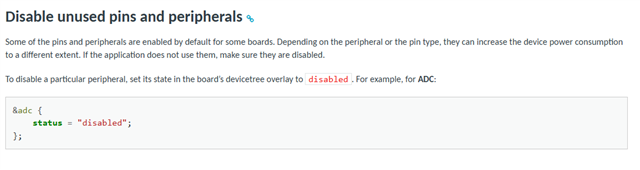
    Should I use  "status = "disabled" for all peripherial that are available in nrf54L10I, but I dont use them?

    Or maybe only some unused perihperials  should by manually disabled ?

    2. And second question - releasing RAM that is not used. It is recomended to call  power_down_unused_ram() 

    My device has 192KB RAM but I have configured like this in overlay file:

    &cpuapp_sram {
        reg = <0x20000000 DT_SIZE_K(64)>;
        ranges = <0x0 0x20000000 DT_SIZE_K(64)>;
    };

    because 64kb is enough for me. 

    Calling power_down_unused_ram() will work ok, and all RAM above 64K will be powered down ? 

    3. 

  • /dts-v1/;
    #include <nordic/nrf54l10_cpuapp.dtsi>
    #include <zephyr/dt-bindings/adc/adc.h>
    #include <zephyr/dt-bindings/adc/nrf-saadc.h>
    #include <zephyr/dt-bindings/gpio/gpio.h>

    / {
    model = " nRF54L10";
    compatible = "tech,beacon-nrf54l10";

    chosen {
    zephyr,sram = &cpuapp_sram;
    zephyr,flash = &rram0;
    };
    aliases {
    buzzer-p = &buzzer_ch0;
    buzzer-m = &buzzer_ch1;
    sw0 = &mag_button;
    sw1 = &service_button;
    sw2 = &secret_button;
    led0 = &my_led0;
    led1 = &my_led1;
    led2 = &my_led2;
    ledred = &my_led0;
    ledgreen = &my_led1;
    ledblue = &my_led2;
    };
    buzzers {
    compatible = "pwm-leds";
    buzzer_ch0: buzzer_node_0 {
    pwms = <&pwm20 0 PWM_HZ(3800) PWM_POLARITY_NORMAL>;
    };
    buzzer_ch1: buzzer_node_1 {
    pwms = <&pwm20 1 PWM_HZ(3800) PWM_POLARITY_INVERTED>;
    };
    };

    my_buttons: my_buttons {
    compatible = "gpio-keys";
    mag_button: button_0 {
    gpios = <&gpio1 6 (GPIO_ACTIVE_LOW | GPIO_PULL_UP)>;
    };
    service_button: button_s {
    gpios = <&gpio1 5 (GPIO_PULL_UP | GPIO_ACTIVE_LOW)>;
    };
    secret_button: button_f {
    gpios = <&gpio1 7 (GPIO_PULL_UP | GPIO_ACTIVE_LOW)>;
    };
    };

    my_leds: my_leds {
    compatible = "gpio-leds";
    my_led0: led_0 {
    gpios = <&gpio2 2 GPIO_ACTIVE_HIGH>;
    };
    my_led1: led_1 {
    gpios = <&gpio2 3 GPIO_ACTIVE_HIGH>;
    };
    my_led2: led_2 {
    gpios = <&gpio2 4 GPIO_ACTIVE_HIGH>;
    };
    };
    };

    &clock {
    status = "okay";
    hfclksrc = "HFXO"; 
    lfclksrc = "LFXO"; 

    &gpio1 { status = "okay"; };
    &gpio2 { status = "okay"; };

    &pinctrl {
    pwm20_default: pwm20_default {
    group1 {
    psels = <NRF_PSEL(PWM_OUT0, 1, 11)>,
    <NRF_PSEL(PWM_OUT1, 1, 13)>;
    nordic,drive-mode = <NRF_DRIVE_H0H1>;
    };
    };

    pwm20_sleep: pwm20_sleep {
    group1 {
    psels = <NRF_PSEL(PWM_OUT0, 1, 11)>,
    <NRF_PSEL(PWM_OUT1, 1, 13)>;
    low-power-enable;
    bias-disable;
    };
    };
    };

    &pwm20 {
    status = "okay";
    pinctrl-0 = <&pwm20_default>;
    pinctrl-1 = <&pwm20_sleep>;
    pinctrl-names = "default", "sleep";
    };

Related