This post is older than 2 years and might not be relevant anymore
More Info: Consider searching for newer posts

cloud_send fail AWS_IOT with nRF9160

Hi,

I'm trying to convert the NCS - cloud client sample to connect to AWS_IOT rather than NRF cloud.

After a connection achieved, i press Btn1 and I get the following error:

*** Booting Zephyr OS build v2.1.99-ncs1-8-g367eec2dd60d ***
Cloud client has started
Connecting to LTE network. This may take several minutes.
Connected to LTE network
Publishing message: {"state":{"reported":{"message":"Hello Internet of Things!"}}}
cloud_send failed, error: -128
E: mqtt_connect, error: -116
cloud_connect, error: -10
Publishing message: {"state":{"reported":{"message":"Hello Internet of Things!"}}}
cloud_send failed, error: -128

....

from nrf_errno.h

#define NRF_EKEYREVOKED     128 ///< Key has been revoked

Sometimes the errors

E: mqtt_connect, error: -116
cloud_connect, error: -10

show up first, so i think those are the root problem, however, there's no error definition for 116! I do not know what that error means, can't find the number 116 anywhere in the project source.

Any idea what these errors mean? and where to find documentation?

My guess is credentials haven't been programmed properly into the modem.

Here are the steps I took to change the creds over to AWS_IOT:

Once an AWS "thing" is created, it gives 1x pem + 1x public and 1x private key, and I activate that on AWS IOT Core.

On the nRF Connect app -> LTE-LINK Monitor -> certificate manager there are a number of fields.

My best guess (because this page doesn't exactly say what cert/key goes into what field in Cert Manager) was copy pasting the contents of the AWS certs as follows into nRF Cert manager

pem file into "CA certificate"

public key into "Client Certificate"

private key into "Private key" 

I gave that a random security tag number and I changed the aws_io/KConfig to reflect the AWS_IOT_SEC_TAG.

Also I changed the AWS_IOT_BROKER_HOST_NAME to something like:

xyzabcefgblah-xxx.iot.us-west-2.amazonaws.com

Also changed AWS_IOT_CLIENT_ID_STATIC to the name I gave my "thing" on AWS IOT CORE.

Question:  Is this parameter Amazon's thing name (arbitrary chosen name by me) or Thing ARN (Amazon Resource Name), which is a way longer string with the name i chose at the end, e.g. : arn:aws:iot:us-west-1:11111111111111:thing/nRF9160DK-1? (nRF9160DK-1  is the name i chose earlier)

I have tried both name formats and it doesn't change the error.

There are no "Activity" on my AWS Core thing.

Anyone has any troubleshooting ideas? 

Much appreciated thanks.

  • Hi!

    Farhang said:
    The other thing I'm wondering about is whether or not i have to remove footer and header from.private key/certs before copy pasting into Link monitor-> cert manager?

     No, keep the header and footer when copy-pasting. 

    I just tested with the JSON file that nRF Connect for Cloud generates for you, by dragging and dropping it into the Certificates Manager and the header and footer are included.

  • OK the POLLHUP  error was fixed by using an alternate port, 8443 or 443 both work with the SIM Card I have, 8883 which is the default setting of NCS sample cloud_client, results in an immediate hang up.

    https://docs.aws.amazon.com/iot/latest/developerguide/device-shadow-rest-api.html

    From:

    https://aws.amazon.com/about-aws/whats-new/2018/02/aws-iot-core-now-supports-mqtt-connections-with-certificate-based-client-authentication-on-port-443/

    "Corporate firewalls and home routers often block inbound and outbound traffic on all ports except port 443 by default, which is the standard port for HTTPS (i.e. internet) traffic. This is done as a security measure to limit the attack surface for possible cyber attacks."

    Not sure why 8883 is blocked, perhaps my SIM MNO/MVNO is blocking traffic on 8883.

    Also as Heidi pointed out, certs should be programmed as follows:

    "You need the thing certificate (*-certificate.pem.crt), the private key (*.private.pem.key), and the root CA (choose the Amazon Root CA 1, AmazonRootCA1.pem)."

    The Thing certificate is the client certificate and the root CA is the CA certificate. 

    I am now able to connect reliably to AWS IoT, however publishing the sample message (i.e. btn1 trigger), causes the following error:

    cloud_send failed, error: -128

    Will update this post when I find the solution.

  • Hi ,

    Could you resolve the issue? If yes can you please share how?

    I have tried with 1nce and iBasis sims and am stuck at the same point.

    On port 8333, MQTTEVT reports -128 i.e "Socket is not connected".
    I tried a different port (443), it doesn't return an error, but the connection isn't stable yet.

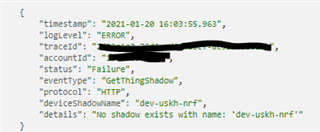
    In AWS cloudwatch logs I can see this:

  •  I did resolve all my issues. Can you confirm you've followed this guide to create a thing in IoT core, Activate the certificate and ensure policy is attached to the thing.

    https://developer.nordicsemi.com/nRF_Connect_SDK/doc/latest/nrf/samples/nrf9160/aws_fota/README.html#creating-a-thing-in-aws-iot

    If all of the above is correct and you have internet connection on your modem, you should get the MQTT_EVT_CONNACK event.

    You can enable debug level logging by replacing 

    CONFIG_CLOUD_CLIENT_LOG_LEVEL_INF=y 

    with

    CONFIG_CLOUD_CLIENT_LOG_LEVEL_DBG=y 


    in your cloud_client/prj.conf.

    I added debug logs to every case in subsys/net/lib/aws_iot/src/aws_iot.c

    switch (mqtt_evt->type) 
    so I know what's going on.
    Also your error shows an error to do with the shadow name. AWS recently added the notion of "unnamed" and "named" shadows and they have different Topics so you may want to read abou that. I also found aws_iot.c of NCS includes a full "Client ID" whereas AWS only asks for a shadow with "thing name", the format of the topic is as follows:
    $aws/things/thingName/shadow
    So i ended up changing the sprintf() where cliend_id_buf is populated so it can build the topic strings, so that it doens't use CONFIG_AWS_IOT_CLIENT_ID_STATIC but uses a new config I added 
    CONFIG_AWS_IOT_THING_NAME that reflects only the ThingName not the full client_ID or what AWS calls Amazon Resource Name
    do you have any comments on this discrepancy between Device  shadow MQTT topic format that AWS requires and what is specified in aws_iot.c of NCS?
Related