This post is older than 2 years and might not be relevant anymore
More Info: Consider searching for newer posts

Windows 10 throughput / connection window clashes

I'm facing a problem with a product I'm developing. The problematic setup is as follows:

  • Two nRF52832 peripherals (S132 v6.0.0), each notifying on two characteristics in two separate services (~100 Hz).
  • A Windows 10 central using native C++ SDK bindings to discover and connect to the peripherals.
  • The connection interval is configured to min 7ms and max 15ms on the peripheral. I can monitor that the negotiated interval is 15ms.
  • GATT MTU: 64 bytes
  • GAP data length: 27 bytes (just tried updating to 64 to match the MTU but that didn't change anything).

The problem is that I can connect one peripheral and receive notifications at the correct rate. As soon as I connect another peripheral, the first one starts failing to send notifications (sd_ble_gatts_hvx returns with NRF_ERROR_RESOURCES due to too many notifications queued). This happens even when the other peripheral is not sending anything, just connected to the central. The newly connected peripheral has no problem with sending notifications at a correct rate.

We don't observe this problem on other platforms (tested on macOS and Android), so I don't think it's an OTA throughput issue. Could it have something to do with how the Windows central spaces out the connection intervals/windows? Can the newly connected peripheral just be "stealing" the windows from the other peripheral? Is there something we can do on the peripheral side to prevent this from happening?

And just to make it extra special, on some rare occasions it just seems to work fine. Maybe once in every 100 connection attempts or so.

Open to any and all ideas...

  • This can be a scheduling issue on the link controller of the PC running Windows 10, so for completeness please report the Bluetooth IC that is used on the Windows 10 PC and the Windows 10 build number. Yes, just connecting at the link will change the bandwidth allocation on the PC Bluetooth. The additional info that this works 1/100 times points towards a scheduler issue possibility.

    You can do a few experiments to get some more insight 

    1. Run this on a PC with a different Bluetooth IC. Verify that you have the latest driver for the Bluetooth IC that you are using so any patches can be applied.

    2. Track the BLE_GATTS_EVT_HVN_TX_COMPLETE messages for the notifications and see if they are getting delayed. You should get a BLE_GATTS_EVT_HVN_TX_COMPLETE event with a count so you get an idea of the number of notifications being done. you can log this with a timer timestamp so you get an idea of the speed of the notifications. You can also adjust the Handle Value Notification queue size using that ble_gatts_conn_cfg_t::hvn_tx_queue_size make sure you have set it to a number that fits your application.

    3. If you use the nRF Sniffer you will need to use 2 sniffers to sniff the 2 peripherals and you should see the actual connection interval and the data being sent.

    4. Change the connection intervals that you are requesting to 30ms - 50ms or something more relaxed to see if the peripherals can co-exist.

    5. Check if you are getting a SD_BLE_GAP_CONN_PARAM_UPDATE that changes the connection interval and may explain the delayed notifications.

  • Additionally, when you are doing the experiments, make sure that no other devices are connected over Bluetooth and that WiFi is disabled, this will ensure that BLE bandwidth is maximized.

  • @daviddedwin Thanks for the reply. The machine I'm testing on is running the latest Windows build (10.0.19041) and according to the Device Manager the Bluetooth adapter driver is "up to date", whatever that means.

    This is a CSR USB dongle (USB\VID_0A12&PID_0001&REV_8891), but I experience this issue on my laptop as well. I'm running macOS Catalina on the same hardware and don't experience this issue.

    I'd really like to keep it at the lowest possible value. I can see that the only connection parameter update received from the Windows central on the nRF52832 sets it to 15ms.

    Also, disabling WiFi is not a solution (while I understand trying to limit the variables in this equation). We are nowhere near any thresholds for BLE bandwidth/throughput, and this setup works fine on another OS on the same hardware.

    I'd love to hear any input you might have on this subject. If there's anything we can do to improve the performance since it's very sub optimal as-is.

  • Hi,

    I would recommend that you capture and upload sniffer trace of the on-air activity between the peripheral and central devices, both for the single-peripheral and dual-peripheral setups. That will provide much information about what happens and could help figure out the root cause.

    Best regards,
    Jørgen

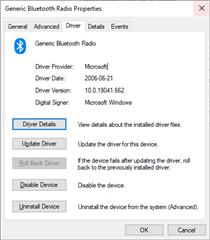
  • Looking at the driver tab that you have posted, the generic Microsoft Bluetooth driver is controlling the dongle on Windows 10. The CSR hardware uses a RAM based patch system to get updated code to the hardware, this patch is usually distributed through the vendor's driver. It would be good to use the vendor's latest driver instead of the generic microsoft driver.

    Since the patch is distributed with the driver, it is possible that the mac OS has a later version of the driver and associated patches and hence performs better.

    I would still encourage you to switch off WiFi and do a test (agreed, it is not a solution), so if the performance of the system improves from its current 1 in 100 attempts to have 2 peripherals, then we are certainly looking at a scheduler issue

    Additionally and I think fairly important, you should test this on a inbuilt  Win 10 Bluetooth hardware, as the dongle does not have the WiFi co-existance and will have worse performance as the WiFi will keep hitting on the Bluetooth packets. The dongle is something that a typical Win 10 user will not be using.

    Summary of my hypotheses :
    * Performance differences between macOS and Win 10, likely due the use of the generic windows driver which may not be at the right patch level.
    * Test with WiFi off to see if performance improves pointing to a scheduler issue
    * Dongle is not a typical use case for Win 10 so test with built-in Bluetooth and a vendor supplied driver

Related