This post is older than 2 years and might not be relevant anymore
More Info: Consider searching for newer posts

C3903U: Argument '-D__MICROLIB' not permitted for option 'cpu'.

My aim is to use a nRF52832 for a Bluetooth peripheral device.

- I just started with a fresh SES V5.44 and downloaded the nRF SDK 17.0.2
- I imported the example "ble_app_hids_keyboard_pca10040_s112" from the SDK
- trying to build the code throws this error : C3903U: Argument '-D__MICROLIB' not permitted for option 'cpu'.

I was asuuming that the examples would compile without any issues - what can I do ?

thanks, matthias

  • I was able to create a license via Nordic website, seems to work now
    Finally I found out where to find the SES project files "emProject" and this allows me to compile now

    I still have no idea how to get around this 'D__MICROLIB' issue - but I guess I wont need it now

    Dont get me wrong, but I'm a bit upset because for days it feels like Nordic tells me to get in touch with Segger, Segger tells me its a nordic issue and I played the same game with arm+Keil+Nordic.

    thanks, matthias

  • I still have no idea how to get around this 'D__MICROLIB' issue

    Are you still getting that with v4.50 of SES ?

    it feels like Nordic tells me to get in touch with Segger, Segger tells me its a nordic issue and I played the same game with arm+Keil+Nordic

    Always the trouble when there's multiple independent players involved.

    Disappointed

    I guess Nordic just don't have the resources to develop their own in-house IDE

  • Segger suggests to continue using 5.44 - and I was able to successfully compile the code from the HID_keyboard example, so why not using 5.44 ...

    It seems I can load the code (hex-file) into the nrf52 chip using nrf-go studio - but it won't work with SES. My hardware setup is compatible with pca10040, so I'm using this path.

    When connecting the J-link target I see an error "Identified core does not match configuration. (Found: Cortex-M0, Configured: Cortex-M4)" - here is the complete output:

    Connecting ‘J-Link’ using ‘USB’
    Connecting to target using SWD
    Loaded C:/Program Files/SEGGER/SEGGER Embedded Studio for ARM 5.44/bin/JLink_x64.dll
    Firmware Version: J-Link V11 compiled Apr 27 2021 16:36:21
    DLL Version: 7.20`
    Hardware Version: V11.00
    Target Voltage: 3.335
    Device "NRF52832_XXAA" selected.
    InitTarget() start
    InitTarget() end
    Found SW-DP with ID 0x5BA01477
    SWD speed too high. Reduced from 4000 kHz to 2700 kHz for stability
    DPIDR: 0x2BA01477
    Scanning AP map to find all available APs
    AP[2]: Stopped AP scan as end of AP map has been reached
    AP[0]: AHB-AP (IDR: 0x24770011)
    AP[1]: JTAG-AP (IDR: 0x02880000)
    Iterating through AP map to find AHB-AP to use
    AP[0]: Core found
    AP[0]: AHB-AP ROM base: 0xE00FF000
    CPUID register: 0x410FC041. Implementer code: 0x41 (ARM)
    Unknown core, assuming Cortex-M0
    Found Cortex-M0 r0p1, Little endian.
    Identified core does not match configuration. (Found: Cortex-M0, Configured: Cortex-M4)
    FPUnit: 6 code (BP) slots and 0 literal slots
    CoreSight components:
    ROMTbl[0] @ E00FF000
    ROMTbl[0][0]: E000E000, CID: B105E00D, PID: 000BB00C SCS-M7
    ROMTbl[0][1]: E0001000, CID: B105E00D, PID: 003BB000 SCS
    ROMTbl[0][2]: E0002000, CID: B105E00D, PID: 002BB003 FPB
    ROMTbl[0][3]: E0000000, CID: B105E00D, PID: 003BB001 ITM
    ROMTbl[0][4]: E0040000, CID: B105900D, PID: 000BB9A1 TPIU
    ROMTbl[0][5]: E0041000, CID: B105900D, PID: 000BB925 ETM

  • I found out, that this issue seems to be related to nRFgo Studio and/or my hex file. I used NRFgo Studio to download the hex file from the segger compilation into the nrf52, and after this, SES reports the cortex-m0. When I erase all memory and download another hex-file (which I know that works), the device reports as Cortex-M4

    I guess that the hex binary from SES is somehow not ok - but how can I find this out ? Its just the example from SDK 17.0.2 with no modification

    Do you know whether its possible to have two versions of SES installed in parallel ? I mean 4.50 and 5.44 

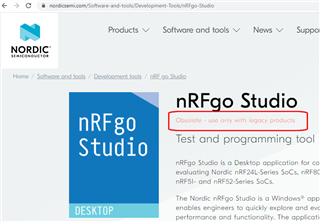
  • nRFgo Studio

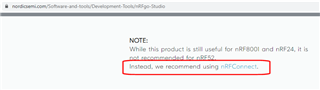
    nRF GO Studio is ancient - does it even support nRF52832 ?

    You should be using nRF Connect:

    further down that page:

    Or just download direct from SES.

    possible to have two versions of SES installed in parallel ?

    It was certainly possible with v4.50 and earlier versions

Related