This post is older than 2 years and might not be relevant anymore
More Info: Consider searching for newer posts

Zigbee routing feature problem

Hi guys, 

 So i have some Nordic DK board including some dongles, NRF52840 DK, NRF52833 DK running with Zigbee and thread SKD 4.1.0 and make a mesh out of them. But I have this problem with mesh topology in Zigbee relating to route discovery. I did 2 experiments

1.The first experiment is set up like this figure 
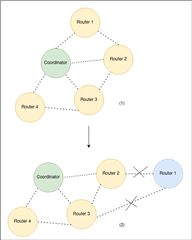
So I have a mesh of devices including some zigbee routers and 1 coordinator like in (1). I tried to move the router 1 on top away from the coordinator so that it is out of range and would send a message to the coordinator through a hop in the middle like in the (2) . From what i learn in the zigbee spec, the router will try to fix and create a new route if the destination is unreachable. I use a sniffer to monitor the network but i did not see any route request sent even after 3-4 minutes. Then, I reset the device but still nothing happened. So how can I make a out of range router to rebuild a route to the coordinator. Is it suppose to make a new route when the destination address is not in the routing table.

2.The second experiment i did is that I create a mesh with 1 coordinator and 4 routers like the figure below 
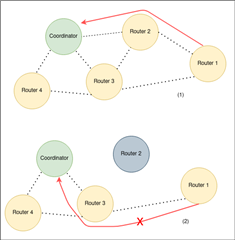
So this time, i managed to make router 1 to join through router 2( which is near router 3) and send message to coordinator like in (1). But the problem is that, when i turn off router 2. In theory Router 1 should re route to path (2). But it did not, when it sent out the message, it kept sending to the addr 0x0000 and not start to send any route request. This time i also waited for 4 minutes and reset every device in the network. But still nothing happened. 

For the firmware inside, I ran Cli zigbee example coordinator and ran a custom firmware from light bulb example on all of the routers. I will attach the firmare at the end so that you can take a look at it with all the SDK config and makefile 

Thank you for any help, the code for router is included below 

Mateus 

light_bulb.zip

  • Hi Mateus,

    I am very sorry for the lack of reply here. First thing, I will need a network key for reading the data from the packets in the sniffer trace you sent to me. If you start the sniffer trace before the network is formed this network key will be stored by wireshark automatically, but if the sniffer trace is started later on you should have a network key available to decode the sniffer traces. Right now the packets on the sniffer trace is undecoded:

    And can we have a summary of the latest questions you have asked for this ticket? And what scenario (1 or 2 on the figures above) are we talking about? I need to try to summarize the inquiries in this ticket to past them to our developers.

    Mateus Vesuvious said:
    I have some other things to update to you. So when I printed out the neigbor table and then check the link status, I can see that they are not really the same.

    Here I wouldn't expect it to be the same.

    Link Status commands are use to keep track of route symmetry. A router will send out a radio 1 broadcast to indicated link status. All the neighboring routers keep track of these messages to determine which routers can hear them and which routers they can hear. So you can have more addresses in the neighbor table withot having them listed in the Link Status command.

    While the neighbor table contains information on every device within transmission range, you can have entries in the neighbor table with value of 0 for outgoing cost field if no link status command listing from this device has been received.

    The age field indicates the number of nwkLinkStatusPeriod intervals that have passed since the last link status command frame was received, up to a maximum value of nwkRouterAgeLimit.

    More information about the neighbor table can be found in the Zigbee specification:
    docs-05-3474-21-0csg-zigbee-specification.pdf

    Best regards,

    Marjeris

Related
