Beware that this post is related to an SDK in maintenance mode
More Info: Consider nRF Connect SDK for new designs
This post is older than 2 years and might not be relevant anymore
More Info: Consider searching for newer posts

Button stuck upon pressing, keeps sending signal to my device

Hello everyone, 

I'm using a modified version of SDK 15.0.0 ble_app_hids_keyboard on my nRF52 DK. It sends a volume up and a volume down command when I press buttons 1 or 2. However, the program gets stuck and won't stop sending that command. My button 4 which sends a pwm signal to led 4 seems to work fine. I've tried switching around the case lines in the button_event_handler function that I've attached here but that made things worse. Any help would be appreciated. Thank you.

static void button_event_handler(uint8_t pin_no, uint8_t button_action)
{
    if (button_action == APP_BUTTON_PUSH)
    {
        switch (pin_no)
        {
            case VOLUP_BUTTON:
                APP_ERROR_CHECK(consumer_control_send(CONSUMER_CTRL_VOL_UP));
                break;
            case VOLDOWN_BUTTON:
                APP_ERROR_CHECK(consumer_control_send(CONSUMER_CTRL_VOL_DW));
                break;
            case IR_BUTTON:
            {
                if(!pwm_on && !nrf_gpio_pin_read(IR_BUTTON))
                {
                    pwm_on = true;
                    app_pwm_channel_duty_set(&PWM1, 0, 50); 
                }
                else
                {
                    pwm_on = false;
                    app_pwm_channel_duty_set(&PWM1, 0, 0);
                }
                break;
            }
            case KEY_PRESS_BUTTON_PIN_NO:
            {
                APP_ERROR_CHECK(hid_kbd_send_string());
                break;
            }
            default:
                APP_ERROR_HANDLER(pin_no);
                break;
        } // end of switch
    } // end of if(button....)
    else if (button_action == APP_BUTTON_RELEASE)
    {
        switch (pin_no)
        {
            case IR_BUTTON: 

                break;
            case VOLDOWN_BUTTON:
                // Fall-through 
            case VOLUP_BUTTON:
                APP_ERROR_CHECK(consumer_control_send(RELEASE_KEY)); 
                break;
            case KEY_PRESS_BUTTON_PIN_NO:    
                APP_ERROR_CHECK(hid_kbd_send_release());
                break;
            default:
                APP_ERROR_HANDLER(pin_no);
                break;
        }
    }
}

  • Hi

    No worries! I understand.

    Debouncing hasn't been implemented yet. This code is mostly the ble_app_hids_keyboard in the sdk 15.0.0 folder. The changes that were made were adding one more button and letting the original buttons to send a different command. The added button was configured to send a pwm signal to an led. No changes were made specifically to the BSP module. I will be attaching my project folder since that will probably be easier to look through than snipets of code. As I remember, the buttons that are named volup_button and voldown_button used to work correctly until the button that sent the pwm signal worked correctly. Is there a conflict between the button configurations that causing the buttons to bounce?

    3051.ble_app_hids_keyboard.zip

  • Hello again,

    Thank you for your understanding, and for providing the project code.

    Looking over your code I see that you are not checking the returned error code from app_button_init, for example. If the app_button_init function makes it all the way to the end, it will return the error code from its call to start the detection delay timer.
    This means that the detection timer might be failing to start, without the application knowing.
    Please add an APP_ERROR_CHECK to this returned error code, and see if an error is returned here. If it is, please let me know which error was generated, so we may look into the API to figure out how we may fix it.

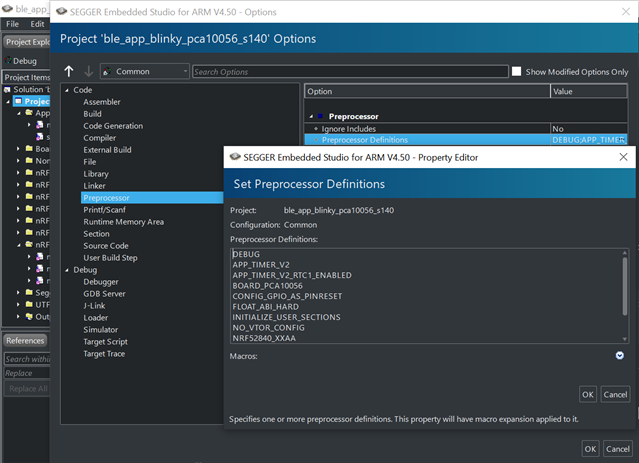
    Please also make sure to have DEBUG defined in your preprocessor defines, like shown in the included image:

    This will make a detailed error message be outputted by your logger whenever a non-NRF_SUCCESS error code is passed to an APP_ERROR_CHECK.

    I would also recommend that you take a look through the code in general, to make sure that all returned error codes are checked. The returned error codes is the only way for the application to know if a function call performed the expected function, or if some error handling is required.

    Looking forward to resolving this issue together!

    Best regards,
    Karl

Related