I have seen this question asked a few times--but every thread seems to have no concrete answer.

I have uninstalled and reinstalled all JLINK drivers.
But still get the errors.

I have nrf52840 dk and am using windows 10
I have seen this question asked a few times--but every thread seems to have no concrete answer.

I have uninstalled and reinstalled all JLINK drivers.
But still get the errors.

I have nrf52840 dk and am using windows 10
nRF Command Line Tools is installed on the C: drive, in the same location as the J-Link.
nRF connect is installed in the C: drive in a different location.
Hello Christian,
christian11 said:nRF Command Line Tools is installed on the C: drive, in the same location as the J-Link.
That is good.
christian11 said:nRF connect is installed in the C: drive in a different location.
Is it the default location (which I might recommend to use at the moment)?
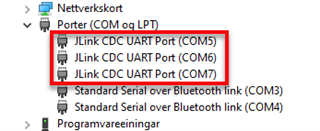
In your Device Manager, is there a JLink UART Port visible (similar to as shown in the picture below, which is from the nRF9160 that has 3 JLink UART ports)?

Regards,
Markus
Markus,
When connected, only one of the 3 shows up:

Hello Christian,
christian11 said:When connected, only one of the 3 shows up:
Yes, that would be correct.
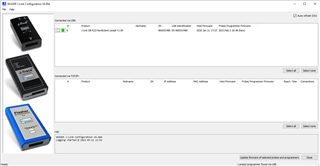
Could you navigate to your JLink folder and open the "JLinkConfig.exe"?
For a working device (which is powered-on), you should get a window like this:

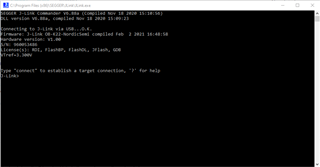
Alternatively, you could use the terminal running “JLink.exe”. It should look like this:

Regards,
Markus