This post is older than 2 years and might not be relevant anymore
More Info: Consider searching for newer posts
This discussion has been locked.
You can no longer post new replies to this discussion. If you have a question you can start a new discussion

External Power Supply Problem:

Hello,

When I use Debug, the program runs successfully. But when I try to connect with External Power Supply the program is not running, Also Reset is not wokring. Please guide me .

Thanks.

  • Hello Stian, thank you for your answer.

    I am using nRF52 DK, on it it says 'nRF6827 2.1.0 2020.39' if it helps. I also tried to eliminate JLink debugger by openning SB29 but the chip did not function. As with your suggestion given below I checked the clock parameters. Application uses external LF clock X2 on the board having 12 pF capacitors as bypasses. They are all intact on board. I have actually posted a ticket about powering and another ticket about some peculiarities elaborating further on respective issues. I would be glad if you could help me out with my issue.

    Best regards.

  • Hi, I read through your other posts, and as I understand you are trying to power the whole board with a piezo harvester. The problem is that the external supply header supplies the segger debugger/UART, USB circuitry, level converters, analog switches, ++ in addition to the nRF52 itself. If you want to power the nRF52 only, you will have to do some modifications to the board. Please follow my steps here:

    1. Cut SB9
    2. Cut SB26 (bottom side) (RESET)
    3. Cut SB20 (bottom side) (SWDIO)
    4. Cut SB21 (bottom side) (SWDCLK)
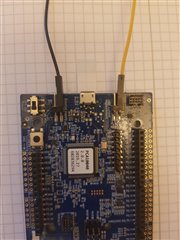
    5. Power the board directly on VDD_nRF as shown in the picture below:
    6. Modify the ble_app_beacon application to disconnect all pins (by default the 4 LED pins and the UART TX pins are configured as outputs). Otherwise the rest of the board will be powered through the GPIOs.
      • Set NRF_LOG_ENABLE to 0 in pca10040/s132/config/sdk_config.h
      • Remove the leds_init() call from the main function.

    When flashing the board you will no longer be able to use the on board debugger as normal since the SWD wires are cut. You have two choices (unless you want to re-solder SB20 and SB21 every time you flash the chip):

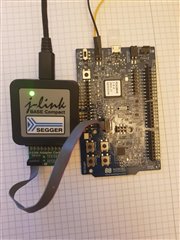
    1. Use an external debugger:
      1. Power the board on the External supply header (3V)
      2. Short P22 with a jumper
      3. Connect the debugger to the Debug in header
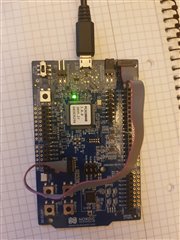
    2. Use the on board debugger:
      1. Connect a USB cable
      2. Short P22 with a jumper
      3. Connect a SWD 10 pin cable between the Debug Out and Debug In headers
  • You are a legend ! I did what you said and I am able to advertise with a current on the order of uA from the supply. May no sorrow come to your door. <3

Related