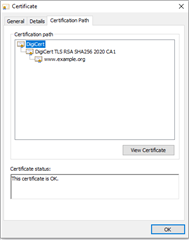
After programming the sample to my nRF9160 DK, I opened the terminal emulator and I observed the following messages:
1. HTTPS client sample started
2. Provisioning certificate
3. Waiting for network..OK
4. Connecting to example.com
5. connect() failed, err 116
I am using the following:
1. nRFD9160 DK v0.8.2
2. Windows10 O.S. version:20H2, OS build:19042.631
3. nRF Connect v 3.7.0
4. nRF Connect SDK v 1.6.1
I attach the log file from the LTE Link Monitor below:
2021-09-04T19:59:12.600Z INFO Application data folder: C:\Users\Administrator\AppData\Roaming\nrfconnect\pc-nrfconnect-linkmonitor
2021-09-04T19:59:12.840Z DEBUG App pc-nrfconnect-linkmonitor v1.1.10 official
2021-09-04T19:59:12.840Z DEBUG App path: C:\Users\Administrator\.nrfconnect-apps\node_modules\pc-nrfconnect-linkmonitor
2021-09-04T19:59:12.840Z DEBUG nRFConnect 3.7.0, required by the app is (^3.6.0)
2021-09-04T19:59:12.840Z DEBUG nRFConnect path: C:\Users\Administrator\AppData\Local\Programs\nrfconnect\resources\app.asar
2021-09-04T19:59:12.841Z DEBUG HomeDir: C:\Users\Administrator
2021-09-04T19:59:12.841Z DEBUG TmpDir: C:\Users\ADMINI~1\AppData\Local\Temp
2021-09-04T19:59:13.059Z VERBOSE Could not fetch serial number for serial port at COM3
2021-09-04T19:59:20.249Z INFO Modem port is opened
2021-09-04T19:59:39.135Z DEBUG modem << *** Booting Zephyr OS build v2.6.0-rc1-ncs1  ***
2021-09-04T19:59:39.395Z DEBUG modem << Flash regionsDomainPermissions
2021-09-04T19:59:39.399Z DEBUG modem << 00 01 0x00000 0x10000 Securerwxl
2021-09-04T19:59:39.404Z DEBUG modem << 02 31 0x10000 0x100000 Non-Securerwxl
2021-09-04T19:59:39.408Z DEBUG modem << Non-secure callable region 0 placed in flash region 1 with size 32.
2021-09-04T19:59:39.411Z DEBUG modem << SRAM regionDomainPermissions
2021-09-04T19:59:39.413Z DEBUG modem << 00 07 0x00000 0x10000 Securerwxl
2021-09-04T19:59:39.415Z DEBUG modem << 08 31 0x10000 0x40000 Non-Securerwxl
2021-09-04T19:59:39.418Z DEBUG modem << PeripheralDomainStatus
2021-09-04T19:59:39.422Z DEBUG modem << 00 NRF_P0               Non-SecureOK
2021-09-04T19:59:39.424Z DEBUG modem << 01 NRF_CLOCK            Non-SecureOK
2021-09-04T19:59:39.426Z DEBUG modem << 02 NRF_RTC0             Non-SecureOK
2021-09-04T19:59:39.428Z DEBUG modem << 03 NRF_RTC1             Non-SecureOK
2021-09-04T19:59:39.430Z DEBUG modem << 04 NRF_NVMC             Non-SecureOK
2021-09-04T19:59:39.436Z DEBUG modem << 05 NRF_UARTE1           Non-SecureOK
2021-09-04T19:59:39.439Z DEBUG modem << 06 NRF_UARTE2           SecureSKIP
2021-09-04T19:59:39.441Z DEBUG modem << 07 NRF_TWIM2            Non-SecureOK
2021-09-04T19:59:39.443Z DEBUG modem << 08 NRF_SPIM3            Non-SecureOK
2021-09-04T19:59:39.445Z DEBUG modem << 09 NRF_TIMER0           Non-SecureOK
2021-09-04T19:59:39.447Z DEBUG modem << 10 NRF_TIMER1           Non-SecureOK
2021-09-04T19:59:39.465Z DEBUG modem << 11 NRF_TIMER2           Non-SecureOK
2021-09-04T19:59:39.469Z DEBUG modem << 12 NRF_SAADC            Non-SecureOK
2021-09-04T19:59:39.471Z DEBUG modem << 13 NRF_PWM0             Non-SecureOK
2021-09-04T19:59:39.473Z DEBUG modem << 14 NRF_PWM1             Non-SecureOK
2021-09-04T19:59:39.475Z DEBUG modem << 15 NRF_PWM2             Non-SecureOK
2021-09-04T19:59:39.476Z DEBUG modem << 16 NRF_PWM3             Non-SecureOK
2021-09-04T19:59:39.478Z DEBUG modem << 17 NRF_WDT              Non-SecureOK
2021-09-04T19:59:39.480Z DEBUG modem << 18 NRF_IPC              Non-SecureOK
2021-09-04T19:59:39.481Z DEBUG modem << 19 NRF_VMC              Non-SecureOK
2021-09-04T19:59:39.483Z DEBUG modem << 20 NRF_FPU              Non-SecureOK
2021-09-04T19:59:39.487Z DEBUG modem << 21 NRF_EGU1             Non-SecureOK
2021-09-04T19:59:39.489Z DEBUG modem << 22 NRF_EGU2             Non-SecureOK
2021-09-04T19:59:39.491Z DEBUG modem << 23 NRF_DPPIC            Non-SecureOK
2021-09-04T19:59:39.493Z DEBUG modem << 24 NRF_REGULATORS       Non-SecureOK
2021-09-04T19:59:39.494Z DEBUG modem << 25 NRF_PDM              Non-SecureOK
2021-09-04T19:59:39.496Z DEBUG modem << 26 NRF_I2S              Non-SecureOK
2021-09-04T19:59:39.498Z DEBUG modem << 27 NRF_GPIOTE1          Non-SecureOK
2021-09-04T19:59:39.500Z DEBUG modem << SPM: NS image at 0x10000
2021-09-04T19:59:39.503Z DEBUG modem << SPM: NS MSP at 0x20019fb8
2021-09-04T19:59:39.504Z DEBUG modem << SPM: NS reset vector at 0x12b65
2021-09-04T19:59:39.506Z DEBUG modem << SPM: prepare to jump to Non-Secure image.
2021-09-04T19:59:39.508Z DEBUG modem << *** Booting Zephyr OS build v2.6.0-rc1-ncs1  ***
2021-09-04T19:59:39.510Z DEBUG modem << HTTPS client sample started
2021-09-04T19:59:39.703Z DEBUG modem << Provisioning certificate
2021-09-04T20:09:50.981Z DEBUG modem << Waiting for network.. OK
2021-09-04T20:09:51.195Z DEBUG modem << Connecting to example.com
2021-09-04T20:09:51.360Z DEBUG modem << connect() failed, err: 116
2021-09-04T20:32:18.128Z DEBUG modem << *** Booting Zephyr OS build v2.6.0-rc1-ncs1  ***
2021-09-04T20:32:18.148Z DEBUG modem << Flash regionsDomainPermissions
2021-09-04T20:32:18.153Z DEBUG modem << 00 01 0x00000 0x10000 Securerwxl
2021-09-04T20:32:18.162Z DEBUG modem << 02 31 0x10000 0x100000 Non-Securerwxl
2021-09-04T20:32:18.179Z DEBUG modem << Non-secure callable region 0 placed in flash region 1 with size 32.
2021-09-04T20:32:18.197Z DEBUG modem << SRAM regionDomainPermissions
2021-09-04T20:32:18.201Z DEBUG modem << 00 07 0x00000 0x10000 Securerwxl
2021-09-04T20:32:18.206Z DEBUG modem << 08 31 0x10000 0x40000 Non-Securerwxl
2021-09-04T20:32:18.208Z DEBUG modem << PeripheralDomainStatus
2021-09-04T20:32:18.211Z DEBUG modem << 00 NRF_P0               Non-SecureOK
2021-09-04T20:32:18.225Z DEBUG modem << 01 NRF_CLOCK            Non-SecureOK
2021-09-04T20:32:18.228Z DEBUG modem << 02 NRF_RTC0             Non-SecureOK
2021-09-04T20:32:18.230Z DEBUG modem << 03 NRF_RTC1             Non-SecureOK
2021-09-04T20:32:18.232Z DEBUG modem << 04 NRF_NVMC             Non-SecureOK
2021-09-04T20:32:18.234Z DEBUG modem << 05 NRF_UARTE1           Non-SecureOK
2021-09-04T20:32:18.236Z DEBUG modem << 06 NRF_UARTE2           SecureSKIP
2021-09-04T20:32:18.238Z DEBUG modem << 07 NRF_TWIM2            Non-SecureOK
2021-09-04T20:32:18.241Z DEBUG modem << 08 NRF_SPIM3            Non-SecureOK
2021-09-04T20:32:18.243Z DEBUG modem << 09 NRF_TIMER0           Non-SecureOK
2021-09-04T20:32:18.265Z DEBUG modem << 10 NRF_TIMER1           Non-SecureOK
2021-09-04T20:32:18.267Z DEBUG modem << 11 NRF_TIMER2           Non-SecureOK
2021-09-04T20:32:18.269Z DEBUG modem << 12 NRF_SAADC            Non-SecureOK
2021-09-04T20:32:18.270Z DEBUG modem << 13 NRF_PWM0             Non-SecureOK
2021-09-04T20:32:18.272Z DEBUG modem << 14 NRF_PWM1             Non-SecureOK
2021-09-04T20:32:18.273Z DEBUG modem << 15 NRF_PWM2             Non-SecureOK
2021-09-04T20:32:18.274Z DEBUG modem << 16 NRF_PWM3             Non-SecureOK
2021-09-04T20:32:18.275Z DEBUG modem << 17 NRF_WDT              Non-SecureOK
2021-09-04T20:32:18.288Z DEBUG modem << 18 NRF_IPC              Non-SecureOK
2021-09-04T20:32:18.291Z DEBUG modem << 19 NRF_VMC              Non-SecureOK
2021-09-04T20:32:18.292Z DEBUG modem << 20 NRF_FPU              Non-SecureOK
2021-09-04T20:32:18.293Z DEBUG modem << 21 NRF_EGU1             Non-SecureOK
2021-09-04T20:32:18.294Z DEBUG modem << 22 NRF_EGU2             Non-SecureOK
2021-09-04T20:32:18.297Z DEBUG modem << 23 NRF_DPPIC            Non-SecureOK
2021-09-04T20:32:18.301Z DEBUG modem << 24 NRF_REGULATORS       Non-SecureOK
2021-09-04T20:32:18.311Z DEBUG modem << 25 NRF_PDM              Non-SecureOK
2021-09-04T20:32:18.313Z DEBUG modem << 26 NRF_I2S              Non-SecureOK
2021-09-04T20:32:18.314Z DEBUG modem << 27 NRF_GPIOTE1          Non-SecureOK
2021-09-04T20:32:18.316Z DEBUG modem << SPM: NS image at 0x10000
2021-09-04T20:32:18.319Z DEBUG modem << SPM: NS MSP at 0x20019fb8
2021-09-04T20:32:18.321Z DEBUG modem << SPM: NS reset vector at 0x12b65
2021-09-04T20:32:18.323Z DEBUG modem << SPM: prepare to jump to Non-Secure image.
2021-09-04T20:32:18.332Z DEBUG modem << *** Booting Zephyr OS build v2.6.0-rc1-ncs1  ***
2021-09-04T20:32:18.334Z DEBUG modem << HTTPS client sample started
2021-09-04T20:32:18.608Z DEBUG modem << Provisioning certificate
2021-09-04T20:44:24.909Z DEBUG modem << Waiting for network.. OK
2021-09-04T20:44:25.195Z DEBUG modem << Connecting to example.com
2021-09-04T20:44:25.389Z DEBUG modem << connect() failed, err: 116