This discussion has been locked.
You can no longer post new replies to this discussion. If you have a question you can start a new discussion

[NCS v1.7.0]Matter light_bulb example compilation error

Dear friend,

I followed the steps below and failed to compile the v1.7.0\nrf\samples\matter\light_bulb program:
1. Enter the v1.7.0\toolchain directory and double-click "SEGGER Embedded Studio.cmd" to open SEGGER.
2. Click "File"->"Open nRF Connect SDK Project"
3. Select the light_bulb project in matter in the Project column, as shown in the figure below:
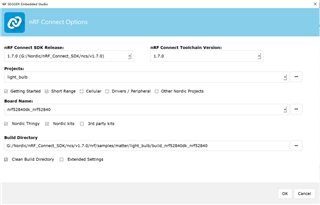

4. Click "Rebuild" and the following error appears:
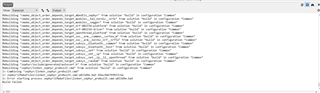
Rebuilding ‘zephyr/linker_zephyr_prebuilt.cmd’ from solution ‘build’ in configuration ‘Common’
1> Combining ‘zephyr/linker_zephyr_prebuilt.cmd’
1> zephyr\CMakeFiles\linker_zephyr_prebuilt.cmd-a833d9e.bat b9ac94e79f037c6a
1> Error starting process zephyr\CMakeFiles\linker_zephyr_prebuilt.cmd-a833d9e.bat
Build failed

The same operation, compiling v1.7.0\nrf\samples\matter\light_switch is successful.
How is matter\light_bulb compiled?

Best Regards,

Zero

  • Hello Zero,

    I just tried this on my end following the steps you describe for the Matter light bulb example, but it builds and rebuilds as expected on my end.
    Your error logs indicate that you might have ran into an issue with the Zephyr dependency part of the SDK.
    Did you use the Toolchain Manager to install the SDK, or did you do it manually?
    Could you try to reinstall the NCS SDK v1.7.0 using the Toolchain Manager?

    As a side note I notice that you have placed your NCS installation in the /Nordic/nRF_Connect_SDK/ directory.
    It is recommended that you place the NCS installation as far up in your hierarchy as possible to avoid the 260 character path length limit imposed by Windows.
    Ideally, your ncs folder would be located at the top of the hierarchy. In the case that the 260 character path limit is exceeded the compiler will not be able to find the files even though they are present at the specified location, which can be very frustrating to debug if you are unaware of the path character limit.

    Best regards,
    Karl

  • I get the same linker error as described above when executing the build in SES. Any other project works fine with the installed NCS SDK v1.7.0. By that it can not be an issue with the SDK installation.

    Are you really able to build successfully within SES or are you maybe using west command line building outside SES?

  • Hello,

    Armin said:
    Are you really able to build successfully within SES or are you maybe using west command line building outside SES?

    Yes, I build and re-built using SES Nordic Edition, following the description in the original ticket.
    Are you seeing the same errors as Zero mentioned?
    Could you try to reinstall the NCS SDK v1.7.0 using the Toolchain Manager, like I asked Zero to do?

    Best regards,
    Karl

  • Yes, I see the same error as Zero mentioned. It is actually a linker error.
    I already installed NCS SDK v1.7.0 using the Toolchain Manager.

  • Armin said:
    Yes, I see the same error as Zero mentioned.

    Thanks for clarifying this.

    Armin said:
    I already installed NCS SDK v1.7.0 using the Toolchain Manager.

    Could you go ahead and reinstall it nevertheless? In order to rule out any issues having occurred during the installation.
    May I ask where in your file hierarchy you have placed the SDK as well? Similar to what I mentioned in Zero's regard.

    Best regards.
    Karl

Related