Bluetooth sample iso_receive - cannot build

Hi,

Environment: nRF SDK 1.9.1, VS Code 1.66.2

Without making any changes, I can build and flash the iso_receive sample but it fails with a -5 error code (EIO) on this line (line 319):

err = bt_le_scan_start(BT_LE_SCAN_CUSTOM, NULL);

I have spoken with the Zephyr support team and they say that that error is a controller error. So I would like to change from Nordic SoftDevice controller to the Zephyr controller by making the following changes in Kconfig:

1. Enabled Bluetooth controller. Software-based BLE link layer was auto selected.
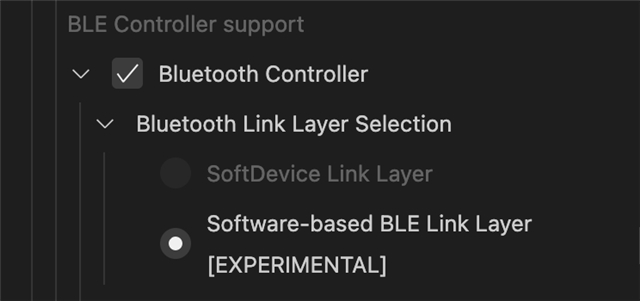
2. Enabled extended advertising

3. De-selected 'Use Nordic LLL'

Saved changes to prj.conf which now looks like this:

CONFIG_BT=y
CONFIG_BT_DEBUG_LOG=y
CONFIG_BT_DEVICE_NAME="Test ISO Receive"
CONFIG_BT_ISO_SYNC_RECEIVER=y

CONFIG_BT_CTLR=y
CONFIG_DEBUG_THREAD_INFO=y
CONFIG_DEBUG_OPTIMIZATIONS=y
CONFIG_BT_LLL_VENDOR_NORDIC=n

When I build this I get tons of errors. Here are two examples:

/opt/nordic/ncs/v1.9.1/zephyr/subsys/bluetooth/controller/ll_sw/nordic/hal/nrf5/radio/radio.c:289:2: error: 'NRF_RADIO' undeclared (first use in this function); did you mean 'NRF_TAD'?

/opt/nordic/ncs/v1.9.1/zephyr/subsys/bluetooth/controller/ll_sw/nordic/hal/nrf5/radio/radio.c:290:17: error: 'RADIO_TXADDRESS_TXADDRESS_Pos' undeclared (first use in this function); did you mean 'TWIM_ADDRESS_ADDRESS_Pos'?

I can successfully build, flash and run other Bluetooth samples e.g. perihperal_hr.

Any insights into what I'm doing wrong?

Regards,

AC

  • Hi,

    You need to create a directory named "child_image" in the project directory. In "child_image" you need to add a file named "hci_rpmsg.conf". hci_rpmsg.conf should contain this line:

    CONFIG_BT_ISO_SYNC_RECEIVER=y

    For clarity, the path will be iso_receive/child_image/hci_rpmsg.conf
    This will add the config to the image on the network core, which controls the radio.

    No other changes to the original sample are needed to start scanning.

  • Hi Oivind,

    Thank you for your suggestion. I can confirm that after making this change I can see the board scanning and receiving advertisements.

    However, this will be using the Nordic SoftDevice controller. How do I switch to the Zephyr controller? I have tried manually editing prj.conf and adding CONFIG_BT_LL_SW_SPLIT=y and, separately, I have tried changing settings in Kconfig. Both approaches result in various build failures.

    Can you point me to any documentation that will tell me what I need to do?

    Regards,

    AC

  • Ok, to use the Zephyr controller you need to add CONFIG_BT_LL_SW_SPLIT=y to the child_image/hci_rpmsg.conf.

    The sample seems to work when I also enable advertising extensions.

    My hci_rpmsg.conf:

    CONFIG_BT_ISO_SYNC_RECEIVER=y
    CONFIG_BT_LL_SW_SPLIT=y
    CONFIG_BT_CTLR_ADV_EXT=y
    

  • Hi Oivind,

    Thank you for your response. A step forward:

    With just CONFIG_BT_ISO_SYNC_RECEIVER=y config option in hci_rpmsg.conf, the DK board is receiving iso broadcast from my source board (a custom board running the Packetcraft stack). A snippet of the log files:

    Waiting for periodic advertising...
    [DEVICE]: FE:BA:10:A0:87:D4 (public), AD evt type 5, Tx Pwr: 127, RSSI -68 Packetcraft audio-cis C:0 S:0 D:0 SR:0 E:1 Prim: LE 1M, Secn: LE 1M, Interval: 0x00a0 (200 ms), SID: 0
    Found periodic advertising.
    Stop scanning...success.
    Creating Periodic Advertising Sync...success.
    Waiting for periodic sync...
    [DEVICE]: FE:BA:10:A0:87:D4 (public), AD evt type 5, Tx Pwr: 127, RSSI -68 Packetcraft audio-cis C:0 S:0 D:0 SR:0 E:1 Prim: LE 1M, Secn: LE 1M, Interval: 0x00a0 (200 ms), SID: 0
    PER_ADV_SYNC[0]: [DEVICE]: FE:BA:10:A0:87:D4 (public) synced, Interval 0x00a0 (200 ms), PHY LE 1M
    PER_ADV_SYNC[0]: [DEVICE]: FE:BA:10:A0:87:D4 (public), tx_power 127, RSSI -67, CTE 0, data length 0, data: 
    Periodic sync established.
    Waiting for BIG info...
    PER_ADV_SYNC[0]: [DEVICE]: FE:BA:10:A0:87:D4 (public), tx_power 127, RSSI -68, CTE 0, data length 0, data: 
    PER_ADV_SYNC[0]: [DEVICE]: FE:BA:10:A0:87:D4 (public), tx_power 127, RSSI -67, CTE 0, data length 0, data: 
    PER_ADV_SYNC[0]: [DEVICE]: FE:BA:10:A0:87:D4 (public), tx_power 127, RSSI -67, CTE 0, data length 0, data: 
    PER_ADV_SYNC[0]: [DEVICE]: FE:BA:10:A0:87:D4 (public), tx_power 127, RSSI -72, CTE 0, data length 0, data: 
    PER_ADV_SYNC[0]: [DEVICE]: FE:BA:10:A0:87:D4 (public), tx_power 127, RSSI -70, CTE 0, data length 0, data: 
    PER_ADV_SYNC[0]: [DEVICE]: FE:BA:10:A0:87:D4 (public), tx_power 127, RSSI -72, CTE 0, data length 0, data: 
    failed (err -11)
    Deleting Periodic Advertising Sync...Start scanning...success.
    

    However, when I also enable CONFIG_BT_LL_SW_SPLIT=y and CONFIG_BT_CTLR_ADV_EXT=y in hci_rpmsg.conf, I still see standard LE advertising and scan requests but I no longer see the iso broadcasts. Sample log file:

    [DEVICE]: F0:C7:7F:AD:4D:7F (public), AD evt type 0, Tx Pwr: 127, RSSI -64  C:1 S:1 D:0 SR:0 E:0 Prim: LE 1M, Secn: No packets, Interval: 0x0000 (0 ms), SID: 255
    [DEVICE]: F0:C7:7F:AD:4D:7F (public), AD evt type 4, Tx Pwr: 127, RSSI -64 Blue Box      C:1 S:1 D:0 SR:1 E:0 Prim: LE 1M, Secn: No packets, Interval: 0x0000 (0 ms), SID: 255
    [DEVICE]: 7B:52:2D:01:FC:A7 (random), AD evt type 0, Tx Pwr: 127, RSSI -51  C:1 S:1 D:0 SR:0 E:0 Prim: LE 1M, Secn: No packets, Interval: 0x0000 (0 ms), SID: 255
    [DEVICE]: 7B:52:2D:01:FC:A7 (random), AD evt type 4, Tx Pwr: 127, RSSI -49  C:1 S:1 D:0 SR:1 E:0 Prim: LE 1M, Secn: No packets, Interval: 0x0000 (0 ms), SID: 255
    

    The team at Zephyr also told me to add these to prj.conf:

    CONFIG_BT_CTLR_ADV_EXT=y
    CONFIG_BT_CTLR_SYNC_PERIODIC=y
    CONFIG_BT_CTLR_SYNC_ISO=y

    By themselves, VS Code shows missing dependency errors. By further adding CONFIG_BT_CTLR and CONFIG_BT_HCI, the dependency errors go away but the code will not build.

    I have also tried adding these to hci_rpmsg.conf and that has no visible effect.

    Are there any other configs that you can think of that I might need?

    Regards,

    AC

  • Hi,

    I can see an engineer has been assigned but, since posting the comment, I now think that this is a Zephyrcontroller issue so I have raised it with the Zephyr team.

    I'm going to close this ticket - if the Zephyr team point to it being a Nordic issue, I'll open up a new ticket.

    Apologies for the confusion.

    Regards,

    AC

Related