Docker installation - build image locally loading for long time

Hi,

I have devloped an application with NCS v2.0.0. I have succesfully built and flahsed the application to the nRF52833 DK. I now would like to use Docker to build the application. I am following the steps on this page. After pasting the below line into the terminal, it loads indefintely. I have attached a screenshot of what I see in the terminal. Any suggestions as to what I should do please?

docker build -t nrfconnect-sdk --build-arg sdk_nrf_revision=v2.1-branch

Regards,
Adam
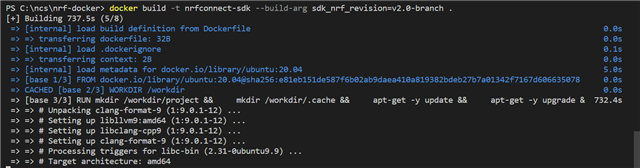
  • Hei, can you share the project code (or a minimal sample) so that I can reproduce the issue? There is a daily test in the repo that ensures building the asset_tracker_v2 works, but I haven't added more samples.

  • Hi Markus,

    Our application is a modified version of this Zephur sample: Peripheral HT. How do I go about building this with docker?

    Thanks,

    Adam

  • Hei, I followed the instructions for the full example:

    # Launch Docker image with an interactive shell
    docker run -it -v ${PWD}:/workdir/project nordicplayground/nrfconnect-sdk:main /bin/bash
    # Init NCS
    west init -m https://github.com/nrfconnect/sdk-nrf --mr v2.1-branch
    # Update
    west update --narrow -o=--depth=1
    # Go to sample
    zephyr/samples/bluetooth/peripheral_ht/
    # Build
    ZEPHYR_BASE=/root/test/zephyr west build -p always -b nrf52840dk_nrf52840
    # This builds and the HEX file is in build/zephyr:
    -- west build: generating a build system
    Loading Zephyr default modules (Zephyr base).
    -- Application: /root/test/zephyr/samples/bluetooth/peripheral_ht
    -- Found Python3: /usr/bin/python3.8 (found suitable exact version "3.8.10") found components: Interpreter 
    -- Cache files will be written to: /workdir/.cache//zephyr
    -- Zephyr version: 3.1.99 (/root/test/zephyr)
    -- Found west (found suitable version "0.14.0", minimum required is "0.7.1")
    -- Board: nrf52840dk_nrf52840
    -- Found host-tools: zephyr 0.14.2 (/workdir/zephyr-sdk)
    -- Found dtc: /workdir/zephyr-sdk/sysroots/x86_64-pokysdk-linux/usr/bin/dtc (found suitable version "1.6.0", minimum required is "1.4.6")
    -- Found toolchain: zephyr 0.14.2 (/workdir/zephyr-sdk)
    -- Found BOARD.dts: /root/test/zephyr/boards/arm/nrf52840dk_nrf52840/nrf52840dk_nrf52840.dts
    -- Generated zephyr.dts: /root/test/zephyr/samples/bluetooth/peripheral_ht/build/zephyr/zephyr.dts
    -- Generated devicetree_unfixed.h: /root/test/zephyr/samples/bluetooth/peripheral_ht/build/zephyr/include/generated/devicetree_unfixed.h
    -- Generated device_extern.h: /root/test/zephyr/samples/bluetooth/peripheral_ht/build/zephyr/include/generated/device_extern.h
    -- Including generated dts.cmake file: /root/test/zephyr/samples/bluetooth/peripheral_ht/build/zephyr/dts.cmake
    Parsing /root/test/zephyr/samples/bluetooth/peripheral_ht/Kconfig
    Loaded configuration '/root/test/zephyr/boards/arm/nrf52840dk_nrf52840/nrf52840dk_nrf52840_defconfig'
    Merged configuration '/root/test/zephyr/samples/bluetooth/peripheral_ht/prj.conf'
    Configuration saved to '/root/test/zephyr/samples/bluetooth/peripheral_ht/build/zephyr/.config'
    Kconfig header saved to '/root/test/zephyr/samples/bluetooth/peripheral_ht/build/zephyr/include/generated/autoconf.h'
    -- The C compiler identification is GNU 10.3.0
    -- The CXX compiler identification is GNU 10.3.0
    -- The ASM compiler identification is GNU
    -- Found assembler: /workdir/zephyr-sdk/arm-zephyr-eabi/bin/arm-zephyr-eabi-gcc
    -- Configuring done
    -- Generating done
    -- Build files have been written to: /root/test/zephyr/samples/bluetooth/peripheral_ht/build
    -- west build: building application
    [1/232] Preparing syscall dependency handling
    
    [2/232] Generating include/generated/version.h
    -- Zephyr version: 3.1.99 (/root/test/zephyr), build: 86893246053c
    [222/232] Linking C executable zephyr/zephyr_pre0.elf
    
    [226/232] Linking C executable zephyr/zephyr_pre1.elf
    
    [232/232] Linking C executable zephyr/zephyr.elf
    Memory region         Used Size  Region Size  %age Used
               FLASH:      175292 B         1 MB     16.72%
                SRAM:       34421 B       256 KB     13.13%
            IDT_LIST:          0 GB         2 KB      0.00%
    

  • Hi Markus,

    Thanks for the help.

    I am still unable to build the application with Docker. I should point out that I am using windows - does the mkae a difference with regards to building the application? I also have a few more questions pelase:

    1. Does it matter what repository you run Docker in? Also, does it matter which repository you are in when you clone a docker image? Should you be in the nrf application’s repository?

    2. I ran the terminal code succesfully from line 1 to 7 above in the Docker interactive shell. However, in line 8, zephyr/samples/bluetooth/peripheral_ht/, the command does not work. My application repository is C:\ncs\myapps\atmo_temp. Insetad of running line 8 as you did, I insetad tried cd C:\ncs\myapps\atmo_temp; as expected, it says that this repository does not exist. What are you trying to do here?

    3. Because of the issue with line 8, I could not run the code in line 10. Insetad I tried the following: west build C:\ncs\myapps\atmo_temp -p always -b nrf52833dk_nrf52833. After running this line, all I see in the terminal is: > and nothing happnes... What should I do here?

    4. Instead of running in the Docker interactive shell, I also tried running the terminal commands from this page that you linked to. I first open a command prompt from the nrf toolchain. I could not copy lines 140-143 into the command prompt as it had an issue with the inverted commas used: '.Instead, I ran each line one at a time. I first run: docker run --rm -v "%cd%":/workdir/project nrfconnect-sdk /bin/bash and I think it runs succesfully as nothing happens... I just see C:\ncs\v2.0.0> in the terminal window. I then run west init and update succesfully. After that, I run the following west build command: west build C:\ncs\myapps\atmo_temp -p always -b nrf52833dk_nrf52833 and the application buids succesfully. How do I know if I am actually building with docker? I could run this command without Docker and it would still build as it is just a west build command.

    Kind Regards,

    Adam

Related