disconnected 0x8

Hello, I found that my device is more prone to disconnection due to 0x8. And I saw the log and found that most of the disconnected cases were immediately disconnected as soon as they were connected. I captured some air packets, please help to analyze, thank you!
Some of my bluetooth parameters are::

#define MIN_CONN_INTERVAL               MSEC_TO_UNITS(40, UNIT_1_25_MS)             /**< Minimum acceptable connection interval (20 ms), Connection interval uses 1.25 ms units. */
#define MAX_CONN_INTERVAL               MSEC_TO_UNITS(75, UNIT_1_25_MS)             /**< Maximum acceptable connection interval (75 ms), Connection interval uses 1.25 ms units. */
#define SLAVE_LATENCY                   2                                           /**< Slave latency. */
#define CONN_SUP_TIMEOUT                MSEC_TO_UNITS(5000, UNIT_10_MS)             /**< Connection supervisory timeout (4 seconds), Supervision Timeout uses 10 ms units. */
#define FIRST_CONN_PARAMS_UPDATE_DELAY  APP_TIMER_TICKS(5000)                       /**< Time from initiating event (connect or start of notification) to first time sd_ble_gap_conn_param_update is called (5 seconds). */
#define NEXT_CONN_PARAMS_UPDATE_DELAY   APP_TIMER_TICKS(30000)                      /**< Time between each call to sd_ble_gap_conn_param_update after the first call (30 seconds). */
#define MAX_CONN_PARAMS_UPDATE_COUNT    3                                           /**< Number of attempts before giving up the connection parameter negotiation. */

My parameter is to perform the update 5s after the connection is successful. If I change the 5s to a smaller value, such as 1.5s, can this situation be improved, and will it introduce new problems?

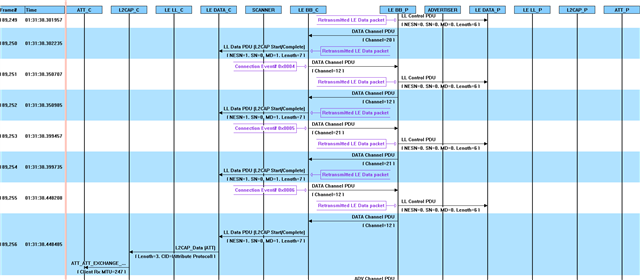
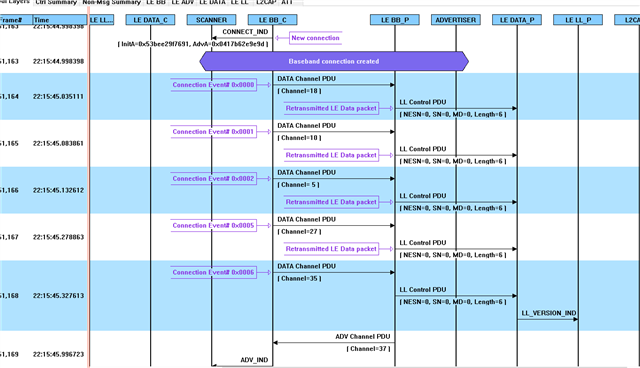
Here is a partial air packet I captured

22:15:52
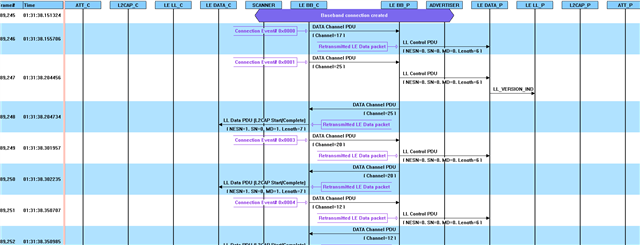
another : 01:31:42
  • Hello,

    Disconnect reason 0x08 means that what you are seeing is a supervision timeout. Basically it means that (at least one of) the devices hasn't picked up any packets from the connected device for CONN_SUP_TIMEOUT time. Looking at your traces, it looks like there are only retransmissions, so it looks like that is the case.

    Do you see the disconnects if you try another phone?
    What HW is the nRF52832 mounted on? Nordic nRF52832 DK? If it is a custom board, can you test it on a DK? 

    Does the log from the nRF say anything?

    I don't think changing the connection parameters (the ones that happen after 5 seconds) will have any effect. Based on the log, it doesn't look like it receives any packets from the nRF. I am not entirely sure what device we are seeing in the trace. I have not seen this software before. Is that packets from the phone or the nRF?

    Do you get the "Connected" event on the nRF?

    Best regards,

    Edvin

  • 00> [462601:31:37.000,000] <debug> nrf_ble_gatt: Requesting to update ATT MTU to 247 bytes on connection 0x0.
    00>
    00> [462601:31:37.000,000] <debug> nrf_ble_gatt: Updating data length to 251 on connection 0x0.
    00>
    00> [462601:31:37.000,000] <info> app: Connected
    00>
    00> [462601:31:37.000,000] <info> app: Uart init.
    00>
    00> [462601:31:42.000,000] <info> app: Disconnected = 0x8

  • I am using a custom board.
    As far as I know, this problem is more likely to occur when connected to this phone.
    These pictures were captured and analyzed using the Frontline sodera analyzer.
    From the rtt log, the disconnect event occurs in about 5s of the connect event

  • It is exactly 5 seconds after, meaning that it didn't successfully receive a single packet from the phone. 

    Can you please try to:

    1: Try the application on a DK, to see whether the application runs better on hardware that we know is working.

    2: Try with a different phone, to see if there is a mismatch.

    3: Capture a sniffer trace using the nRF Sniffer for Bluetooth LE

    4: In your sdk_config.h file, can you please try to find, and set the following settings:

    #define NRF_SDH_CLOCK_LF_SRC 0
    #define NRF_SDH_CLOCK_LF_RC_CTIV 16
    #define NRF_SDH_CLOCK_LF_RC_TEMP_CTIV 2
    #define NRF_SDH_CLOCK_LF_ACCURACY 1

    Best regards,

    Edvin

Related