



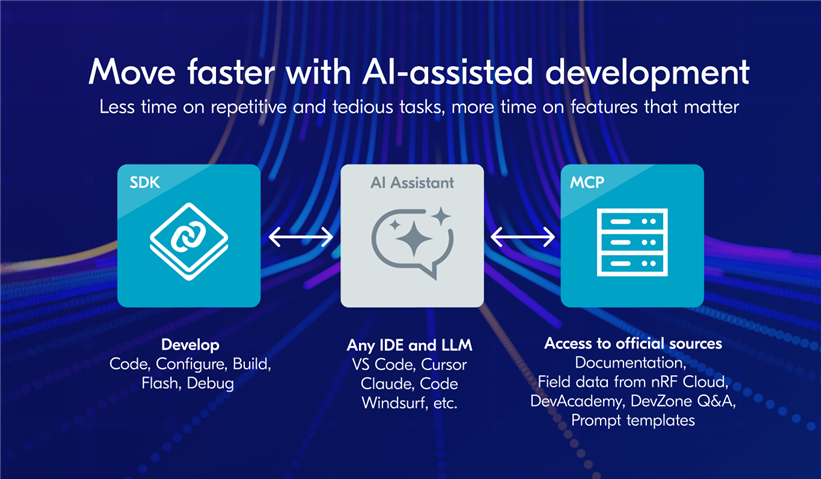
Today we're bringing AI-assisted development to nRF Connect SDK and nRF Cloud. For many developers, AI assistance is already part of their workflows. Claude Code, Cursor, and GitHub Copilot help with writing code, explaining APIs, and accelerating routine tasks. But Large Language Models (LLMs) trained on generic data run into clear limits. They lack Nordic context and field data to provide accurate results and insights.
Our MCP servers provide what’s missing. Connect your AI assistant of choice to our MCP servers, and turn your generic AI assistant into a Nordic expert, and get better and more accurate results, faster, in all product stages, from prototyping to fleet management
In this blog post, we'll cover what AI-assisted development with Nordic means, what it includes, and how to get started.
Table of Contents
- What AI-assisted development with Nordic means
- Hands-on demos: Use cases for AI-assisted development
- Adding Zephyr features to a project
- Migration of applications to newer SDK versions
- DeviceTree and Kconfig file generation for a custom board
- Keeping AI cost low and output quality high
- Troubleshooting reported issues with access to nRF Cloud data
- Deciding if a new version is production-ready
- Seeking out the bad seeds in your fleet
- What our MCP servers provide
- What's next
What AI-assisted development with Nordic means
We define AI-assisted development as the practice of using LLMs and tools built on them to aid in the development of embedded devices, under close developer oversight. The AI assistant can advise, but the process should be monitored and validated by an experienced developer. This isn't vibe coding. The developer is in charge.
-
Prototype faster. Setting up projects, configuring peripherals, and adding simple functionality. The assistant helps you make prototypes faster, so you spend more time on the final product.
-
Automate the tedious. Tests. Custom-board ports. Documentation. SDK version ports. Let the AI assistant do the busywork, so you can focus on the work that needs your expertise.
-
Debug efficiently. With better context and access to real-world failure data, your AI assistant can help identify and solve issues faster.
-
Higher quality, lower cost. Better reference material means fewer tokens spent on corrections. Higher quality and lower AI cost at the same time.
Hands-on demos: Use cases for AI-assisted development
Here's a selection of what's possible with AI-assisted development with Nordic. Each video demonstrates a real developer task, completed with an AI assistant connected to our MCP servers.
Adding Zephyr features to a project
Zephyr's reusable components are one of its greatest strengths. Here's how the assistant helps you find the right components and integrate them.
Migration of applications to newer SDK versions
Manual SDK migrations mean reading changelogs and hunting breaking changes. Here's how the assistant helps you get a clear overview of what changed.
DeviceTree and Kconfig file generation for a custom board
Moving from a development kit to a custom board is usually a manual, tedious process. Here's how the assistant helps work through the changes systematically.
Keeping AI cost low and output quality high
AI tools usage is measured in tokens, and the more you use, the more you pay. See how giving your assistant a good map and compass can help reduce your running costs.
Troubleshooting reported issues with access to nRF Cloud data
Investigating customer-reported issues normally takes time and context switching. Here's how the assistant gets to root cause from just the serial numbers and a few prompts.
Deciding if a new version is production-ready
Deciding if a release is production-ready usually means pulling data from multiple sources. Here's how the assistant compares the new version against the previous one in minutes.
Seeking out the bad seeds in your fleet
Identifying problem devices in your fleet usually means hours of forensic investigation. Here's how the assistant does the work from a natural-language prompt and hands you a CSV of affected devices.
These are just a few examples. We expect developers will find other ways to use AI-assisted development with Nordic.
What our MCP servers provide
The Nordic MCP server and the nRF Cloud MCP server each provide different types of context and capabilities to your AI assistant. You can connect to one or both at the same time, and some use cases benefit from using them together.
MCP exposes three types of capabilities to AI assistants:
-
Resources: data sources the assistant can access (for example, reference guides and scripts).
-
Slash commands: patterns for invoking reusable prompt templates or workflows (for example, setup and development workflows for the nRF Connect SDK).
-
Tools: functions the assistant can call (for example, searching Nordic documentation or querying field data).
Each of our MCP servers exposes a combination of these capabilities.
Nordic MCP server
The Nordic MCP server gives your AI assistant the context to work accurately with the nRF Connect SDK and other Nordic tools.
-
Resources:
-
A concise development and review guide for nRF Connect SDK and Zephyr code, used by the assistant when generating or reviewing code.
-
A reference for nrfutil commands and options.
-
A reusable UART read, write, and monitor script.
-
-
Slash commands: nRF Connect SDK workflows for setup (installing the SDK, preparing toolchain and project) and development (building, programming, debugging, testing, monitoring UART, and board-specific tasks).
-
Tools: Semantic search across Nordic documentation, including the nRF Connect SDK, DevAcademy, and DevZone Q&A. Listing of available documentation sources.
nRF Cloud MCP server
The nRF Cloud MCP server gives your AI assistant read-only access to nRF Cloud field data from your deployed devices.
Tools: Read-only queries against your fleet, including device metadata and metrics, issues and traces, software version information, logs, coredumps, and more.
Note: Today, we have two MCP servers: the Nordic MCP server and the nRF Cloud MCP server. The nRF Cloud MCP server will soon be merged into the Nordic MCP server. From a developer perspective, you can connect to one or both today.
What's next
-
Feedback: This is the first release of AI-assisted development with Nordic. We're already working on use case coverage and incorporating user feedback into upcoming releases. We're looking for honest input on what works, what doesn't, and what would make this more useful. Please share your experience through our feedback survey.
-
Join the webinar: For a hands-on tour of AI-assisted development with Nordic, register for our upcoming webinar next week. We'll walk through real demos, cover common use cases, and answer questions from developers exploring the capability. Register here.
-
Get started: See the Nordic MCP documentation and the nRF Cloud MCP documentation.
-
Learn more: Visit the AI-assisted development landing page.
We'd love to hear how you're using AI-assisted development with Nordic in your work. Share your experience, questions, or ideas in the comments below.

Top Comments