



When Android 16 was released earlier this year, it introduced the first public APIs supporting Bluetooth® Channel Sounding for precise ranging on smartphones. Until recently, however, there hadn’t been phone hardware available that supported Bluetooth 6 and Channel Sounding. That changed on August 28th, 2025, when Google released the Pixel 10, the first mobile phone to support Channel Sounding, with many more expected to follow.
Today, the nRF Toolbox app for Android has received a major update adding Channel Sounding support, bringing accurate distance estimation to your application development toolbox. For the first time, developers can evaluate and leverage Bluetooth Channel Sounding on Android with an open-source app from Nordic Semiconductor using an nRF54L Series device and a Pixel 10 smartphone.
With this release, the app completes Nordic’s end-to-end Bluetooth Channel Sounding offering by bringing you the capability to test and evaluate Channel Sounding directly on smartphones, as well as help you develop your own Channel Sounding-enabled app. Nordic’s Bluetooth Channel Sounding offering enables dedicated Bluetooth LE tags for accurate item finding and brings item finding as a value-add feature to other Bluetooth LE products such as remotes, tools, and medical equipment. It also supports use cases such as room-level presence detection, retail and museum proximity engagements, and industrial safety through proximity zones.
In this blog post, we’ll walk you through what you’ll need to evaluate Channel Sounding with the nRF Toolbox Android app using an nRF54L15 SoC running the Bluetooth Channel Sounding reflector sample from nRF Connect SDK and a Google Pixel 10 smartphone using Android 16’s Bluetooth Channel Sounding initiator and algorithm implementation.
Update 10/27/2025: As of recently, Bluetooth Channel Sounding support has also been added on Pixel 9 via the Quarterly Platform Release 2 (QPR2) Beta.
Update 12/02/2025: Android 16 QPR2 is now released. The Channel Sounding feature in nRF Toolbox is now supported on the Pixel 9 and 10 phones out of the box, if your system is updated to the latest version of Android 16.
Update 06/16/2026: The Bluetooth Channel Sounding sample in nRF Connect SDK v3.3.0 has been confirmed to work with Android 17 Beta 4 (CP21.260330.008)
Table of Contents
Prerequisites
To evaluate Channel Sounding on a smartphone, you’ll need to download and install the nRF Toolbox app. You can find the nRF Toolbox app on Google Play from this link - just click the install button and once it’s done downloading and installing, you are ready to go.
A note for those that are interested in developing a Channel Sounding app on Android themselves: nRF Toolbox is fully open-source and developed in Kotlin. Its source code can be found in the Android-nRF-Toolbox GitHub repository, so you can use it as a reference for your own app development. The code includes Channel Sounding support via the Android RangingManager class, and you can find the app side implementation in the file ChannelSoundingManager.kt.
In addition to the app, you’ll need the following hardware and software:
Hardware
-
Google Pixel 10 - any model works.
- Update 12/02/2025: Google Pixel 9 now also works when running the latest version of Android 16.
-
nRF54L15 Development Kit (DK) configured as a Channel Sounding Reflector.
-
Power source and power cable for the DK.
Software
-
nRF Connect SDK - version 3.0.1 or newer.
-
Android 16 QPR2 or Android 17
-
Latest version of the nRF Toolbox app with Channel Sounding demo support (version 4.1.4 or greater).
Update 12/02/2025: As the QPR2 became a stable release on Dec 2nd, 2025, enrollment in the QPR2 Beta program is not required anymore. If your Pixel 9 or 10 phone is up to date with the latest system version, Channel Sounding is supported by nRF Toolbox for your phone.
Update 06/16/2026: The Channel Sounding Reflector sample from nRF Connect SDK v3.3.0 has been confirmed to work with Android version 17 Beta 4 (CP21.260330.008)
Building and flashing the Reflector sample on your DK
The first step is to build and flash the Channel Sounding Reflector with Ranging Responder sample on to your nRF54L15 DK. To configure the Reflector sample from nRF Connect SDK to work with your Android smartphone, set the "Extra KConfig fragments" to include android_ranging.conf.
Once you've added the android_ranging.conf to your build configuration, build the sample and flash it to your nRF54L15 DK. The preparations are now done, and you can move on to running a quick demo with your smartphone and the nRF54L15 DK Reflector.
Running the Channel Sounding demo
This demo showcases how Bluetooth Channel Sounding works between an Android 16 device acting as a Channel Sounding Initiator and the Nordic nRF54L15 Development Kit acting as a Reflector. It also demonstrates how Android’s new RangingManager API (introduced in Android 16) can provide precise distance estimation between two Bluetooth Low Energy devices using the integrated Channel Sounding algorithm from the Android operating system.
Note: Please ensure you have made the changes to the Reflector with RSRP sample app as described in the previous section before proceeding.
For reference, here is a video of Robin from Nordic Semiconductor running the demo on his Pixel 10 with Android 16 QPR2.
Steps for running the demo
-
Launch the nRF Toolbox app on the Pixel 10.
-
Scan for and connect to the nRF54L15 DK (advertising as Nordic CS Reflector).
-
When prompted, Pair with the DK — this establishes a bonded connection.
-
Once bonding completes, Channel Sounding distance measurements will begin automatically.
-
Observe the live distance readings on the app UI.
Demo tip:
For optimal evaluation, try moving the phone anywhere between 50 cm to 20 meters (or further, if space permits) from the DK. Move the smartphone away from the nRF54L15 DK and measure the actual distance with e.g., a measuring tape to obtain a reference for the ranging accuracy.
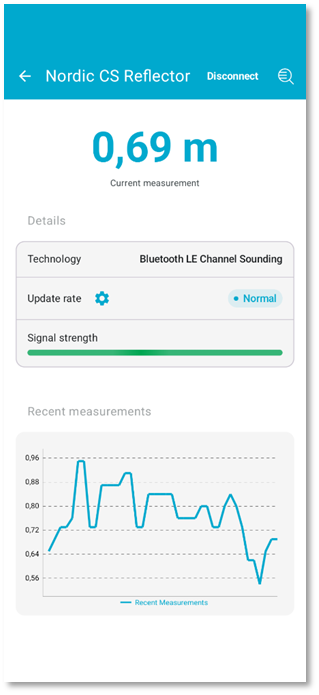
The screenshot below shows how the UI on the nRF Toolbox app looks when Channel Sounding is enabled, and the measurements are active.
Closing
Bluetooth Channel Sounding is one of the most significant enhancements to Bluetooth LE, and Nordic is proud to be at the forefront of its adoption. By combining the nRF54L Series with the open-source nRF Toolbox for Android app, we’re providing developers with the tools they need to explore, evaluate, and build innovative smartphone-connected products with next-level ranging capabilities.
In this blog post, we showed you what you’ll need on the hardware and software side to run a Channel Sounding demo on a smartphone using the nRF Toolbox, and walked you through the steps for evaluating the accuracy and performance of Channel Sounding using a Pixel 10 smartphone with Android 16 QPR2 acting as a Bluetooth Channel Sounding Initiator and an nRF54L15 device acting as the Reflector.

Top Comments