



Nordic Semiconductor is enabling full-featured Wi-Fi 6© applications on the nRF54LM20A SoC, paired with the nRF70 Series companion ICs. This powerful combination provides developers with the hardware and software tools needed to evaluate multi-protocol stack support and build next-generation connected products.
Table of Contents
- Why nRF54LM20A?
- SoC architecture and highlights
- nRF54LM20A is the ideal host for low-power Wi-Fi
- Security and architecture upgrades
- Key verticals and applications
- Memory requirements for Matter over Wi-Fi
- Evaluation hardware: nRF7002-EB II
- Getting started with nRF7002 and nRF54LM20A
- Closing
- References
Why nRF54LM20A?
The nRF54LM20A is Nordic’s latest addition to the nRF54L series of wireless SoCs. Featuring the highest memory configuration among the nRF54L series, it is an ideal host microcontroller for Wi-Fi applications that require larger NVM and lower system current consumption. All devices in the nRF54L series offer improvements over previous generations, making it the go-to platform for Matter, Aliro, and other advanced IoT protocols.
SoC architecture and highlights
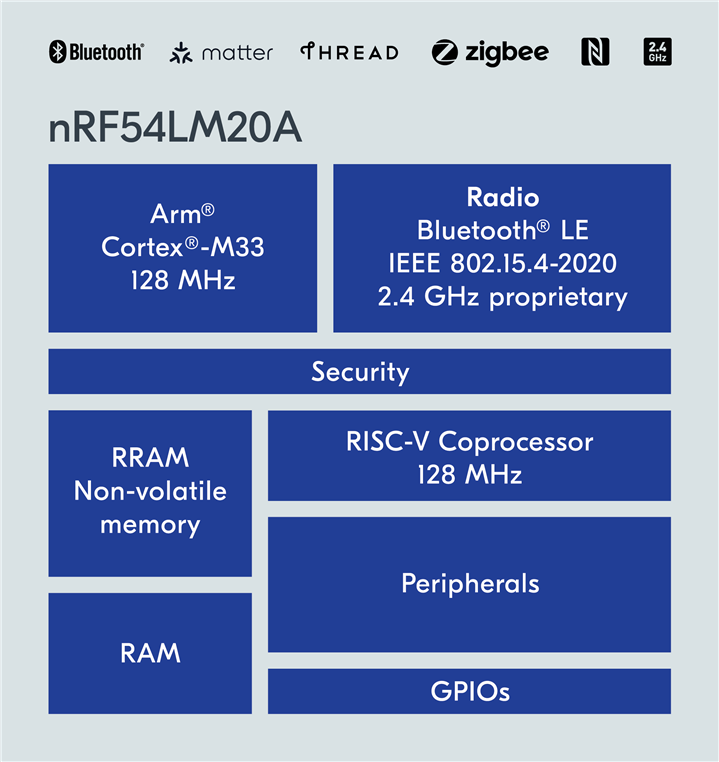
The nRF54LM20A features:
- Processor: Arm Cortex-M33 128 MHz
- CoreMark score: 503 CoreMark®, 3.93 CoreMark/MHz (executing from non-volatile memory)
- Memory: 2 MB on-chip NVM and 512 KB SRAM
- Security: Trusted execution environment enabled by TrustZone, tamper detection, and a cryptographic accelerator protected against side-channel attacks
- Peripherals: HW SPI for nRF70 Series interface, sQSPI available as SoftPeripheral on RISC-V coprocessor
- Radio: 4th generation 2.4 GHz multiprotocol radio supporting Bluetooth LE and Channel Sounding.
- Power: Significantly reduced with low-power-oriented architecture, individually controllable power domains, unique Nordic technologies and progression to 22nm process.
The nRF54LM20A delivers a leap in integration flexibility and future-proof memory capacity, while improving on current consumption and raw functionality, such as USB and up to 66 GPIOs.
nRF54LM20A is the ideal host for low-power Wi-Fi
The nRF54LM20A is an ideal choice for memory-intensive applications, such as hosting the Wi-Fi networking stack for the nRF70 Series. Along with ample on-chip RAM and NVM, nRF54LM20A supports several key features required for low power applications with the nRF70 companion devices:
- SPI ensures efficient communication with the nRF7002 Wi-Fi 6 companion IC
- QSPI emulation using SoftPeripherals with the RISC-V coprocessor allows for higher Wi-Fi data throughput
- Low-power architecture with unique RRAM-based NVM with fast wake and low leakage, ultra low current consumption in SoC Idle and SystemOFF modes, as well as low power transmit and receive operations with the 2.4 GHz multi-protocol radio.
- Standalone operation with the nRF7002 as a companion IC allows the nRF54LM20A host to stay in sleep mode, while the nRF7002 maintains association with the Wi-Fi access point. In the absence of Wi-Fi traffic the nRF54LM20A can support Wi-Fi connected stand-by operation while remaining entirely in System ON Idle state.
The above feature set makes nRF54LM20A ideal for smart home applications powered by Matter, which rely on Wi-Fi for OTA updates, local device access, cloud synchronization, or secondary communication alongside the Bluetooth LE or Thread radio.
Security and architecture upgrades
Compared to the robust nRF52 and nRF5340 devices, the nRF54LM20A introduces several key advancements:
- Advanced security infrastructure, including protection against side-channel attacks
- Upgraded cryptographic hardware for faster and more secure operations
- Enhanced multi-protocol radio, supporting advanced features like Bluetooth channel sounding for accurate ranging—ideal for smart-home applications requiring precise spatial awareness
Key verticals and applications
The nRF54LM20A in combination with the nRF7002 offers a broad range of applications such as:
- Home Automation: Matter-based smart home solutions, asset tracking, smart sensors, and lighting applications
- Cloud Connectivity and Device Management: Integration with Memfault, AWS, and Azure for diagnostics, firmware updates, and cloud services
- Multi-protocol: Bluetooth LE or Thread combined with multi-band Wi-Fi 6 for a complete and flexible connectivity platform
Memory requirements for Matter over Wi-Fi
nRF54LM20A is uniquely suited for Matter applications. With the nRF70 Series companion ICs, Matter applications can run on nRF54LM20A with Wi-Fi as the underlying transport protocol, using the on-chip Bluetooth LE radio for Matter device onboarding.
Matter over Wi-Fi applications are supported in the nRF Connect SDK with nRF5340 host SoC combined with nRF7002, however they are memory-intensive. A few representative examples of memory usage for Matter over Wi-Fi applications in release builds are given below:
| Sample | NVM usage (KB) | RAM usage (KB) |
| Light bulb | 879 | 289 |
| Lock | 885 | 291 |
| Thermostat | 885 | 289 |
These totals include MCUboot, application code, factory data, and settings. With only 1 MB of application processor NVM on the nRF5340, many applications require external flash for DFU and future scalability. In contrast, the nRF54LM20A offers 2 MB of on-chip low-leakage RRAM for future use cases which will inevitably exceed 1MB, while enabling more efficient low-power operation.
Evaluation hardware: nRF7002-EB II
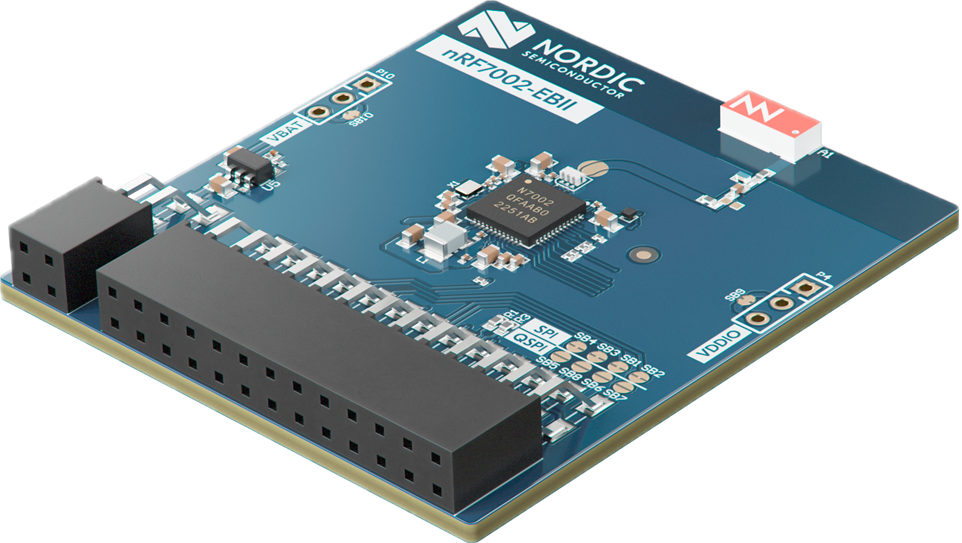
To help developers evaluate their Wi-Fi applications on nRF54LM20A, Nordic plans to release a new Wi-Fi Expansion Board with the nRF7002 companion IC with plug-and-play support for the nRF54LM20 DK.
The new expansion board (nRF7002 EB II) will be compatible with the latest development kits for the nRF54 Series devices. Key features include:
- Dual-band Wi-Fi 6: 2.4 GHz & 5 GHz low-power Wi-Fi 6 connectivity via the nRF7002 companion IC
- Host Interface: SPI communication with co-existence support
- Design Focus: Optimized for nRF54LM20 DK and future DK compatibility
- Software Support: nRF Connect SDK v3.2.0 onward
Getting started with nRF7002 and nRF54LM20A
While the nRF7002 EB II has not yet been officially released, initial support for the expansion board is already present in the nRF Connect SDK along with documentation for how to build and run Wi-Fi example applications on the nRF54L Series DKs.
Logs of successful connection are provided below, based on the Wi-Fi Shell application in the nRF Connect SDK on the nRF54LM20A target.
Boot:
[00:00:00.006,803] <inf> wifi_nrf_bus: SPIM spi@c8000: freq = 8 MHz
[00:00:00.006,819] <inf> wifi_nrf_bus: SPIM spi@c8000: latency = 0
[00:00:00.263,691] <inf> fs_nvs: 2 Sectors of 4096 bytes
[00:00:00.263,696] <inf> fs_nvs: alloc wra: 0, fd0
[00:00:00.263,700] <inf> fs_nvs: data wra: 0, 0
*** Booting nRF Connect SDK v3.1.99-5154e433ae20 ***
*** Using Zephyr OS v4.2.99-d792280a1c86 ***
Starting nrf54lm20dk with CPU frequency: 128 MHz
[00:00:00.264,809] <inf> wifi_supplicant: wpa_supplicant initialized
uart:~$
Scan:
uart:~$ wifi scan
Scan requested

Num  | SSID                             (len) | Chan (Band)   | RSSI | Security             | BSSID             | MFP
1    | FTM_2                            5     | 149  (5GHz  ) | -32  | WPA2-PSK             | 14:22:3B:53:E1:9F | Disable
2    | CI_AIRTEL_XSTREAM_G_2425G_A_1952 32    | 161  (5GHz  ) | -37  | WPA2-PSK             | C8:9C:BB:12:9C:9D | Disable
3    | CI_ENGENIUS_EAP600_69241         24    | 36   (5GHz  ) | -37  | OPEN                 | 88:DC:96:36:7A:3B | Disable
4    | CI_TPLINK_EAP773_5G              19    | 153  (5GHz  ) | -38  | WPA2-PSK             | 20:23:51:40:C9:11 | Disable
5    | CI_ENGENIUS_EAP600_521016        25    | 1    (2.4GHz) | -39  | WPA2-PSK             | 88:DC:96:36:7A:3A | Disable
6    | NETGEAR_WAX214_5G                17    | 44   (5GHz  ) | -40  | OPEN                 | 96:18:65:68:E6:D1 | Disable
7    | HOST_AJAY_ASUS_5G                17    | 36   (5GHz  ) | -41  | WPA3-SAE-HNP         | 24:4B:FE:AD:EB:B4 | Optional
8    | 5G_FRITZ_BOX_6660                17    | 56   (5GHz  ) | -43  | OPEN                 | D4:24:DD:AE:D5:7B | Disable
9    | UNIFI_5G                         8     | 36   (5GHz  ) | -43  | WPA2-PSK             | 78:45:58:28:DA:2C | Disable
10   | abcd_5                           6     | 36   (5GHz  ) | -44  | OPEN                 | D4:24:DD:DA:97:39 | Disable
11   | CI_TPLINK_EAP773_24G             20    | 1    (2.4GHz) | -45  | WPA2-PSK             | 20:23:51:40:C9:10 | Disable
12   | TPLINK_EAP245                    13    | 153  (5GHz  ) | -46  | WPA2-PSK             | 10:27:F5:97:CA:9F | Disable
13   |                                  0     | 100  (5GHz  ) | -46  | WPA2-PSK             | 60:CF:84:3A:96:A4 | Optional
14   | SAMPLE                           6     | 40   (5GHz  ) | -46  | WPA-PSK              | D8:44:89:1E:E3:43 | Disable
15   | ASUS_A0_IoT                      11    | 100  (5GHz  ) | -47  | WPA2-PSK             | D2:CF:84:3A:96:A6 | Disable
16   | ASUS_A0                          7     | 100  (5GHz  ) | -47  | WPA3-SAE-HNP         | D2:CF:84:3A:96:A5 | Optional
17   | CI_ASUS_RTAX88U_759201           22    | 36   (5GHz  ) | -47  | OPEN                 | E8:9C:25:BA:8F:F4 | Disable
18   | HUAWEI-5G-7qFT                   14    | 36   (5GHz  ) | -47  | WPA2-PSK             | 6E:26:36:A3:78:CC | Disable
19   | CI_ASUS_RTAX88U_842604           22    | 1    (2.4GHz) | -47  | WPA3-SAE-HNP         | E8:9C:25:BA:8F:F0 | Required
20   |                                  0     | 153  (5GHz  ) | -48  | WPA3-SAE-HNP         | 50:EB:F6:AE:84:CC | Optional
21   | ASUS_A0                          7     | 10   (2.4GHz) | -48  | WPA3-SAE-HNP         | B2:CF:84:3A:96:A1 | Optional
22   | HOST_AJAY_ASUS_24G               18    | 124  (5GHz  ) | -48  | WPA3-SAE-HNP         | 24:4B:FE:AD:EB:B0 | Optional
23   | Airtel_Zerotouch_5G              19    | 157  (5GHz  ) | -49  | WPA-PSK              | F4:27:56:34:35:C1 | Disable
24   | BELKIN_F9K1103V1                 16    | 132  (5GHz  ) | -49  | WPA2-PSK             | A8:40:F8:06:3A:2C | Optional
25   | ssid                             4     | 112  (5GHz  ) | -49  | WPA2-PSK             | CE:28:AA:70:BE:AC | Disable
26   | BELKIN_F9K1103V1                 16    | 60   (5GHz  ) | -49  | WPA2-PSK             | A8:40:F8:06:3A:28 | Optional
27   | NETGEAR_WAX214_24G               18    | 9    (2.4GHz) | -49  | WPA2-PSK             | 94:18:65:48:E6:D1 | Disable
28   | ZyXELD36228                      11    | 6    (2.4GHz) | -49  | OPEN                 | 00:02:6F:12:34:56 | Disable
29   | SAMPLE                           6     | 4    (2.4GHz) | -50  | OPEN                 | D8:44:89:1E:E3:42 | Disable
30   | zyxel_nwa_1123_5                 16    | 36   (5GHz  ) | -52  | OPEN                 | 5E:F4:AB:F9:8F:1C | Disable
31   | zyxel_nwa_1123_5                 16    | 36   (5GHz  ) | -52  | OPEN                 | 5C:F4:AB:F9:8F:1C | Disable
---
---
---
---
---
---
90   | EWA@IoTG                         8     | 64   (5GHz  ) | -81  | WPA2 Enterprise      | 80:8D:B7:BF:0F:73 | Disable
91   | EWA@INTERNET                     12    | 64   (5GHz  ) | -81  | WPA2 Enterprise      | 80:8D:B7:BF:0F:71 | Disable
92   | EWA@GUEST                        9     | 64   (5GHz  ) | -81  | OPEN                 | 80:8D:B7:BF:0F:70 | Disable
93   | CI_ASUS_RTAX88U_639992           22    | 36   (5GHz  ) | -81  | WPA3-SAE-HNP         | 04:42:1A:B9:90:2C | Required
94   | MCO_Zone1                        9     | 52   (5GHz  ) | -83  | WPA2-PSK             | 7C:5A:1C:44:A7:AE | Disable
95   | MCO_MCO                          7     | 52   (5GHz  ) | -83  | WPA2-PSK             | 7C:5A:1C:44:A7:AD | Disable
96   | EWA@IoTG                         8     | 56   (5GHz  ) | -84  | WPA2 Enterprise      | 80:8D:B7:BD:1F:93 | Disable
97   | EWA@INTERNET                     12    | 56   (5GHz  ) | -84  | WPA2 Enterprise      | 80:8D:B7:BD:1F:91 | Disable
98   |                                  0     | 48   (5GHz  ) | -85  | WPA2-PSK             | E6:D3:62:1B:85:23 | Disable
99   | sia24                            5     | 48   (5GHz  ) | -86  | WPA2-PSK             | E0:D3:62:1B:85:23 | Disable
Scan request done
Connect/Ping:
uart:~$ wifi connect -s NORDIC-GUEST -k 1 -p xyzabcd1234
Connection requested
Connected
[00:01:04.084,596] <inf> wpa_supp: wlan0: SME: Trying to authenticate with f0:1d:2d:72:eb:ef (SSID='NORDIC-GUEST' freq=5620 M)
[00:01:04.107,633] <inf> wpa_supp: wlan0: Trying to associate with f0:1d:2d:72:eb:ef (SSID='NORDIC-GUEST' freq=5620 MHz)
[00:01:04.134,879] <inf> wpa_supp: wlan0: Associated with f0:1d:2d:72:eb:ef
[00:01:04.135,492] <inf> wpa_supp: wlan0: CTRL-EVENT-SUBNET-STATUS-UPDATE status=0
[00:01:04.959,922] <inf> wpa_supp: wlan0: WPA: Key negotiation completed with f0:1d:2d:72:eb:ef [PTK=CCMP GTK=CCMP]
[00:01:04.960,316] <inf> wpa_supp: wlan0: CTRL-EVENT-CONNECTED - Connection to f0:1d:2d:72:eb:ef completed [id=0 id_str=]
[00:01:14.325,392] <inf> net_dhcpv4: Received: 192.168.51.78
uart:~$


uart:~$ net dns google.com
Query for 'google.com' sent.
dns: 142.250.74.142
dns: All results received

uart:~$ net ping 142.250.74.142
PING 142.250.74.142
28 bytes from 142.250.74.142 to 192.168.51.78: icmp_seq=1 ttl=115 time=398 ms
28 bytes from 142.250.74.142 to 192.168.51.78: icmp_seq=2 ttl=115 time=322 ms
28 bytes from 142.250.74.142 to 192.168.51.78: icmp_seq=3 ttl=115 time=344 ms
uart:~$
Availability of development kits and samples
The nRF54LM20A is ready for development. We’ve opened the project-based early access program to enable access to the nRF54LM20A DK and samples. To apply for access, please fill out the form here nordicsemi.com/nRF54LM20A or contact our Nordic sales representative directly. Reach out to your Nordic sales representative for nRF7002-EB II access.
Closing
The nRF54LM20A, in combination with the nRF70 Series, is more than just a technical upgrade. It is a strategic cornerstone in Nordic Semiconductor’s roadmap for Wi-Fi-enabled IoT. We are committed to supporting developers with a modern, scalable, and cost-effective platform that enables them to build, test, and launch full-featured Wi-Fi applications across key verticals like smart home, access control, and cloud-connected devices. With long-term support through the nRF Connect SDK, dedicated hardware tools, and a clear focus on future-proofing memory and power requirements, Nordic ensures that developers can confidently bring their products to market and evolve with the demands of tomorrow’s connected world.
