Can the SWD port (P8) be used to collect Trace data using a serial-to-usb cable?

Hi,

I was looking to collect trace data from the Thingy:91, but it says I need to use the nRF9160-DK, or other more complicated board to connect to the debug header (P8), using a dedicated SWD 10-pin connector.  However, looking at the circuit diagram, it seem that that only 3 lines (SWDIO, SWDCLK, RESET) + GND are used. 
So I am wondering if...

Can I use a 1.8v serial-to-USB cable instead?
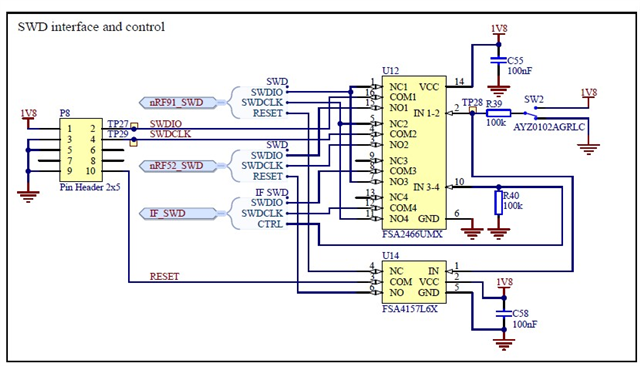
Yes, I know this is not a great way, but it depends on the requirements for CLK and RESET. I was hoping that perhaps it would be enough to keep RESET low, and that the CLK is not really used to clock signals, and just keep it floating or something, and connecting serial Rx to IO.

Parents Reply Children
  •  I'm not sure I understand what you are trying to achieve. Could you please elaborate?

    To collect a modem trace from the nRF9160, you can follow this guide on our Infocenter. This uses UART over USB (default). From the description you provided it sounds like you want to change the modem trace backend to use RTT, as desribed here. If you are referring to the latter to collect modem trace from a Thingy:91, then you will need to use a DK as this has an onboard Segger debugger which allows SWD connection for debugging and programming.

    You can test the modem tracing using e.g. debug enabled asset tracker v2 from our precompiled firmware package (found under downloads in the Thingy:91 product page). This works out of the box with UART/USB modem trace.

    More information can be found under Working with Thingy:91.

    Kind regards,
    Øyvind

  • Hi ,
    Thanks for the quick answer!

    Yes, I wanted to get a Modem Trace but not having to attach the 9160-DK (Segger) debugger via the required special SWD cable, since I don't have one! (So I was trying to hack one up, as described above.)

    I didn't know that the *debug enabled FW would allow us to collect Modem Trace data over the USB interface without the debugger cable. (I have not tried this yet.) 

    Please confirm I understood this right.


    UPDATE 2023-06-19

    Tried the debug shell and it works. Thank you!

Related