Mcuboot first stage, stadalone, bootloader create a merged.hex with two applications one in each slot

Hello,

I'm working on a project where I utilize mcuboot in standalone mode with two slots for updating a single application via mcumgr.

I have a scenario where I need to merge a .hex file, placing my main application in slot 1 and a test app in slot 0. The goal is to flash both mcuboot + test_app (slot 0) and the main app (slot 1) in a single .hex file during production.

I've implemented the method from this guide under "Adding a child image using Zephyr modules." While the merged.hex appears to include both applications, I'm facing an issue with mcumgr. It's unable to detect the application in slot 1, even though I can confirm its presence via the nrfconnect - programmer app.

Do you have any examples or guidance on this? Is such a use case supported by mcumgr/mcuboot?

Is there any specific metadata or configuration that mcumgr/mcuboot expects during a regular update via mcumgr, which might be causing the app in slot 1 to be undetectable?

Thank you for your assistance!

Parents
  • Hi, 

    Check the .config filde under build/zephyr and make sure CONFIG_PARTITION_MANAGER_ENABLED is enabled. 

    Do you have any examples or guidance on this? Is such a use case supported by mcumgr/mcuboot?

    See my colleague's example https://github.com/hellesvik-nordic/samples_for_nrf_connect_sdk/tree/main/bootloader_samples/smp 

    Regards,
    Amanda H.

  • Hi Amanda, 

    Thank you for your message. None of the samples do precisely what I need (but they're great examples of other things that we may run into, thank you for sharing!).

    I want a merged.hex with mcuboot+ App1 in slot#0 and App2 in slot#1.
    I already achieved this by having two distinct applications, build each and using the `imgtool` to sign and use `--hex--addr` in the second to put it in the mcuboot slot#1 and finally join them together with the mergehex.py script. I am doing this while using a pm_static.yml to always have the same slot size and a consistent `--hex--addr` for the mcuboot #slot1.

    Do you see any problem with my approach or better ways to do it?

    Thank you,
    Pedro Sousa

  • Hi, 

    Not sure if I understand your requirement correctly or not. 

    The secondary slot is for the updated image. See the explanation here.  

    -Amanda H.

  • Hi Amanda,

    I understand and I want to use it for OTA updates in the field.

    But during the production of the device I want to program the device only once to save time (only one .hex file) and have both the mcuboot + HW tests application for the production line + Final Application for users of my device.

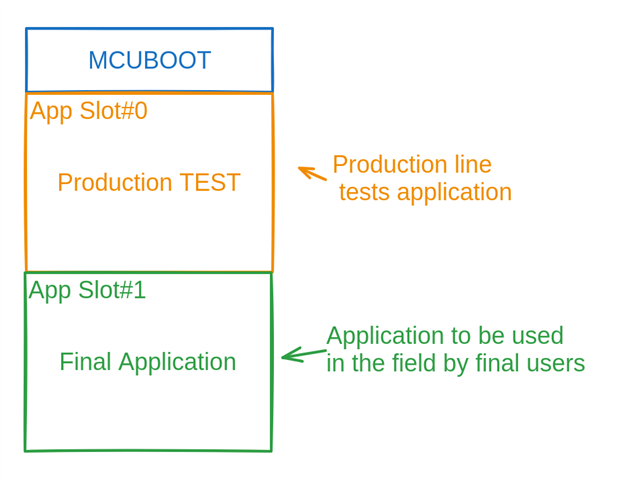
    Using the programmer only once I want my Flash to look like this:

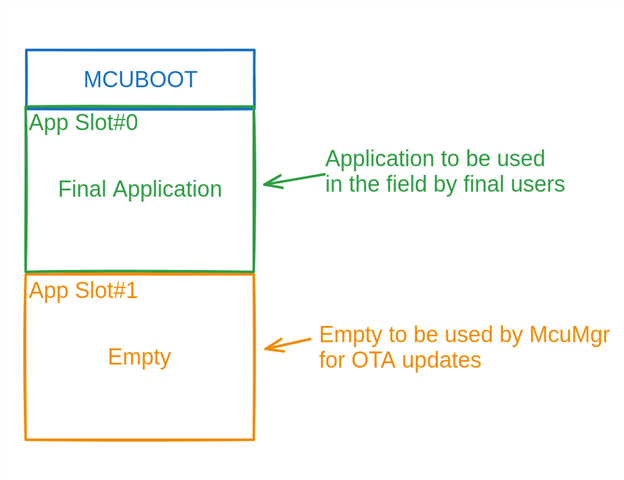
    During the production of the device, my Production Test app runs in my testing fixtures and before packing the device I use the mcumgr to switch the Final Application to Slot#0 and erase the Production test app. To have the flash like this:


    The goal of this is to reduce the time spent flashing multiple applications when producing the device.

    I would like to understand if there is a better way to do this than the one I described in my previous answer to produce one .hex file with: Mcuboot + HW tests application + Final application.

    And also if this approach may raise any issues that I might be overlooking.

    Thank you,
    Pedro Sousa

Reply
  • Hi Amanda,

    I understand and I want to use it for OTA updates in the field.

    But during the production of the device I want to program the device only once to save time (only one .hex file) and have both the mcuboot + HW tests application for the production line + Final Application for users of my device.

    Using the programmer only once I want my Flash to look like this:

    During the production of the device, my Production Test app runs in my testing fixtures and before packing the device I use the mcumgr to switch the Final Application to Slot#0 and erase the Production test app. To have the flash like this:


    The goal of this is to reduce the time spent flashing multiple applications when producing the device.

    I would like to understand if there is a better way to do this than the one I described in my previous answer to produce one .hex file with: Mcuboot + HW tests application + Final application.

    And also if this approach may raise any issues that I might be overlooking.

    Thank you,
    Pedro Sousa

Children
Related