Changing the default output of a GPIO in nRF5340 kit to be 3.3 v instead of 1.8 v.

Hi I'm using nRF7002-DK kit and I noticed that the output voltage of a GPIO is 1.8 V instead of a 3.3 V. I have encountered a solution mentioned that we should apply these two instructions: 

nrfjprog --memwr 0x10001304 --val 5
nrfjprog -r

Can you tell how to apply these two instructions knowing that I use visual studio. 

Many thanks in advance. 

Parents
  • Hi!

    There are 2 alternatives on how this can be done.

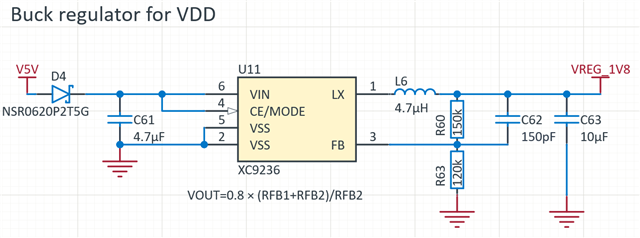
    1) If this should be permanent, it's possible to change the resistor values for the 1.8V regulator to make it generate 3.3V.It's not something we have intended for the customer to do. It's basically reading the datasheet of the regulator and change the resistor divider according to the formula. As these are 0201 components, you need steady hands and microscope to change it.
    For 3.3V R60 =470k and R63 =150k.

    2) If you have an external power supply (or voltage level), you can feed the VIO REF pin(with 3.3V), which will switch the power to the voltage follower circuit.

Reply
  • Hi!

    There are 2 alternatives on how this can be done.

    1) If this should be permanent, it's possible to change the resistor values for the 1.8V regulator to make it generate 3.3V.It's not something we have intended for the customer to do. It's basically reading the datasheet of the regulator and change the resistor divider according to the formula. As these are 0201 components, you need steady hands and microscope to change it.
    For 3.3V R60 =470k and R63 =150k.

    2) If you have an external power supply (or voltage level), you can feed the VIO REF pin(with 3.3V), which will switch the power to the voltage follower circuit.

Children
Related