Beware that this post is related to an SDK in maintenance mode
More Info: Consider nRF Connect SDK for new designs

SDK for Mesh: ERROR_INVALID_DATA from Packet Send command

Hi,

This project is about our existing gateway designs using nRF SDK for Mesh v5.0.0. The firmware is based on the serial example using a custom machine-machine interface. Only modifications to the serial example were increasing the replay cache to 1024 entries and adding a variation of the Packet Send command at the opcode 0xB0 that allows us to use the Packet Send functionality using unicast addresses directly instead of address handles. This latter detail is important as we use that Packet Send command.

There are three gateways each with a different unicast address. The mesh network consists of three subnets and three appkeys, each gateway being responsible for one subnet and appkey. There are also two provisioners first one starting from 0x0001 and the other from 0x2FFF.

On one gateway with unicast address 0x2012, our Packet Send keeps returning error code 0x87 for ERROR_INVALID_DATA. This is one example:

Nov 14 09:14:34 lynxgw19401107 ezmeshsys[19450]: [MeshManager] [SendGwMeshStatusAckInd] Send ACK for Status message...
Nov 14 09:14:34 lynxgw19401107 ezmeshsys[19450]: TX data buf: 12 b0 00 00 12 20 78 01 1e 00 00 00 c8 93 04 01 00 00 00
Nov 14 09:14:34 lynxgw19401107 ezmeshsys[19450]: *** localhost Queue size 1
Nov 14 09:14:34 lynxgw19401107 ezmeshsys[19450]: *** 10.16.0.1 Queue size 1
Nov 14 09:14:34 lynxgw19401107 ezmeshsys[19450]: *** localhost Queue size 1
Nov 14 09:14:34 lynxgw19401107 ezmeshsys[19450]: *** 10.16.0.1 Queue size 1
Nov 14 09:14:34 lynxgw19401107 ezmeshsys[19450]: UART_TX 19
Nov 14 09:14:34 lynxgw19401107 ezmeshsys[19450]: Sent :
Nov 14 09:14:34 lynxgw19401107 ezmeshsys[19450]: Length: 19 : 12 b0 00 00 12 20 78 01 1e 00 00 00 c8 93 04 01 00 00 00
Nov 14 09:14:34 lynxgw19401107 ezmeshsys[19450]: ===> UART : Received: Length: 3 : 84 b0 87
Nov 14 09:14:34 lynxgw19401107 ezmeshsys[19450]: [uart_process] Received UART Buffer: Size: 3 --- Buffer: 84 b0 87
Nov 14 09:14:34 lynxgw19401107 ezmeshsys[19450]: >>>>>>>> Received msg_mesh_gw_cmd_rsp (Original Op Code: 0xb0 => Unknown incoming message; Status: 0x87 => ERROR_INVALID_DATA)

Our gateway is trying to send a simple ACK message in reply to a device with unicast address 0x0178 but as you can see, no luck. This image may be clearer:
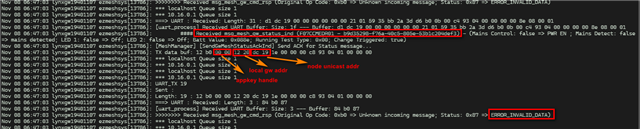
Labelled command

In serial_handler_mesh.c, there are two places in our code that can return ERROR_INVALID_DATA, lines 31 and 57:

/*
    Send a packet direct to a unicast address
    Do not use for a group address
*/
static void handle_cmd_direct_packet(const serial_packet_t * p_cmd)
{
    nrf_mesh_tx_params_t tx_params;
    memset(&tx_params, 0, sizeof(tx_params));

    serial_evt_cmd_rsp_data_packet_send_t rsp;
    rsp.token = nrf_mesh_unique_token_get();

    uint32_t status;

    nrf_mesh_address_t address;
    memset(&address, 0, sizeof(address));

    // Address handle is actually the 16 bit unicast address here
    address.value = p_cmd->payload.cmd.mesh.packet_send.dst_addr_handle;
    address.type = NRF_MESH_ADDRESS_TYPE_UNICAST;
    address.p_virtual_uuid = NULL;

    tx_params.dst = address;

    dsm_local_unicast_address_t valid_src_addrs;
        dsm_local_unicast_addresses_get(&valid_src_addrs);

    if (p_cmd->payload.cmd.mesh.packet_send.src_addr <  valid_src_addrs.address_start ||
        p_cmd->payload.cmd.mesh.packet_send.src_addr >= valid_src_addrs.address_start + valid_src_addrs.count)
    {
        status = NRF_ERROR_INVALID_ADDR;
    } else
    {
        {
            status = dsm_tx_secmat_get(DSM_HANDLE_INVALID,
                                        p_cmd->payload.cmd.mesh.packet_send.appkey_handle,
                                        &tx_params.security_material);
        }
        if (status == NRF_SUCCESS)
            {
                tx_params.src       = p_cmd->payload.cmd.mesh.packet_send.src_addr;
                tx_params.ttl       = p_cmd->payload.cmd.mesh.packet_send.ttl;
                tx_params.force_segmented  = p_cmd->payload.cmd.mesh.packet_send.force_segmented;
                tx_params.transmic_size = (nrf_mesh_transmic_size_t) p_cmd->payload.cmd.mesh.packet_send.transmic_size;
                if (p_cmd->length > NRF_MESH_SERIAL_PACKET_OVERHEAD + SERIAL_CMD_MESH_PACKET_SEND_OVERHEAD)
                {
                    tx_params.p_data    = p_cmd->payload.cmd.mesh.packet_send.data;
                    tx_params.data_len  = p_cmd->length - SERIAL_CMD_MESH_PACKET_SEND_OVERHEAD - NRF_MESH_SERIAL_PACKET_OVERHEAD;
                }
                else
                {
                    tx_params.p_data = NULL;
                    tx_params.data_len = 0;
                }
                tx_params.tx_token = rsp.token;

                status = nrf_mesh_packet_send(&tx_params, NULL);
            }
    }
    serial_handler_common_cmd_rsp_nodata_on_error(p_cmd->opcode, status, (uint8_t *) &rsp, sizeof(rsp));
}

However I'm not sure which one it is. The device is currently onsite with no remote debug access. Could you perhaps point me to the issue?

Regards,

Arif

Parents
  • Hi,

    This may be a shot in the dark, but the comment above the handle_cmd_direct_packet() function states it should not be used for group addresses. Depending on byte order, the unicast address marked in the screenshot is either 0x19DC (which is correctly a unicast address) or it is 0xDC19 which is in the group address range. If it is the latter, maybe that has something to do with the issue that you see?

    I see that the response message indicating error (84 b0 87) comes as a response to an opcode b0 message (which is your custom command.) From what I understand, this is handled by the handle_cmd_direct_packet() function that you posted the source code for here. If the address.value is a group address, then address.type of NRF_MESH_ADDRESS_TYPE_UNICAST should make the call on line 57 to nrf_mesh_packet_send() return the NRF_ERROR_INVALID_ADDR error, which is then translated to SERIAL_STATUS_ERROR_INVALID_DATA, so this could be the cause of the issue.

    However the issue may also come from the status code NRF_ERROR_INVALID_ADDR, since that one too is translated to SERIAL_STATUS_ERROR_INVALID_DATA, so it may as well come from the if on lines 28 to 29 evaluating to true and returning that error from line 31.

    Are you able to trigger the same error locally, through sending the same message as you see in the log? (12 b0 00 00 12 20 78 01 1e 00 00 00 c8 93 04 01 00 00 00). A debug session, or triggering the issue with more logging, would allow you to narrow down where the issue may lie. Without more information it is hard to be more specific regarding what may fail and why.

    Regards,
    Terje

  • Hi Terje,

    Thanks for your advice, I admit submitting the ticket as it was gave you quite a small amount of information to work with. 

    This may be a shot in the dark, but the comment above the handle_cmd_direct_packet() function states it should not be used for group addresses. Depending on byte order, the unicast address marked in the screenshot is either 0x19DC (which is correctly a unicast address) or it is 0xDC19 which is in the group address range. If it is the latter, maybe that has something to do with the issue that you see?

    The byte order was in little endian so 0x19DC is correct. At any rate I don't think it's related to an incorrect address issue directly. We've recently programmed a new gateway up to switch out with the one at the customer site. Same net and appkeys from the json file. And it worked flawlessly. We then took the problematic gateway to the office and I modified the firmware to log the lines 31 and 57 to RTT. 

    I did a chiperase to flash the onboard nRF module with that firmware. And then curiously it started working properly after we put in the keys again. We're going to return the gateway to the site to further test its functionality.

    My guess is that the original set of keys on that gateway was wrong somehow. Do you remember my other ticket: nRF SDK for Mesh serial example - Unable to delete appkey - Nordic Q&A - Nordic DevZone - Nordic DevZone (nordicsemi.com)?

    I think it might be related because we sometimes conduct integration tests on gateways on our local office mesh network before sending it to a customer site. We then delete the keys and other configuration data for final provisioning for the customer site. I'll have to check how our backend engineer handled the deletion of keys. If they used the delete subnet or delete appkey commands, then like my ticket previously, they would have ended with one appkey that refuses to be deleted for some reason.

    Do you concur?

    Regards,

    Arif

Reply
  • Hi Terje,

    Thanks for your advice, I admit submitting the ticket as it was gave you quite a small amount of information to work with. 

    This may be a shot in the dark, but the comment above the handle_cmd_direct_packet() function states it should not be used for group addresses. Depending on byte order, the unicast address marked in the screenshot is either 0x19DC (which is correctly a unicast address) or it is 0xDC19 which is in the group address range. If it is the latter, maybe that has something to do with the issue that you see?

    The byte order was in little endian so 0x19DC is correct. At any rate I don't think it's related to an incorrect address issue directly. We've recently programmed a new gateway up to switch out with the one at the customer site. Same net and appkeys from the json file. And it worked flawlessly. We then took the problematic gateway to the office and I modified the firmware to log the lines 31 and 57 to RTT. 

    I did a chiperase to flash the onboard nRF module with that firmware. And then curiously it started working properly after we put in the keys again. We're going to return the gateway to the site to further test its functionality.

    My guess is that the original set of keys on that gateway was wrong somehow. Do you remember my other ticket: nRF SDK for Mesh serial example - Unable to delete appkey - Nordic Q&A - Nordic DevZone - Nordic DevZone (nordicsemi.com)?

    I think it might be related because we sometimes conduct integration tests on gateways on our local office mesh network before sending it to a customer site. We then delete the keys and other configuration data for final provisioning for the customer site. I'll have to check how our backend engineer handled the deletion of keys. If they used the delete subnet or delete appkey commands, then like my ticket previously, they would have ended with one appkey that refuses to be deleted for some reason.

    Do you concur?

    Regards,

    Arif

Children
  • Hi,

    Arif@Lynxemi said:

    If they used the delete subnet or delete appkey commands, then like my ticket previously, they would have ended with one appkey that refuses to be deleted for some reason.

    Do you concur?

    I agree that if the device was tested on your network, then keys were erased not with the workaround of using a Bluetooth Mesh State Clear command, then that might have led to issues. This would be a good path to investigate further for the issue that you see here.

    If it turns out the device was not previously configured, or previously configured and then reset using the workaround from the other case, then the course of action would be a new look into this current issue to see what other causes there might be.

    Regards,
    Terje

Related