I followed installation instructions of the VSCode plugin and trying to build some simple sample.
In the build configuration I do not see the nrf7002dk board as an option.
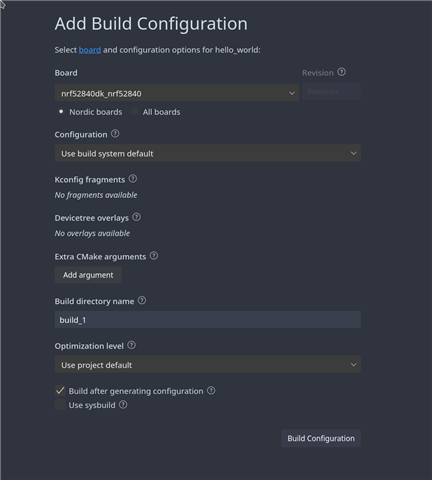
I followed installation instructions of the VSCode plugin and trying to build some simple sample.
In the build configuration I do not see the nrf7002dk board as an option.

Hi,
Which version of the nRF Connect SDK are you using?
This might be due to the SDK not being installed completely. Can you verify that you have the nrf directory and that the directory boards/arm/nrf7002dk_nrf5340 exists under nrf?
The directory structure should be similar to this:
└─── <west-workspace>/ ├─── .west/ ├─── bootloader/ ├─── modules/ ├─── nrf/
└─── boards
└─── arm
└─── nrf7002dk_nrf5340
├─── nrfxlib/ ├─── zephyr/ └─── ...
Best regards,
Marte
Hi,
Which version of the nRF Connect SDK are you using?
This might be due to the SDK not being installed completely. Can you verify that you have the nrf directory and that the directory boards/arm/nrf7002dk_nrf5340 exists under nrf?
The directory structure should be similar to this:
└─── <west-workspace>/ ├─── .west/ ├─── bootloader/ ├─── modules/ ├─── nrf/
└─── boards
└─── arm
└─── nrf7002dk_nrf5340
├─── nrfxlib/ ├─── zephyr/ └─── ...
Best regards,
Marte
Hi Marte,
I managed to build from the command line, after some issues. So I probably will not pursue the `VSCode` plugin and simply uninstall it.
Thanks for your prompt response !
Hi,
I am glad to hear that you found a solution! I will close this ticket as solved then. Do not hesitate to create a new ticket if you run into more issues
Best regards,
Marte