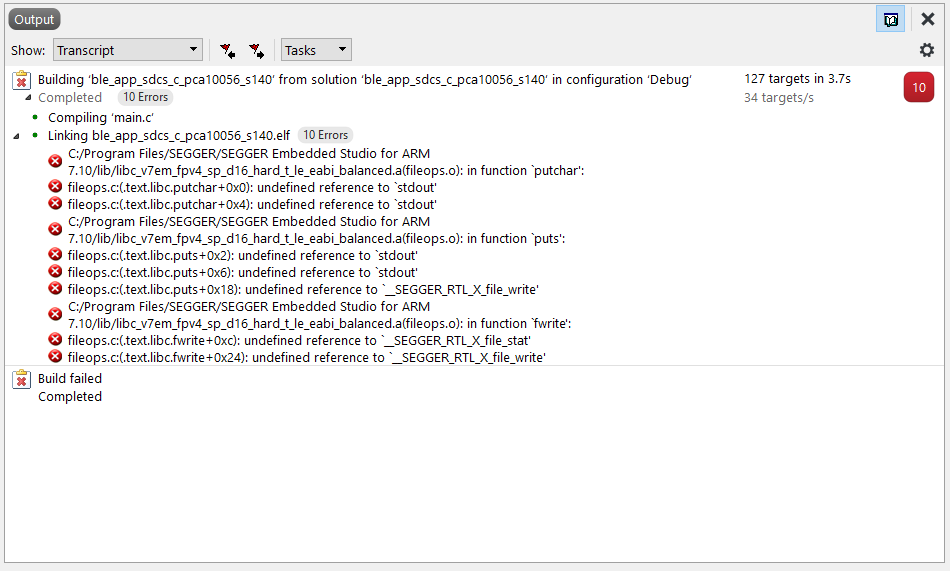
Hello,
I have created my own BLE project. My main looks like this:
int main(void)
{
    //bool erase_bonds;

    // Initialize.
    log_init(); // uses UART
    timer_init();
    //bsp_board_init(BSP_INIT_LEDS);
    power_management_init();
    buttons_leds_init(&erase_bonds);
    uart_init(); // uses UART
    ble_stack_init();
    gatt_init();
    peer_manager_init();
    db_discovery_init();
    //hrs_c_init();
    sdcs_c_init();
    bas_c_init();
    scan_init();

    NRF_LOG_INFO("SDCS client started.");

    scanning_start(&erase_bonds);

    NRF_LOG_INFO("Waiting for Button press...");
    NRF_LOG_INFO("Button 2 -> start authentication");
    NRF_LOG_INFO("Button 3 -> remote access open door request");
    NRF_LOG_INFO("Button 4 -> set new encryption key via uart");

    // Enter main loop.
    for (;;)
    {
        idle_state_handle();
    }
}
As you can see I initialize some modules (e.g. the logging module and the uart module) and I start scanning. After that I can establish a connection to another BLE (peripheral) device.
Debug log:
<info> app_timer: RTC: initialized.
<info> app: SDCS client started.
<info> app: Starting scan.
<info> app: Waiting for Button press...
<info> app: Button 2 -> start authentication
<info> app: Button 3 -> remote access open door request
<info> app: Button 4 -> set new encryption key via uart
<info> app: Connected. m_conn_handle: 0x0
<info> app: GATT ATT MTU on connection 0x0 changed to 247.
<info> app: BLE_GATTC_EVT_EXCHANGE_MTU_RSP
<info> app: Data length for connection 0x0 updated to 251.
<info> app: SDCS discovered.
<info> ble_sdcs_c: Configuring CCCD. CCCD Handle = 14, Connection Handle = 0
<info> app: BLE_GATTC_EVT_WRITE_RSP, gatt_status: 0x0
<info> app: BLE_GATT_HVX_NOTIFICATION
As soon as the central is connected to the peripheral I can initiate the required authentication process by pressing Button 2. For the authentication I use an encryption key for AES-128 CBC (no padding) encryption. So far this all works when the connected peripheral device is using the standard encryption key. It doesn't work when it has set a custom encryption key.
Now I want to add functionality to my central so that when I press Button 4 on my central device it should show me some information on my RTT (terminal in Segger Embedded Studio) to instruct me to type in a desired encryption key. Then I want to be able to type in the desired encryption key by using UART (via MCU USB port (COM7) on my nRF52840 DK and PuTTY). Once I type q or Q in PuTTY terminal, UART should stop receiving via UART and let me process the input string in my firmware while still not running into errors.
So far I tried to realise this by using code from the examples/peripheral/uart/pca10056/blank/ses example solution. I can debug this example programm and it works.
Because I use the logging module and the uart module from the example program, I got an error in the initialization. I prevent that error from happening by disabling UART for the logging module (NRF_LOG_BACKEND_UART_ENABLED 0 in sdk_config.h). Now the logger is only using RTT.
My current problem is that I don't know exactly how I can make it work with the buttons. Currently I start scanning for BLE peripheral devices near the end of main() before I run into that infinite loop. This way button 2 and 3 work (but get errors because my peer has a custom encryption key) and button 4 doesn't work (it doesn't even show my NRF_LOG_INFO("...") commands on RTT when I press button 4 right after the BLE connection has been established).
my event handler:
void bsp_event_handler(bsp_event_t event)
{
    ret_code_t err_code;

    switch (event)
    {
    /*
        case BSP_EVENT_KEY_0:
        {
            NRF_LOG_INFO("Button 1 pressed.");
            // Start execution.
            NRF_LOG_INFO("SDCS client started.");

            scanning_start(&erase_bonds);

            // Handle any pending log operation(s), then sleep until the next event occurs.
            for (;;)
            {
                idle_state_handle();
            }
            break;
        }
        */
        case BSP_EVENT_KEY_1:
        {
            NRF_LOG_INFO("Button 2 pressed.");

            p_sdcs_auth->value = auth_value;

            p_sdcs_auth = &auth_params;
            p_sdcs_auth->auth_failed = false;

            #ifdef TEST
              sdcs_auth_challenge_test(p_sdcs_auth); // sendet eine fertige challenge
            #else
              sdcs_auth_challenge(p_sdcs_auth); // Funktion für Echtfall enthält ebenfalls Test-Funktionalität die aktiviert werden kann
            #endif

            ble_gattc_write_params_t const p_write_params =
            {
              .write_op = BLE_GATT_OP_WRITE_REQ, // type: uint8_t , description: GATT write operations: https://infocenter.nordicsemi.com/index.jsp?topic=%2Fcom.nordic.infocenter.s140.api.v7.2.0%2Fgroup___b_l_e___g_a_t_t___w_r_i_t_e___o_p_s.html
              .flags = BLE_GATT_EXEC_WRITE_FLAG_PREPARED_WRITE, // type: uint8_t , description: Execute prepared write.
              .handle = 0x0D, // uint16_t , description: Handle to the attribute to be written.
              .offset = 0, // uint16_t, description: Offset in Bytes. For WRITE_CMD and WRITE_REQ, offset must be 0.
              .len = p_sdcs_auth->len , // uint16_t, description: Length of Data in Bytes, Data Pipe: Length 19 but 20 Bytes
              //.p_value = &value, // type: uint8_t const * , description: Pointer to the value data.
              .p_value = p_sdcs_auth->value,
            };

            NRF_LOG_INFO("gattc_write_pipe(): authentication challenge");
            gattc_write_pipe(p_write_params);
            break;
        }
        case BSP_EVENT_KEY_2:
        {
            NRF_LOG_INFO("Button 3 pressed.");

            p_sdcs_auth->value = auth_value;

            p_sdcs_auth = &auth_params;

            sdcs_remote_access_timed_open_door(p_sdcs_auth);

            ble_gattc_write_params_t const p_write_params =
            {
              .write_op = BLE_GATT_OP_WRITE_REQ, // type: uint8_t , description: GATT write operations: https://infocenter.nordicsemi.com/index.jsp?topic=%2Fcom.nordic.infocenter.s140.api.v7.2.0%2Fgroup___b_l_e___g_a_t_t___w_r_i_t_e___o_p_s.html
              .flags = BLE_GATT_EXEC_WRITE_FLAG_PREPARED_WRITE, // type: uint8_t , description: Execute prepared write.
              .handle = 0x0D, // uint16_t , description: Handle to the attribute to be written.
              .offset = 0, // uint16_t, description: Offset in Bytes. For WRITE_CMD and WRITE_REQ, offset must be 0.
              .len = p_sdcs_auth->len , // uint16_t, description: Length of Data in Bytes, Data Pipe: Length 19 but 20 Bytes
              //.p_value = &value, // type: uint8_t const * , description: Pointer to the value data.
              .p_value = p_sdcs_auth->value,
            };

            NRF_LOG_INFO("gattc_write_pipe(): sdcs release cylinder for release time (0xE1)");
            gattc_write_pipe(p_write_params);

            break;
        }
        case BSP_EVENT_KEY_3:
        {
            NRF_LOG_INFO("Button 4 pressed.");
            NRF_LOG_INFO("Please enter a new encryption_key: ");
            uart_receive();
            break;
        }
        case BSP_EVENT_SLEEP:
            nrf_pwr_mgmt_shutdown(NRF_PWR_MGMT_SHUTDOWN_GOTO_SYSOFF);
            break;

        case BSP_EVENT_DISCONNECT:
            err_code = sd_ble_gap_disconnect(m_conn_handle, BLE_HCI_REMOTE_USER_TERMINATED_CONNECTION);
            if (err_code != NRF_ERROR_INVALID_STATE)
            {
                APP_ERROR_CHECK(err_code);
            }
            break;

        case BSP_EVENT_WHITELIST_OFF:
            whitelist_disable();
            break;

        default:
            break;
    }
}
Can you please give me some advice on what the problem could be and what the options are to make it work?
Idealy I would like to start scanning for BLE peripherals (with a Button 1 press) after I set the custom encryption key (with a Button 4 press and input via PuTTY). You can see I commented the button 1 event in my event handler code because even with a modified main() it didn't not work.