

I started from this example and was able to get DFU to work on my device: https://devzone.nordicsemi.com/guides/nrf-connect-sdk-guides/b/software/posts/ncs-dfu (which is helpful, but unfortunately already outdated with the latest SDK as some of those config options no longer exist, so I hope this can be update to help others).
I have since added some other features and made changes, and it stopped working with an earlier DFU file I had been testing with. Reverting to older firmware to DFU the latest image also failed. Upon building/flashing the latest firmware, I was able to DFU it over itself. So in both instances, DFU "works" but apparently not if the firmware changes "too much". I am looking for some guidance on some of the common things that might qualify as "too much", since OTA DFU is basically worthless if you can't actually use it to update firmware.
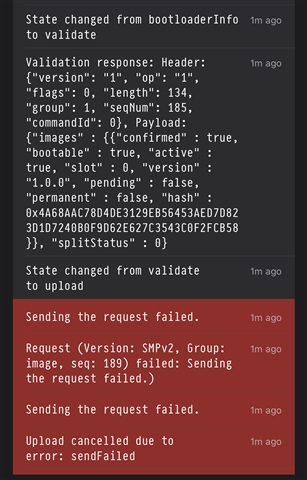
For reference, this is what the log in the NRF Connect App shows when the DFU fails (appears to be the same issue this user had here nRF Connect iOS APP failed to perform OTA DFU for dfu_application.zip), but the logs are pretty generic and I did not see any errors print out on the device (though some guidance on how to enable the proper logs might be helpful here)
Happy to provide any other information that would be helpful and thank you in advance for your consideration.

