Unable to get SPIM peripheral to use CSN signal

Hello,

I want to combine multiple peripherals in a nrf53 using DPPI to one, complex peripheral. That's why I directly program against the peripheral documentation and use the peripheral layout definitions from hal/nordic/nrfx/mdk/nrf5340_application.h and do not use the abstractions provided by Zephyr, even thought the application is Zephyr based (as we later need to add Bluetooth).

To get to the final state, I planned to start by implementing a simple SPI transaction. The nrf53 is the SPI master and should implement SPI mode 0. I configure MOSI, CSN and SCK as outputs and set the output level to low.

When I start the transaction, by triggering TASKS_START and waiting for EVENTS_END, MOSI and CLK behave like expected, the CSN pins stays low.

I made some weird observations:

  •  STALLSTATE is always 1, even after setting the register explicitly to 0. Reading it afterwards yields always 1.
  •  A lot of registers do not have their documented default values:
    • PSELDCX is 0, not ~0.
    • IFTIMING.CSNDUR is 1, not 2

      STALLSTAT is 1, not 0

  • I've set PSELDCX explicitly to 0xffffffff and it reads then as 0x11f

I tried:

  • using NRF_SPIM1_S and NRF_SPIM2_S (to make sure, that the peripheral is not used by other parts of zephyr)
  • Logged the address of some registers (for example STALLSTAT to make sure, that I'm really coping with the correct peripheral)
  • Switched pins (CLK and CSN) to make sure, that there is no hardware problem
  • Changing FREQUENCY -> works
  • Configuring CSNPOL explicitly to 0

The nrf53 is installed on a PCA10095 Version 2.0.1. I think, I can read QKAAD0 on the chip.

What else can I try? What can I do to get closer to the cause of my problem?

thanks in advance 

Torsten

Parents
  • Not till now ;-) Now, I've looked at it. It seems to not configure a Chip Select pin at all.

    I've read nrfx_spim.c and was surprised to see, that (in case the chips select pin is configured [which is not the case for the given example]) the chip select pin is manually set within `set_ss_pin_state()`. I've read the errata for the nrf53 and haven't found anything that would apply.

    I would love to trigger a SPI transfer, using DPPI, which then implies, that the CS signal would have to be set by the peripheral. According to the documentation (V1.3.1) this should be possible.

    I also can not find any handling of the STALLSTAT register. I've tracked it down to `nrfy_spim_stallstat_rx_get()` but can not find any call to that function.

  • Hi,

    Unfortunately I don't have time to look into the details here, but I would like to say that historically the CSN pin was not part of the SPI peripheral (and even when it was added, it first only only for a few of the internal SPI peripherals had this functionality), so CSN was (and is for many variants still) handled outside of the SPI driver. Since the driver is generic (and be used for all variants) it may not be very straight forward to get this working. Looking quickly at the nrfx spi api, I get the impression that NRFX_SPIM_EXTENDED_ENABLED will add support for configuration of the CSN pin in the SPI peripheral. Alternativly calling nrf_spim_csn_configure() during init of the spi driver.

    Regarding handling of STALLSTAT register, there is no need to handle it really, it's just a register saying if a stalled occured during last transfer (e.g. that it might have been a very short delay between 2 bytes), it's not really useful unless you have extremely tight timing and just want to know there was possible delay during the latest transfer. It does not affect the data in any way (only the timing).

    Kenneth

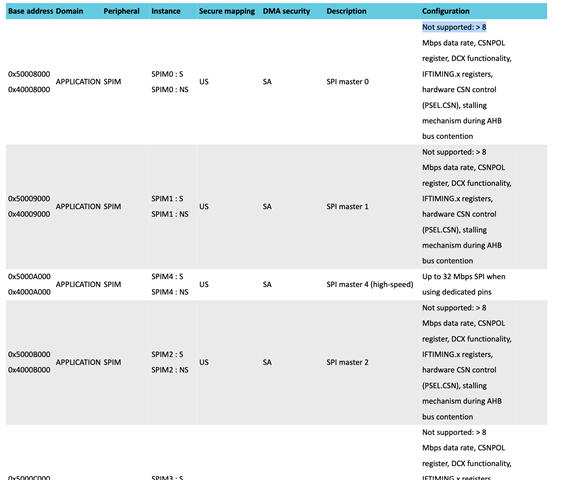
  • Ok, looks like I've solved that riddle on my own. In nrf5340_application_peripherals.h, I found the following hint:

    #define SPIM0_FEATURE_HARDWARE_CSN_PRESENT  0
    #define SPIM1_FEATURE_HARDWARE_CSN_PRESENT  0
    #define SPIM2_FEATURE_HARDWARE_CSN_PRESENT  0
    #define SPIM3_FEATURE_HARDWARE_CSN_PRESENT  0
    #define SPIM4_FEATURE_HARDWARE_CSN_PRESENT  1

    I just remembered, that I've read something in the documentation, I could not really make sense of: "Configuration: Not supported: > 8":

    So, my guess would be, that the PDF generation tool used, can not cope with more than 8 unsupported peripheral features and bails out with that message (Not supported: > 8) and then simply prints some of the unsupported peripheral features. So it looks like, most (4 out of 5) SPIM peripheral do not implement the documented features.

    Stating the fact, that not all features are implemented by all peripherals would have saved me a lot of time. Using SPIM4 seams to do the trick.

    Thanks,

    Torsten

  • Hello,

    Sounds good you solved it, just to explain this "Not supported", the table list up everything that is not supported for that specific spi instance, which for instance include that it does not support higher than 8Mbps data rate and and hardware CSN control.

    Kenneth

Reply Children
Related