BLE is not advertising on nrf52840

Hello, 

I am working on nrf52840 in which the BLE is not Advertising even after i am adding one paramter 

i just want to add the parameters at the time of adding the  2 parameters. As you can see in picture 


At the time of adding the advertisiment Parameter i want to add 3 parameters 
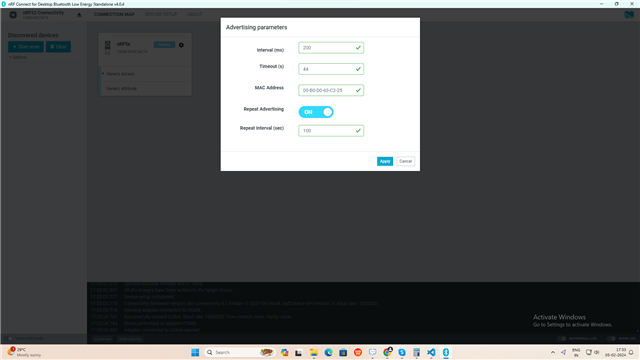


Namely Mac Address , Repeat advertising & repeat Interval & after adding this 3 parameter the advertisiment is not working & i am unable to configure this Parameters. 

We dont using nrf Connect Sdk we only use nrf52840 dongle 

Can anyone know how to configure this dongle with the help of coding 

Parents
  • Hi,

    It should be possible to modify (the source code of) the nRF Connect for Desktop BLE app to add settings such that advertising is started at a regular interval. See the nRF Connect for Desktop Developer documentation for details on app development for nRF Connect for Desktop.

    For changing the BLE address, you need changes on the connectivity firmware on the dongle, since there is no serialized API for doing that. Therefore, this change would be more complex as it requires changes both to the connectivity firmware, to the nRF Connect for Desktop app, and to the serialization API.

    Please note that while the serialization currently uses pc-ble-driver-js and firmware based off of the connectivity sample of nRF5 SDK, those solutions are now in maintenance mode, ref. our nRF Connect SDK and nRF5 SDK statement. For new functionality, such as features from newer Bluetooth specifications, you need to use other solutions. One option is to use HCI and run the Controller on an nRF device and the Host on a PC. E.g. Bluetooth: HCI UART or Bluetooth: HCI USB on the nRF device, and a Bluetooth HCI Host on the PC.

    Regards,
    Terje

Reply
  • Hi,

    It should be possible to modify (the source code of) the nRF Connect for Desktop BLE app to add settings such that advertising is started at a regular interval. See the nRF Connect for Desktop Developer documentation for details on app development for nRF Connect for Desktop.

    For changing the BLE address, you need changes on the connectivity firmware on the dongle, since there is no serialized API for doing that. Therefore, this change would be more complex as it requires changes both to the connectivity firmware, to the nRF Connect for Desktop app, and to the serialization API.

    Please note that while the serialization currently uses pc-ble-driver-js and firmware based off of the connectivity sample of nRF5 SDK, those solutions are now in maintenance mode, ref. our nRF Connect SDK and nRF5 SDK statement. For new functionality, such as features from newer Bluetooth specifications, you need to use other solutions. One option is to use HCI and run the Controller on an nRF device and the Host on a PC. E.g. Bluetooth: HCI UART or Bluetooth: HCI USB on the nRF device, and a Bluetooth HCI Host on the PC.

    Regards,
    Terje

Children
No Data
Related