Issue while uploading firmware over Bluetooth using smp_svr program for NRF5340DK board

Hello community, 

I am stuck on a problem regarding uploading of a new firmware over BLE using smp_svr sample program.

Here are the following steps I am doing :

1. First I am compiling the sample program present at /zephyr/samples/subsys/mgmt/mcumgr/smp_svr with the bluetooth overlay file : 

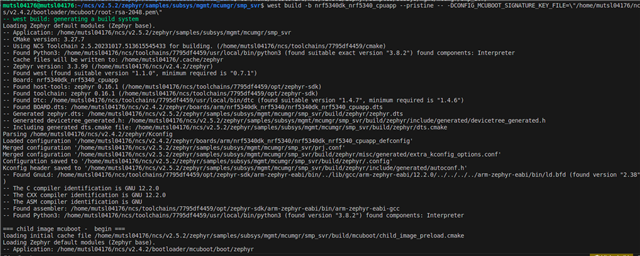
This is the command I am using : west build -b nrf5340dk_nrf5340_cpuapp --pristine -- -DOVERLAY_CONFIG=overlay-bt.conf -DCONFIG_MCUBOOT_SIGNATURE_KEY_FILE=\"/home/mutsl04176/ncs/v2.4.2/bootloader/mcuboot/root-rsa-2048.pem\"

The program compiles successfully:
Then I am flashing the merged.hex file generated at /build/zephyr directory:

To test out the image management functionalities over bluetooth I am using the mcumgr tool:

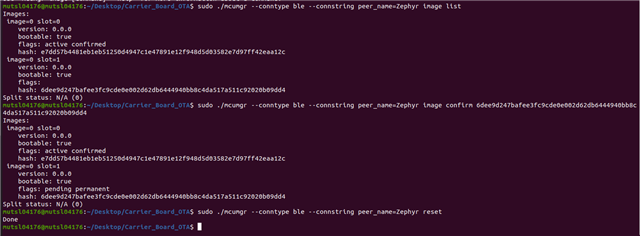
As you can see that I am able to see the image list using the following command:

sudo ./mcumgr --conntype ble --connstring ctlr_name=hci0,peer_name='Zephyr' image list

Similarly the image upload command also works : 

For an example I am using the blink example, compiling it and uploading the app_update.bin file via BLE using mcumgr

sudo ./mcumgr --conntype ble --connstring ctlr_name=hci0,peer_name='Zephyr' image upload /home/mutsl04176/ncs/v2.5.2/zephyr/samples/basic/blinky/build/zephyr/app_update.bin

Once can also see that if I check the image list again, a new image on the second slot is available.

Next I am confirming the second image and then resetting the board in order for the new image to boot up once reset is done : 

An the problem arises here. After image reset, the LED is not blinking, i.e. the new program that was flashed is not executing.

Any idea why this is happening? Any steps that I am missing here? Some guidance here will be super helpful!

  • Hi,

    Could you enable mcuboot logging and provide the log?

    For mcuboot logging, please refer to RTT logging with mcuboot and adding RTT logs to MCUboot.

    Best regards,
    Dejan

  • I have executed the following commands : 

    Here are the logs that are generated on the RTT logs : 

    ###RTT Client: ************************************************************ 
    ###RTT Client: *               SEGGER Microcontroller GmbH                * 
    ###RTT Client: *   Solutions for real time microcontroller applications   * 
    ###RTT Client: ************************************************************ 
    ###RTT Client: *                                                          * 
    ###RTT Client: *       (c) 2012 - 2016  SEGGER Microcontroller GmbH       * 
    ###RTT Client: *                                                          * 
    ###RTT Client: *     www.segger.com     Support: [email protected]       * 
    ###RTT Client: *                                                          * 
    ###RTT Client: ************************************************************ 
    ###RTT Client: *                                                          * 
    ###RTT Client: * SEGGER J-Link RTT Client   Compiled Feb  7 2024 17:12:43 * 
    ###RTT Client: *                                                          * 
    ###RTT Client: ************************************************************ 
    
    ###RTT Client: -----------------------------------------------
    ###RTT Client: Connecting to J-Link RTT Server via localhost:19021 ...
    ###RTT Client: Connected.
    
    SEGGER J-Link V7.94i - Real time terminal output
    SEGGER J-Link (unknown) V1.0, SN=1050055215
    Process: JLinkExe
    *** Booting Zephyr OS build v3.3.99-ncs1-1 ***
    [00:00:00.002,441] <inf> littlefs: LittleFS version 2.5, disk version 2.0
    [00:00:00.002,624] <inf> littlefs: FS at flash-controller@39000:0xf8000 is 6 0x1000-byte blocks with 512 cycle
    [00:00:00.002,624] <inf> littlefs: sizes: rd 16 ; pr 16 ; ca 64 ; la 32
    [00:00:00.016,937] <inf> smp_sample: build time: Feb  8 2024 11:53:57
    [00:00:00.029,174] <inf> bt_hci_core: HW Platform: Nordic Semiconductor (0x0002)
    [00:00:00.029,205] <inf> bt_hci_core: HW Variant: nRF53x (0x0003)
    [00:00:00.029,235] <inf> bt_hci_core: Firmware: Standard Bluetooth controller (0x00) Version 224.11902 Build 2231721665
    [00:00:00.030,944] <inf> bt_hci_core: Identity: E6:5F:64:2F:79:2A (random)
    [00:00:00.030,975] <inf> bt_hci_core: HCI: version 5.4 (0x0d) revision 0x2077, manufacturer 0x0059
    [00:00:00.031,005] <inf> bt_hci_core: LMP: version 5.4 (0x0d) subver 0x2077
    [00:00:00.032,928] <inf> smp
    [00:09:47.478,302] <inf> smp_bt_sample: Connected
    [00:09:48.172,149] <inf> mcumgr_img_grp: Erased 0x6000 bytes of image slot
    [00:09:48.257,995] <inf> mcumgr_img_grp: Erased 0x1000 bytes of image slot trailer
    [00:09:49.304,412] <inf> smp_bt_sample: Disconnected (reason 0x13)
    [00:09:49.307,220] <inf> smp_bt_sample: Advertising successfully started
    [00:10:06.324,920] <inf> smp_bt_sample: Connected
    [00:10:06.517,486] <inf> smp_bt_sample: Disconnected (reason 0x13)
    [00:10:06.520,294] <inf> smp_bt_sample: Advertising successfully started
    [00:10:21.414,154] <inf> smp_bt_sample: Connected
    [00:10:21.616,210] <inf> smp_bt_sample: Disconnected (reason 0x13)
    [00:10:21.619,018] <inf> smp_bt_sample: Advertising successfully started

  • Hi,

    You could check if your update image is built correctly.

    For further troubleshooting, you could try to enable MCUboot logging by adding extra CMake arguments.

    mcuboot_CONFIG_LOG=y
    mcuboot_CONFIG_MCUBOOT_LOG_LEVEL_INF=y

    Best regards,
    Dejan


  • Adding these two lines in my prj.conf file of the smp_svr sample program gives me a compilation error. These flags are not recognized

  • Hello,

    Could you please post the .config file from your build folder here? It's located in build/mcuboot/zephyr/?

    Thanks,

    Vidar

Related