connected devices sidebar view "vanished"

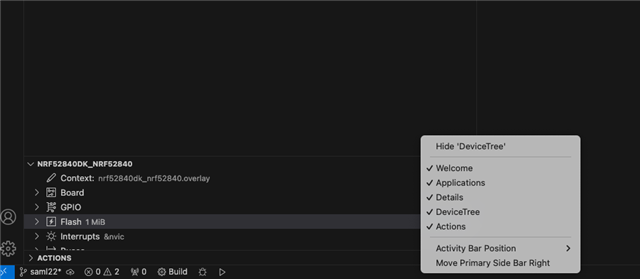
I can't get my connected devices sidebar view back. I see several people asking how to devices to show up in the view, but my problem is no view at all. I have attached a screen-grab of the bottom left hand corner where it used to be. I have clicked on an one of the other views to show the pop-up options, none of which are "connected devices". At present there are two nRF52840 DKs connected (testing communications between them). Used to be able to select the kit, pop up the virtual console, reboot, etc. But now no view at all.

I read thru other comments. Deleted the nordic extensions, used the tool-kit manager to reinstall them -- without luck. Deleted $(HOME)/.vscode & reinstalled a bunch of extensions with no luck. Really nice feature in constant use. ????

On a M1 Mac with latest version of everything (Feb 2024).
Parents
  • Hi Kent

    A few ideas from our devs to what this can be:

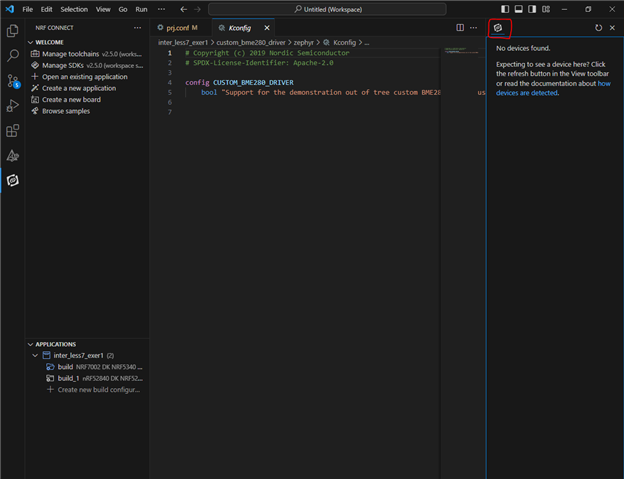
    It could be that you unintentionally dragged the Connected Devices panel to a separate top level sidebar. If so you would see a second nRF icon in the sidebar you have drawn it. Please see the screenshot here where I have drawn it to the right side of the screen for demo purposes:

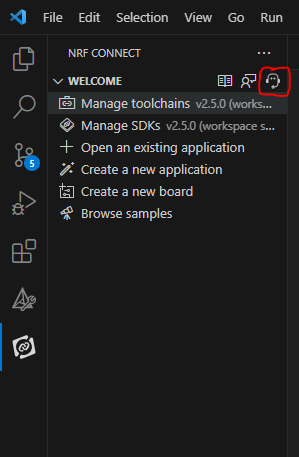
    Another issue might be that the provider of that panel has failed to activate for some reason. In that case we would need generated support information, but we don't think this is very likely.  You can generate support information with this button:


    Best regards,

    Simon

    UPDATE: Also, all views get a command in the command palette letting you focus on a view/tab. You can write "nRF Connect: Focus on Connected Devices View" to locate the Connected Devices tab.

Reply
  • Hi Kent

    A few ideas from our devs to what this can be:

    It could be that you unintentionally dragged the Connected Devices panel to a separate top level sidebar. If so you would see a second nRF icon in the sidebar you have drawn it. Please see the screenshot here where I have drawn it to the right side of the screen for demo purposes:

    Another issue might be that the provider of that panel has failed to activate for some reason. In that case we would need generated support information, but we don't think this is very likely.  You can generate support information with this button:


    Best regards,

    Simon

    UPDATE: Also, all views get a command in the command palette letting you focus on a view/tab. You can write "nRF Connect: Focus on Connected Devices View" to locate the Connected Devices tab.

Children
No Data
Related