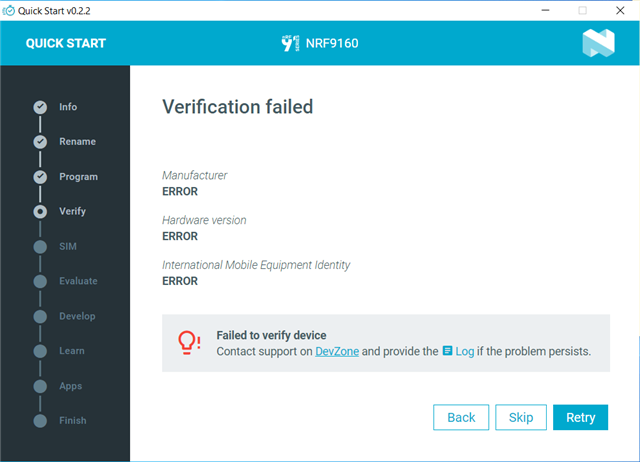
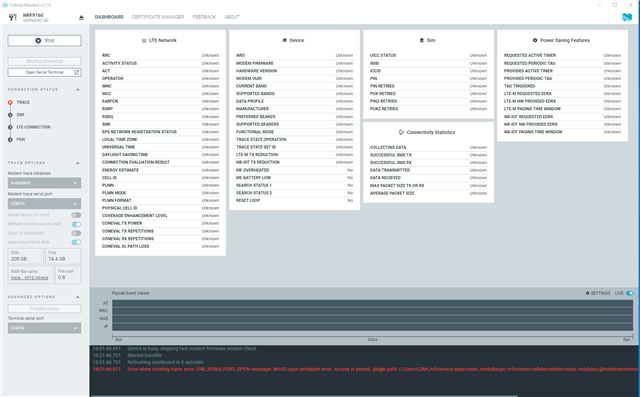
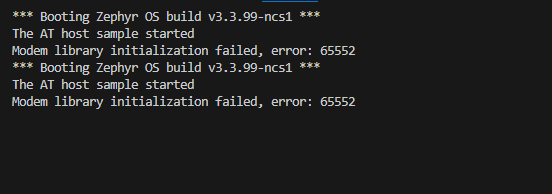
I was going through the Cellular IOT fundamental tutorial. I downloaded the nRF connect for desktop application and started with "quick start". I selected the asset tracking, program the board. During stage "automatic kit communication with AT commands", I clicked verify, but I get Error. I opened the log file and observe "unable to find the AT Client". Additionally, I have noticed the LED5 (activity led) keeps blinking. Could anyone kindly tell how to fix this issue?
2024-02-29T12:35:21.388Z INFO Initialising nrfutil module: device
2024-02-29T12:35:21.404Z DEBUG Started watching devices
2024-02-29T12:35:23.258Z INFO Using nrfutil-device version: 2.1.1
2024-02-29T12:35:23.259Z INFO Using nrf-device-lib version: 0.17.5
2024-02-29T12:35:23.260Z INFO Using nrfjprog DLL version: 10.24.0
2024-02-29T12:35:23.260Z INFO Using JLink version: JLink_V7.94e
2024-02-29T12:35:27.737Z DEBUG Selected device: nRF9160 DK
2024-02-29T12:35:27.764Z DEBUG Changed step: info
2024-02-29T12:35:28.842Z DEBUG Changed step: rename
2024-02-29T12:35:30.722Z DEBUG Changed step: program
2024-02-29T12:36:33.307Z DEBUG Changed step: verify
2024-02-29T12:36:40.125Z INFO Opened port with options: {"path":"COM12","baudRate":115200}
2024-02-29T12:36:42.154Z INFO Closed port: COM12
2024-02-29T12:36:42.156Z INFO Opened port with options: {"path":"COM11","baudRate":115200}
2024-02-29T12:36:44.166Z INFO Opened port with options: {"path":"COM10","baudRate":115200}
2024-02-29T12:36:44.169Z INFO Closed port: COM11
2024-02-29T12:36:46.190Z ERROR Error: Unable to find the AT client.
2024-02-29T12:36:46.208Z INFO Closed port: COM10
2024-02-29T12:37:20.874Z DEBUG Changed step: program
2024-02-29T12:38:31.523Z DEBUG Changed step: verify
2024-02-29T12:38:32.542Z DEBUG Changed step: program
2024-02-29T12:38:50.950Z DEBUG Changed step: verify
2024-02-29T12:38:51.940Z DEBUG Changed step: sim
2024-02-29T13:36:34.899Z DEBUG Changed step: verify
2024-02-29T13:36:35.342Z DEBUG Changed step: sim
2024-02-29T13:36:36.217Z DEBUG Changed step: verify
2024-02-29T13:36:37.054Z DEBUG Changed step: program
2024-02-29T13:36:37.779Z DEBUG Changed step: verify
2024-02-29T13:36:39.283Z DEBUG Changed step: program
2024-02-29T13:38:05.567Z DEBUG Changed step: verify
2024-02-29T13:38:08.204Z INFO Opened port with options: {"path":"COM12","baudRate":115200}
2024-02-29T13:38:10.211Z INFO Closed port: COM12
2024-02-29T13:38:10.213Z INFO Opened port with options: {"path":"COM11","baudRate":115200}
2024-02-29T13:38:12.222Z INFO Closed port: COM11
2024-02-29T13:38:12.224Z INFO Opened port with options: {"path":"COM10","baudRate":115200}
2024-02-29T13:38:14.226Z ERROR Error: Unable to find the AT client.
2024-02-29T13:38:14.246Z INFO Closed port: COM10
2024-02-29T13:38:16.397Z DEBUG Changed step: program
2024-02-29T13:38:22.118Z DEBUG Changed step: verify
2024-02-29T13:38:23.091Z INFO Opened port with options: {"path":"COM12","baudRate":115200}
2024-02-29T13:38:25.098Z INFO Closed port: COM12
2024-02-29T13:38:25.100Z INFO Opened port with options: {"path":"COM11","baudRate":115200}
2024-02-29T13:38:27.108Z INFO Closed port: COM11
2024-02-29T13:38:27.110Z INFO Opened port with options: {"path":"COM10","baudRate":115200}
2024-02-29T13:38:29.112Z ERROR Error: Unable to find the AT client.
2024-02-29T13:38:29.134Z INFO Closed port: COM10
2024-02-29T13:54:31.622Z DEBUG Changed step: program
2024-02-29T13:54:59.594Z DEBUG Changed step: verify
2024-02-29T13:56:17.158Z DEBUG Changed step: program
2024-02-29T13:57:48.274Z DEBUG Changed step: verify
2024-02-29T13:57:51.975Z INFO Opened port with options: {"path":"COM12","baudRate":115200}
2024-02-29T13:57:53.985Z INFO Closed port: COM12
2024-02-29T13:57:53.989Z INFO Opened port with options: {"path":"COM11","baudRate":115200}
2024-02-29T13:57:56.001Z INFO Opened port with options: {"path":"COM10","baudRate":115200}
2024-02-29T13:57:56.001Z INFO Closed port: COM11
2024-02-29T13:57:58.003Z ERROR Error: Unable to find the AT client.
2024-02-29T13:57:58.009Z INFO Closed port: COM10