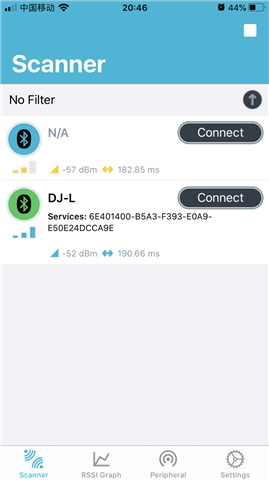
Using appearance or short name for filtering

Hello Nordic Engineer,

I used SDK17.1.0 and ble_app_multirole_lesc, So, we need to discuss scan_init() and advertising_init().

Assuming there are three devices, A, B, and C. Both B and C are advertising the same UUID, but I only want A and B to establish a connection.

Additionally, I would like the advertising name to be '#define DEVICE_NAME "Hello123"'. This is not my actual product name, so please disregard this issue. What I want to emphasize is that the advertising name must be the full name.

So I want to use two filtering methods to achieve my goal. The third parameter set to true indicates that both requirements must be met simultaneously to establish a connection.

nrf_ble_scan_filters_enable(&m_scan, TYPE | NRF_BLE_SCAN_UUID_FILTER, true);

TYPE = NRF_BLE_SCAN_APPEARANCE_FILTER or NRF_BLE_SCAN_SHORT_NAME_FILTER

As long as the goal can be achieved, I won't specify a particular type.

Let's discuss APPEARANCE first:

《sdk_config.h》
#define NRF_BLE_SCAN_APPEARANCE_CNT 1

《main.c》
static void scan_init(void)
{
    ...
    
    uint16_t mAppearance;
    
    ...
    
    nrf_ble_scan_init(&m_scan, &init_scan, scan_evt_handler);
    
    ...
    
    nrf_ble_scan_filter_set(&m_scan, SCAN_APPEARANCE_FILTER, &mAppearance);
    
    ...
    
    nrf_ble_scan_filters_enable(&m_scan, NRF_BLE_SCAN_APPEARANCE_FILTER | NRF_BLE_SCAN_UUID_FILTER, true);
    
}


static void advertising_init(void)
{
    ...
    
    init.advdata.include_appearance      = true;
    
    ...
    
    ble_advertising_init(&m_advertising, &init);
    
    ble_advertising_conn_cfg_tag_set(&m_advertising, APP_BLE_CONN_CFG_TAG);
}

I have two question:

【1】I don't know how to set mAppearance.

【2】Do I have any other parts that need to be set?

Let's discuss the short name next:

《sdk_config.h》
#define NRF_BLE_SCAN_SHORT_NAME_CNT 1

《main.c》
nrf_ble_scan_short_name_t m_short_name =
{
	.p_short_name	= "Hello",
	.short_name_min_len	= 5
};

static void scan_init(void)
{
    nrf_ble_scan_filter_set(&m_scan, SCAN_SHORT_NAME_FILTER, &m_short_name);
    
    nrf_ble_scan_filters_enable(&m_scan, NRF_BLE_SCAN_SHORT_NAME_FILTER | NRF_BLE_SCAN_UUID_FILTER, true);
}

static void advertising_init(void)
{
    init.advdata.name_type               = BLE_ADVDATA_SHORT_NAME;
    init.advdata.short_name_len          = m_short_name.short_name_min_len;
}

I have a question. If the device name is 'Hello123' and I set a short name filter, can I establish a connection by setting 'Hello' with the shortest length set to 5? (Even though my test failed, is my idea correct?)

Thanks

  • Hello,

    【1】I don't know how to set mAppearance.

    You can set the appearance using the sd_ble_gap_appearance_set as a call during your gap_params_init function.

    【2】Do I have any other parts that need to be set?

    No, so long as you have room in your advertisement payload for the appearance the call to sd_ble_gap_appearance_set is all you will need to do.

    I have a question. If the device name is 'Hello123' and I set a short name filter, can I establish a connection by setting 'Hello' with the shortest length set to 5? (Even though my test failed, is my idea correct?)

    Yes, please have a look at the answer by my colleague in this thread for a more in-depth answer.
    The answer is given for nRF Connect SDK, but the filtering works the same in the nRF5 SDK so it still applies.

    On a general note, please make sure to check all returned error codes from SDK functions so that you can be alerted in the case that they have failed for whatever reason.

    Best regards,
    Karl

  • Hello Ylvisaker ,

    Just checked, it means to set in the 'advertising_init()' function:

    init.advdata.name_type               = BLE_ADVDATA_SHORT_NAME;

    Because in another question you answered, my scenario is 1-to-1-to-1, but in this self-imagined network scheme, at the top layer (First), there is a mobile phone, which acts as the central device and will send various commands through the app. The phone certainly needs to scan and connect. I hope that the screen of the phone displays not just 'Hello', but the complete device name, for example, 'Hello001' or 'Hello002'

    If setting a short name will prevent the phone from displaying the device's serial number during scanning, then I cannot use this method.

    I am currently trying to use two UUIDs to solve this.

    static void services_init(void)
    {
        uint32_t           err_code;
        ble_nus_init_t     nus_init;
    //    nrf_ble_qwr_init_t qwr_init = {0};
    
    //    // Initialize Queued Write Module.
    //    qwr_init.error_handler = nrf_qwr_error_handler;
    
    //    err_code = nrf_ble_qwr_init(&m_qwr, &qwr_init);
    //    APP_ERROR_CHECK(err_code);
    
        // Initialize NUS.
        memset(&nus_init, 0, sizeof(nus_init));
    
        nus_init.data_handler = nus_data_handler;
    
        err_code = ble_nus_init(&m_nus, &nus_init);
        APP_ERROR_CHECK(err_code);
    	
    	/* YOUR_JOB: Add code to initialize the services used by the application.*/
        ble_cus_init_t                     cus_init;
        
        
        // Initialize CUS Service.
        memset(&cus_init, 0, sizeof(cus_init));
        
        err_code = ble_cus_init(&m_cus, &cus_init);
        APP_ERROR_CHECK(err_code);    
    }

    I encountered NRF_ERROR_NO_MEM(ble_cus_init).

    ret_code_t ble_cus_init(ble_cus_t * p_cus, const ble_cus_init_t * p_cus_init)
    {
        if (p_cus == NULL || p_cus_init == NULL)
        {
            return NRF_ERROR_NULL;
        }
    
        ret_code_t  err_code;
        ble_uuid_t  ble_uuid;
    
        // Initialize service structure
        p_cus->conn_handle               = BLE_CONN_HANDLE_INVALID;
    
        // Add Custom Service UUID
        ble_uuid128_t base_uuid = {CUSTOM_SERVICE_UUID_BASE};
        err_code =  sd_ble_uuid_vs_add(&base_uuid, &p_cus->uuid_type);
        VERIFY_SUCCESS(err_code);
        
        ble_uuid.type = p_cus->uuid_type;
        ble_uuid.uuid = CUSTOM_SERVICE_UUID;
    
        // Add the Custom Service
        err_code = sd_ble_gatts_service_add(BLE_GATTS_SRVC_TYPE_PRIMARY, &ble_uuid, &p_cus->service_handle);
        if (err_code != NRF_SUCCESS)
        {
            return err_code;    // This seems redundant, but we'll add more later
        }
        return err_code;
    }

    I tried to increase the RAM by 0x90. In Keil, I set the RAM start address to 0x20003090 and the size to 0x2F70. However, I still encountered NRF_ERROR_NO_MEM. Can you help me solve this problem?

    Thank you

  • Hello,

    tony55723 said:
    If setting a short name will prevent the phone from displaying the device's serial number during scanning, then I cannot use this method.

    The filter is only used to check whether or not an advertising report should be sent to the application. If you have broader filters you will have more advertising reports sent to your application which you may then look through to see if they are the device you are looking for.

    tony55723 said:
    However, I still encountered NRF_ERROR_NO_MEM. Can you help me solve this problem?

    Please make sure to have DEBUG defined in your preprocessor defines, like shown in the included image:

    This will make your logger output a detailed error message in the case that a non-NRF_SUCCESS error code is passed to an APP_ERROR_CHECK. In this case, the SoftDevice should also print the necessary changes to the memory allocations to support the configuration you are using.

    Best regards,
    Kark

  • Hello Ylvisaker ,

    I succeeded by setting NRF_SDH_BLE_VS_UUID_COUNT = 2.

    But the scanned UUID is not the 128-bit UUID I generated.

    static ble_uuid_t m_adv_uuids[] = {CUSTOM_SERVICE_UUID, BLE_UUID_TYPE_VENDOR_BEGIN};
    
    
    #define CUSTOM_SERVICE_UUID_BASE          {0x3D, 0xA2, 0xE8, 0x77, 0x29, 0x37, 0x89, 0x9C
                                            , 0x81, 0x4E, 0xFC, 0xA6, 0xAF, 0x9B, 0xE3, 0x0B}
    
    
    /**@brief Function for initializing the advertising functionality. */
    static void advertising_init(void)
    {
        ret_code_t             err_code;
        ble_advertising_init_t init;
    
        memset(&init, 0, sizeof(init));
    
        init.advdata.name_type               = BLE_ADVDATA_FULL_NAME;				
        init.advdata.include_appearance      = true;										
        init.advdata.flags                   = BLE_GAP_ADV_FLAGS_LE_ONLY_GENERAL_DISC_MODE;
        init.advdata.uuids_complete.uuid_cnt = sizeof(m_adv_uuids) / sizeof(m_adv_uuids[0]); 
        init.advdata.uuids_complete.p_uuids  = m_adv_uuids;									
    
        init.config.ble_adv_fast_enabled  = true;
        init.config.ble_adv_fast_interval = ADV_INTERVAL;
        init.config.ble_adv_fast_timeout  = APP_ADV_DURATION;
    
        init.evt_handler = on_adv_evt;
    
        err_code = ble_advertising_init(&m_advertising, &init);
        APP_ERROR_CHECK(err_code);
    
        ble_advertising_conn_cfg_tag_set(&m_advertising, APP_BLE_CONN_CFG_TAG);
    }
    
    
    ret_code_t ble_cus_init(ble_cus_t * p_cus, const ble_cus_init_t * p_cus_init)
    {
        if (p_cus == NULL || p_cus_init == NULL)
        {
            return NRF_ERROR_NULL;
        }
    
        ret_code_t err_code;
        ble_uuid_t ble_uuid;
    
        // Initialize the service structure
        p_cus->conn_handle              = BLE_CONN_HANDLE_INVALID;
    
        // Add Custom Service UUID
        ble_uuid128_t base_uuid = {CUSTOM_SERVICE_UUID_BASE};
        err_code = sd_ble_uuid_vs_add(&base_uuid, &p_cus->uuid_type);
        VERIFY_SUCCESS(err_code);
    
        ble_uuid.type = p_cus->uuid_type;
        ble_uuid.uuid = CUSTOM_SERVICE_UUID;
    
        err_code = sd_ble_gatts_service_add(BLE_GATTS_SRVC_TYPE_PRIMARY, &ble_uuid, &p_cus->service_handle);
        if (err_code != NRF_SUCCESS)
        {
            return err_code;
        }
    
        // Add the Custom Value Characteristic
        return custom_value_char_add(p_cus, p_cus_init);
    }

    This is the relevant code, can you help me take a look?

    Thank you

    =====================================================

    Let me update you on the progress. I've resolved this issue, and it's related to 'sd_ble_uuid_vs_add'.

    I have a question. How can I filter two UUIDs?

    Do I need to execute 'sd_ble_uuid_vs_add' and 'sd_ble_gatts_service_add' again?

    ret_code_t ble_cus_init(ble_cus_t * p_cus, const ble_cus_init_t * p_cus_init)
    {
        if (p_cus == NULL || p_cus_init == NULL)
        {
            return NRF_ERROR_NULL;
        }
    
        ret_code_t err_code;
        ble_uuid_t ble_uuid;
    
        // Initialize the service structure
        p_cus->conn_handle              = BLE_CONN_HANDLE_INVALID;
    
        // Add Custom Service UUID
        ble_uuid128_t base_uuid = {CUSTOM_SERVICE_UUID_BASE_CONTROL};
    
    	
        err_code = sd_ble_uuid_vs_add(&base_uuid, &p_cus->uuid_type);
        VERIFY_SUCCESS(err_code);
    
        ble_uuid.type = p_cus->uuid_type;
        ble_uuid.uuid = CUSTOM_SERVICE_UUID;
    
        err_code = sd_ble_gatts_service_add(BLE_GATTS_SRVC_TYPE_PRIMARY, &ble_uuid, &p_cus->service_handle);
        if (err_code != NRF_SUCCESS)
        {
            return err_code;
        }
    
        // Add the Custom Value Characteristic
        return custom_value_char_add(p_cus, p_cus_init);
    }

  • Hello,

    From what I can see your code looks to be correct, and so I expect the issue to be somewhere in the configuration or setup.
    Could you elaborate on what you are referring to when you say 'I succeeded by setting NRF_SDH_BLE_VS_UUID_COUNT =2' ?

    It would be great if you could show more of your code, and the full advertising packet as displayed in the nRF Connect application.
    What is the value of CUSTOM_SERVICE_UUID?

    Best regards,
    Karl

Related