Problem when removing NCS SDK by tool manager

Hi, 

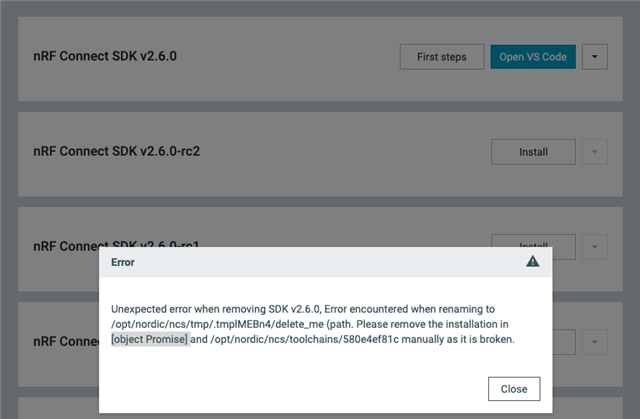
when I try to remove the NCS SDK 2.6.0 by tool manager, I meet the problem (please check the attached picture).
I remove the /opt/nordic/ncs/toolchains/580e4ef81c manually 
But, what is the [object Promise] ?  Thanks !
Best Regards
Frank
Parents
  • Hi Frank,

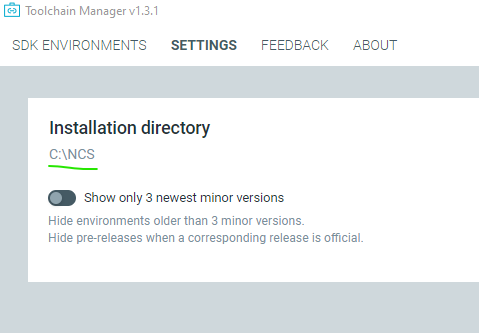
    When you open the settings in Toolchain Manager, you can see the installation directory:

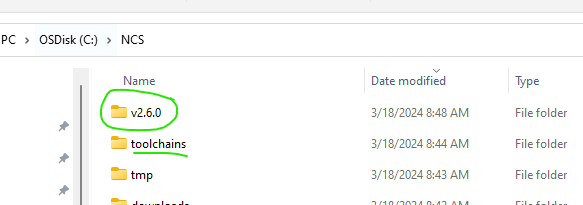
    and make sure you have manually deleted the sdk v2.6.0 files from this path, say, similar to the following:

    You need to delete the 580e4ef81c within the "toolchains" (which you have already done) as well as "v2.6.0" folder.

    After this, please reload the nRF Connect for Desktop application and do let me know whether you get the error again.

    Regards,

    Priyanka

Reply
  • Hi Frank,

    When you open the settings in Toolchain Manager, you can see the installation directory:

    and make sure you have manually deleted the sdk v2.6.0 files from this path, say, similar to the following:

    You need to delete the 580e4ef81c within the "toolchains" (which you have already done) as well as "v2.6.0" folder.

    After this, please reload the nRF Connect for Desktop application and do let me know whether you get the error again.

    Regards,

    Priyanka

Children
Related