DFU OTA - Softdevice - secure bootloader example takes huge space itself.

Hello All,

I have firmware ready for nRF52833 in softdevice using SDK 17.0.2.  Which consumpes approximatly 356KB of flash please check below screen shot

My plan was to integrate DFU / OTA in this application, but when I tried to load the SDK example of secure bootloader_ble_s140_pca10100 then I found it consumption flash space very huge in itself. Please check the screen shot below.

My question is how I can manage to implement OTA into my firmware.? Also I have tried to change below Flash size but no luck.

FLASH_PH_START=0x0

FLASH_PH_SIZE=0x80000

RAM_PH_START=0x20000000

RAM_PH_SIZE=0x20000

FLASH_START=0x78000

FLASH_SIZE=0x6000

RAM_START=0x20002ae8

RAM_SIZE=0x1d518

FLASH RX 0x0 0x80000;RAM1 RWX 0x20000000 0x20000;mbr_params_page RX 0x0007E000 0x1000;bootloader_settings_page RX 0x0007F000 0x1000;uicr_bootloader_start_address RX 0x10001014 0x4;uicr_mbr_params_page RX 0x10001018 0x4

Please help me to adjust memory settings to get my firmware fit to your example.

Thanks and regards,

Neeraj Dhekale

Parents
  • Hi Neeraj,

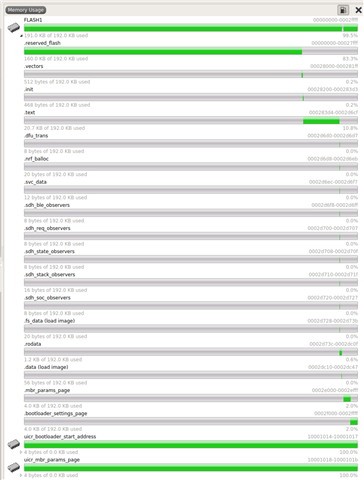
    The graphical representation of memory usage in Segger Embedded Studio can be misleading, as it shows the whole physical memory, and shows parts not used for this pacticular image as used. So for the bootlaoder which is placed close to the end of the flash, it will also show the reseved flash as used. You can get more details by selecting the memory view window, and expanding to seeing the different parts as shown here (this is for a device with less memory, but the principle remains the same):

    As you can see here, most of the "used" memory is reserved.

    Generally using DFU on the nRF52833 should be no problem, but you need to get an overview of the memory layout, as showsn in the bootloader modules documentation.

    In short, you need to find:

    • SoftDevice size (you can read this from the SoftDevice specification. Let us assume 0x26000 bytes.
    • Bootloader size. The example SDK Bluetooth bootlaoder takes 0x6000 bytes, wich is the case for S140 version 7.
    • Bootloader settings page. 0x1000
    • MBR params page. 0x1000 (not needed if you don't support bootloader updates)
    • Persistent storage / FDS for use with BLE bonding, let us say 0x3000 (configurable)

    If you sum this up, and add any other flash pages you need for soemthing specail, the rest is available for your application.

Reply
  • Hi Neeraj,

    The graphical representation of memory usage in Segger Embedded Studio can be misleading, as it shows the whole physical memory, and shows parts not used for this pacticular image as used. So for the bootlaoder which is placed close to the end of the flash, it will also show the reseved flash as used. You can get more details by selecting the memory view window, and expanding to seeing the different parts as shown here (this is for a device with less memory, but the principle remains the same):

    As you can see here, most of the "used" memory is reserved.

    Generally using DFU on the nRF52833 should be no problem, but you need to get an overview of the memory layout, as showsn in the bootloader modules documentation.

    In short, you need to find:

    • SoftDevice size (you can read this from the SoftDevice specification. Let us assume 0x26000 bytes.
    • Bootloader size. The example SDK Bluetooth bootlaoder takes 0x6000 bytes, wich is the case for S140 version 7.
    • Bootloader settings page. 0x1000
    • MBR params page. 0x1000 (not needed if you don't support bootloader updates)
    • Persistent storage / FDS for use with BLE bonding, let us say 0x3000 (configurable)

    If you sum this up, and add any other flash pages you need for soemthing specail, the rest is available for your application.

Children
No Data
Related