

Hi,
I'm integrating an external SPI flash W25Q32 with the nRF52840 using the NOR FLASH driver, but it's not functioning properly as the MCU log indicates an MPU error.
I have taken the spi_flash sample and am trying to integrate it into my project, but unfortunately, it's not functioning. I suspect there might be a partition error.
The Log displays the next error:
*** Booting nRF Connect SDK v3.5.99-ncs1 ***
Bluetooth initialized
Mesh initialized
Inicializando NUS-SPP service
Recovered identity for NUS: 1
Advertising successfully started
[00:00:00.001,098] <err> spi_nor: Device id 00 00 00 does not match config 15 40 16
[00:00:00.005,035] <inf> MAIN_THREAD: Initializing...

[00:00:00.019,165] <inf> fs_nvs: 8 Sectors of 4096 bytes
[00:00:00.019,165] <inf> fs_nvs: alloc wra: 7, fb8
[00:00:00.019,195] <inf> fs_nvs: data wra: 7, 58
[00:00:00.019,348] <inf> bt_sdc_hci_driver: SoftDevice Controller build revision:
                                            36 f0 e5 0e 87 68 48 fb  02 fd 9f 82 cc 32 e5 7b |6....hH. .....2.{
                                            91 b1 5c ed                                      |..\.
[00:00:00.022,827] <inf> bt_hci_core: HW Platform: Nordic Semiconductor (0x0002)
[00:00:00.022,857] <inf> bt_hci_core: HW Variant: nRF52x (0x0002)
[00:00:00.022,888] <inf> bt_hci_core: Firmware: Standard Bluetooth controller (0x00) Version 54.58864 Build 1214809870
[00:00:00.023,315] <inf> bt_hci_core: No ID address. App must call settings_load()
[00:00:00.025,573] <wrn> bt_mesh_access: Unused space in relation list: 1
[00:00:00.318,817] <inf> bt_hci_core: Identity[0]: F6:24:AF:24:B9:8A (random)
[00:00:00.318,908] <inf> bt_hci_core: Identity[1]: F0:21:2E:86:30:2B (random)
[00:00:00.318,939] <inf> bt_hci_core: HCI: version 5.4 (0x0d) revision 0x118f, manufacturer 0x0059
[00:00:00.318,969] <inf> bt_hci_core: LMP: version 5.4 (0x0d) subver 0x118f
[00:00:00.340,881] <inf> MAIN_THREAD:
                                      spi@40004000 SPI flash testing

[00:00:00.340,881] <inf> MAIN_THREAD: ==========================

[00:00:00.340,911] <inf> MAIN_THREAD:
                                      Perform test on single sector
[00:00:00.340,911] <inf> MAIN_THREAD:
                                      Test 1: Flash erase

[00:00:00.340,911] <err> os: ***** MPU FAULT *****
[00:00:00.340,942] <err> os:   Instruction Access Violation
[00:00:00.340,942] <err> os: r0/a1:  0x00051824  r1/a2:  0x00000000  r2/a3:  0x00001000
[00:00:00.340,972] <err> os: r3/a4:  0x4002f000 r12/ip:  0x20008b00 r14/lr:  0x0001d759
[00:00:00.340,972] <err> os:  xpsr:  0x60000000
[00:00:00.341,003] <err> os: Faulting instruction address (r15/pc): 0x4002f000
[00:00:00.341,033] <err> os: >>> ZEPHYR FATAL ERROR 20: Unknown error on CPU 0
[00:00:00.341,064] <err> os: Current thread: 0x20007020 (main)
[00:00:00.554,229] <err> os: Halting system
And also had take a look in the logic lines and this is what I see:
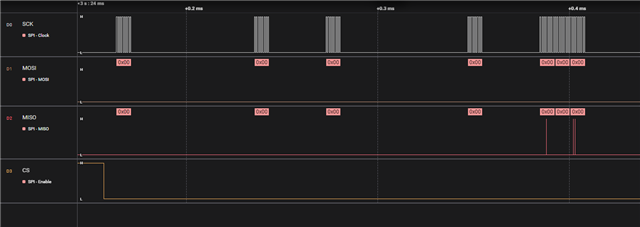
This occurs just before the MCU halting. As you can see the only lines that are working is the CLK and CS.
This is my overlay file:
/ {
	aliases {
		spi-flash0 = &spi1_cs0_flash;
	};
};


&spi1 {
	cs-gpios = <&gpio0 29 (GPIO_ACTIVE_LOW | GPIO_PULL_UP)>;

	status = "okay";
	spi1_cs0_flash: W25Q32@0 {
		compatible = "jedec,spi-nor";
		status = "okay";
		reg = <0x0>;
		spi-hold-cs;
		has-dpd;
		// wp-gpios = <&gpio0 28 (GPIO_ACTIVE_LOW | GPIO_PULL_UP)>;
		// hold-gpios = <&gpio0 4 (GPIO_ACTIVE_LOW | GPIO_PULL_UP)>;
        spi-max-frequency = <DT_FREQ_M(1)>;
		// label = "W25Q32";
        jedec-id = [15 40 16];
        size = <4194304>;
	};
};

&spi1_default {
	group1 {
		psels = <NRF_PSEL(SPIM_SCK, 0, 31)>,
				<NRF_PSEL(SPIM_MISO, 1, 8)>,
				<NRF_PSEL(SPIM_MOSI, 0, 30)>;
	};
};

&spi1_cs0_flash {
	partitions {
		compatible = "fixed-partitions";
		#address-cells = <1>;
		#size-cells = <1>;

		ext_storage: partition@0 {
			label = "external_storage";
			reg = <0x00000000 0x00400000>;
		};
	};
};
And this is my prj.conf file
#
# Copyright (c) 2020 Nordic Semiconductor ASA
#
# SPDX-License-Identifier: LicenseRef-Nordic-5-Clause
#
CONFIG_NCS_SAMPLES_DEFAULTS=y

# Deffered logging helps improve LPN power consumption
# when friendship is established.
CONFIG_LOG_MODE_DEFERRED=y


# General configuration
CONFIG_MAIN_STACK_SIZE=4096
CONFIG_HEAP_MEM_POOL_SIZE=2048
CONFIG_SYSTEM_WORKQUEUE_STACK_SIZE=4096
CONFIG_FLASH=y
CONFIG_FLASH_MAP=y
CONFIG_NVS=y
CONFIG_NVS_LOOKUP_CACHE=y
CONFIG_SETTINGS=y
CONFIG_SETTINGS_NVS_NAME_CACHE=y
CONFIG_HWINFO=y
CONFIG_DK_LIBRARY=y
CONFIG_PM_SINGLE_IMAGE=y
CONFIG_PM_PARTITION_SIZE_SETTINGS_STORAGE=0x8000
CONFIG_SOC_FLASH_NRF_PARTIAL_ERASE=y

# Temperature sensor
CONFIG_SENSOR=y
CONFIG_TEMP_NRF5=y

# Bluetooth configuration
CONFIG_BT=y
CONFIG_BT_COMPANY_ID=0x0059
CONFIG_BT_DEVICE_NAME="OmegaMesh"
CONFIG_BT_L2CAP_TX_BUF_COUNT=8
CONFIG_BT_OBSERVER=y
CONFIG_BT_PERIPHERAL=y
CONFIG_BT_SETTINGS=y
CONFIG_BT_EXT_ADV=y
# 5 sets are used by Bluetooth Mesh, 1 is needed for the sample advs.
CONFIG_BT_EXT_ADV_MAX_ADV_SET=6
CONFIG_BT_MAX_CONN=3
CONFIG_BT_ID_MAX=2

# Disable unused Bluetooth features
# CONFIG_BT_CTLR_DUP_FILTER_LEN=0
CONFIG_BT_CTLR_LE_ENC=n
CONFIG_BT_PHY_UPDATE=n
CONFIG_BT_CTLR_CHAN_SEL_2=n
CONFIG_BT_CTLR_MIN_USED_CHAN=n
CONFIG_BT_CTLR_PRIVACY=n

# Bluetooth mesh configuration
CONFIG_BT_MESH=y
CONFIG_BT_MESH_RELAY=y
CONFIG_BT_MESH_FRIEND=y
CONFIG_BT_MESH_TX_SEG_MAX=32
CONFIG_BT_MESH_RX_SEG_MAX=32
CONFIG_BT_MESH_PB_GATT=y
CONFIG_BT_MESH_GATT_PROXY=y
CONFIG_BT_MESH_PROXY_USE_DEVICE_NAME=y
CONFIG_BT_MESH_DK_PROV=y
CONFIG_BT_MESH_NLC_PERF_CONF=y
CONFIG_BT_MESH_MODEL_EXTENSION_LIST_SIZE=6

# CONFIG_BT_MESH_PROP_MAXCOUNT

CONFIG_BT_MESH_CDB=y
CONFIG_BT_MESH_CDB_NODE_COUNT=16
CONFIG_BT_MESH_CDB_SUBNET_COUNT=3
CONFIG_BT_MESH_CDB_APP_KEY_COUNT=3

# Enable the NUS service
CONFIG_BT_NUS=y
CONFIG_BT_MESH_BATTERY_SRV=y
CONFIG_BT_MESH_BATTERY_CLI=y
# Enable bonding
CONFIG_FLASH_PAGE_LAYOUT=y


CONFIG_BT_MESH_SUBNET_COUNT=2
CONFIG_BT_MESH_APP_KEY_COUNT=3
CONFIG_BT_MESH_CRPL=32
CONFIG_BT_MESH_MSG_CACHE_SIZE=64
# CONFIG_BT_MESH_SHELL=y

# Bluetooth mesh models
CONFIG_BT_MESH_SENSOR_SRV=y
CONFIG_BT_MESH_SENSOR_SRV_SENSORS_MAX=5
CONFIG_BT_MESH_SENSOR_CLI=y
CONFIG_BT_MESH_SENSOR_USE_LEGACY_SENSOR_VALUE=n
CONFIG_BT_MESH_PROP_SRV=y

# Debugging
CONFIG_BT_MESH_LOG_LEVEL_DBG=y
# CONFIG_BT_MESH_PROV_DEVICE_LOG_LEVEL_INF=y

# Config logger
CONFIG_LOG=y

# CONFIG_USE_SEGGER_RTT=y
CONFIG_LOG_BACKEND_RTT=n
CONFIG_LOG_BACKEND_UART=y
CONFIG_LOG_PRINTK=n

CONFIG_ASSERT=y

#External flash
CONFIG_SPI=y
CONFIG_SPI_NOR=y
CONFIG_SPI_NOR_FLASH_LAYOUT_PAGE_SIZE=4096


#debugging
CONFIG_RESET_ON_FATAL_ERROR=n
CONFIG_THREAD_NAME=y
With the following testing code
#define SPI_FLASH_TEST_REGION_OFFSET 0x0000
#define SPI_FLASH_SECTOR_SIZE        4096

static void single_sector_test(const struct device *flash_dev)
{
	const uint8_t expected[] = { 0x55, 0xaa, 0x66, 0x99 };
	const size_t len = sizeof(expected);
	uint8_t buf[sizeof(expected)];
	int rc;


	LOG_INF("\nPerform test on single sector");
	/* Write protection needs to be disabled before each write or
	 * erase, since the flash component turns on write protection
	 * automatically after completion of write and erase
	 * operations.
	 */
	LOG_INF("\nTest 1: Flash erase\n");

	/* Full flash erase if SPI_FLASH_TEST_REGION_OFFSET = 0 and
	 * SPI_FLASH_SECTOR_SIZE = flash size
	 */
	rc = flash_erase(flash_dev, SPI_FLASH_TEST_REGION_OFFSET,
			 SPI_FLASH_SECTOR_SIZE);
	if (rc != 0) {
		LOG_ERR("Flash erase failed! %d\n", rc);
	} else {
		LOG_INF("Flash erase succeeded!\n");
	}

	LOG_INF("\nTest 2: Flash write\n");

	LOG_INF("Attempting to write %zu bytes\n", len);
	rc = flash_write(flash_dev, SPI_FLASH_TEST_REGION_OFFSET, expected, len);
	if (rc != 0) {
		LOG_ERR("Flash write failed! %d\n", rc);
		return;
	}

	memset(buf, 0, len);
	rc = flash_read(flash_dev, SPI_FLASH_TEST_REGION_OFFSET, buf, len);
	if (rc != 0) {
		LOG_ERR("Flash read failed! %d\n", rc);
		return;
	}

	if (memcmp(expected, buf, len) == 0) {
		LOG_INF("Data read matches data written. Good!!\n");
	} else {
		const uint8_t *wp = expected;
		const uint8_t *rp = buf;
		const uint8_t *rpe = rp + len;

		LOG_ERR("Data read does not match data written!!\n");
		while (rp < rpe) {
			LOG_INF("%08x wrote %02x read %02x %s\n",
			       (uint32_t)(SPI_FLASH_TEST_REGION_OFFSET + (rp - buf)),
			       *wp, *rp, (*rp == *wp) ? "match" : "MISMATCH");
			++rp;
			++wp;
		}
	}
}

int main(void)
{
	const struct device *flash_dev = DEVICE_DT_GET(DT_NODELABEL(spi1));

	LOG_INF("Initializing...\n");

	if (!device_is_ready(flash_dev)) {
		LOG_ERR("%s: device not ready.\n", flash_dev->name);
		// return 0;
	}

	LOG_INF("\n%s SPI flash testing\n", flash_dev->name);
	LOG_INF("==========================\n");

	single_sector_test(flash_dev);

	// app code
}
What could be happening?
Thanks for advance!


