Issues in Modifying an nRF52840-based Peripheral UART Program to Host_Only

I wanted to change the Peripheral UART program in the nrf samples to the host_only version, and I made some attempts. I added the following code to the prj.conf file:

CONFIG_BT_HCI=y
CONFIG_BT_CTLR=n
CONFIG_BT_H4=y

In the app.overlay file I added the following code:

/ {
	chosen {
		nordic,nus-uart = &uart0;
	};
};

&uart0 {
	current-speed = <115200>;
	// hw-flow-control;
};
&uart1 {
    compatible = "nordic,nrf-uarte";
    status = "okay";
    current-speed = <115200>;
    pinctrl-0 = <&uart1_default>;
    pinctrl-1 = <&uart1_sleep>;
    pinctrl-names = "default", "sleep";
};
/ {
    chosen {
        // zephyr,console = &uart0;
        // zephyr,shell-uart = &uart0;
        zephyr,bt-uart = &uart0;
        zephyr,bt-c2h-uart = &uart0;
    };
 };

After build and flash, the program doesn't seem to run correctly. After debug, I find that the program enters an endless loop in the uart_init() function, specifically "err = uart_callback_set(uart, uart_cb, NULL);" this line produced an error.

Parents
  • Hi, 

    Please let me know if you managed to make the beacon sample worked as the host when you connect to the controller  ?
    When you use the peripheral uart there can be a conflict as the sample uses UART to receive command (from human user) and the UART you are using for HCI communication. 
    In your case you are using uart0 for both normal nus-uart and HCI UART. You should choose for example nus-uart to use UART0 and HCI uart to use UART 1. 

  • I'm terribly sorry. I forgot to reply. With your help, I have successfully made the beacon sample worked as the host.
    I enabled uart1 in the overlay file with the intention of using UART 1 as HCI uart. When the overlay file is configured with the following code:

    &uart0 {
    	current-speed = <115200>;
    	// hw-flow-control;
    };
    &uart1 {
        compatible = "nordic,nrf-uarte";
        status = "okay";
        current-speed = <115200>;
        pinctrl-0 = <&uart1_default>;
        pinctrl-1 = <&uart1_sleep>;
        pinctrl-names = "default", "sleep";
    };
    / {
        chosen {
            nordic,nus-uart = &uart0;
            // zephyr,console = &uart0;
            // zephyr,shell-uart = &uart0;
            zephyr,bt-uart = &uart1;
            zephyr,bt-c2h-uart = &uart1;
        };
     };
    

    the program has the same problem. I don't know what the problem is with this project.

    Looking forward to your reply. 

  • Hi,

    I attempted to follow your instructions, but the UART initialization function still encountered failure. I am unable to identify the exact issue.

    I comprehend the functionality of each part of the program, but I have yet to fully grasp its underlying operation.

  • Hi hahaha, 

    I found that it was an issue of conflicting between bt-uart and nus-uart but this time on the driver. 
    When you select CONFIG_BT_H4=y it will select UART_INTERRUPT_DRIVEN and this will force both UART0 and UART1 to interrupt driven. When with nus-uart it's UART asynchronous. 

    You would need to force UART0 to asynchronous. Please add 

    CONFIG_UART_0_INTERRUPT_DRIVEN=n
    CONFIG_UART_0_ASYNC=y 

    to the prj.conf. 
    Here is what I used:

    #
    # Copyright (c) 2018 Nordic Semiconductor
    #
    # SPDX-License-Identifier: LicenseRef-Nordic-5-Clause
    #
    
    # Enable the UART driver
    CONFIG_UART_ASYNC_API=y
    CONFIG_NRFX_UARTE0=y
    
    CONFIG_SERIAL=y
    CONFIG_UART_EXCLUSIVE_API_CALLBACKS=n
    CONFIG_UART_USE_RUNTIME_CONFIGURE=y
    CONFIG_GPIO=y
    
    # Make sure printk is printing to the UART console
    CONFIG_CONSOLE=y
    CONFIG_UART_CONSOLE=y
    
    CONFIG_HEAP_MEM_POOL_SIZE=2048
    
    CONFIG_BT=y
    CONFIG_BT_PERIPHERAL=y
    CONFIG_BT_DEVICE_NAME="Nordic_UART_Service"
    CONFIG_BT_MAX_CONN=1
    CONFIG_BT_MAX_PAIRED=1
    
    # Enable the NUS service
    CONFIG_BT_NUS=y
    
    # Enable bonding
    CONFIG_BT_SETTINGS=y
    CONFIG_FLASH=y
    CONFIG_FLASH_PAGE_LAYOUT=y
    CONFIG_FLASH_MAP=y
    CONFIG_NVS=y
    CONFIG_SETTINGS=y
    
    # Enable DK LED and Buttons library
    CONFIG_DK_LIBRARY=y
    
    # This example requires more stack
    CONFIG_MAIN_STACK_SIZE=1152
    CONFIG_SYSTEM_WORKQUEUE_STACK_SIZE=2048
    
    # Config logger
    CONFIG_LOG=y
    CONFIG_USE_SEGGER_RTT=y
    CONFIG_LOG_BACKEND_RTT=y
    CONFIG_LOG_BACKEND_UART=n
    CONFIG_LOG_PRINTK=n
    
    CONFIG_ASSERT=y
    CONFIG_BT_HCI=y
    CONFIG_BT_CTLR=n
    CONFIG_BT_H4=y
    CONFIG_UART_0_INTERRUPT_DRIVEN=n
    CONFIG_UART_0_ASYNC=y
    Overlay: 
    &pinctrl {
    	uart1_default: uart1_default {
    		group1 {
    			psels = <NRF_PSEL(UART_TX, 0, 28)>,
    				<NRF_PSEL(UART_RTS, 0, 29)>;
    		};
    		group2 {
    			psels = <NRF_PSEL(UART_RX, 0, 30)>,
    				<NRF_PSEL(UART_CTS, 0, 31)>;
    			bias-pull-up;
    		};
    	};
    
    	uart1_sleep: uart1_sleep {
    		group1 {
    			psels = <NRF_PSEL(UART_TX, 0, 28)>,
    				<NRF_PSEL(UART_RX, 0, 30)>,
    				<NRF_PSEL(UART_RTS, 0, 29)>,
    				<NRF_PSEL(UART_CTS, 0, 31)>;
    			low-power-enable;
    		};
    	};
    };
    &uart0 {
    	compatible = "nordic,nrf-uarte";
    	status = "okay";
    	current-speed = <115200>;
    	hw-flow-control;
    };
    &uart1 {
        compatible = "nordic,nrf-uarte";
        status = "okay";
        current-speed = <1000000>;
        hw-flow-control;
        pinctrl-0 = <&uart1_default>;
        pinctrl-1 = <&uart1_sleep>;
        pinctrl-names = "default", "sleep";
    };
    &spi1 {
    	status = "disabled";
    };
    / {
       chosen {
    		nordic,nus-uart = &uart0;
    		zephyr,bt-uart = &uart1;
    	
       };
    };
    
  • Hi,

    Using the configuration file and overlay file you gave me, I still can't get peripheral_uart to execute as host. However, when the program flash to the development board, the situation changed. The original program will cause all 4 leds on the 52840 development board to light up, according to the program, this is the process into the error cycle. Now, all four leds are out, indicating that the program is not being executed correctly.

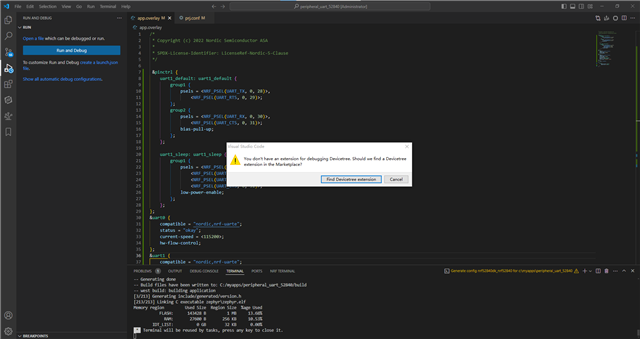
    In addition, when these two files are modified, my debug program cannot execute normally, VScode feedback information as shown in the following figure.

    (PS:In case the picture is not clear enough, the relevant text excerpts in the picture are as follows: You don't have an extension for debugging Devicetree. Should we find a  Devicetree extension in the Marketplace? )

  • Hi, 
    Please try to check the log (RTT log or UART log). 
    Have you made sure you connect the controller board to the right UART pins ? I used P0.28, P0.29, P0.30, P0.31 for the UART connection. 
    The 4 lights turn off most likely because it's no longer assert with uart_init but it can't communicate with the BLE controller board. 

  • I have verified that my pins are connected correctly. I conducted tests using the same configuration file and overlay file as you did, with no other changes made. When using the serial assistant on PC to capture the TX pin of uart1, I found no output information. My suspicion is that bt_enable() is not being executed effectively. Do you utilize the aforementioned files in the peripheral_uart routine to enable communication between host and controller? Have there been any additional modifications to either the host or controller?

    In any case, my objective is to troubleshoot why debugging isn't functioning so that I can identify and address the issue.

Reply
  • I have verified that my pins are connected correctly. I conducted tests using the same configuration file and overlay file as you did, with no other changes made. When using the serial assistant on PC to capture the TX pin of uart1, I found no output information. My suspicion is that bt_enable() is not being executed effectively. Do you utilize the aforementioned files in the peripheral_uart routine to enable communication between host and controller? Have there been any additional modifications to either the host or controller?

    In any case, my objective is to troubleshoot why debugging isn't functioning so that I can identify and address the issue.

Children
Related